You want every event that passes through an Azure event hub to also land in your data lake as files, without writing and running a consumer for it. Event Hubs Capture does exactly that. This tutorial sets up Event Hubs Capture to ADLS Gen2 with a managed identity instead of keys, picks capture windows deliberately, checks that files arrive, and reads the Avro output with Spark. It’s written against Microsoft Learn as of November 2026. The Spark reader was run locally against synthetic Capture-format files and the Bicep file was compiled; nothing was deployed to Azure for this post, and each code block says which is which.
Short answer
Capture is a setting on the event hub, not a separate service. To send it to ADLS Gen2 with a managed identity:
- Use a Standard, Premium or Dedicated namespace. The Basic tier doesn’t support Capture (Capture overview).
- Turn on a managed identity for the namespace (system-assigned or user-assigned).
- Give that identity Storage Blob Data Contributor on the ADLS Gen2 storage account (authentication modes for Capture).
- Enable Capture on the event hub with the managed identity, the container, a time window (60–900 seconds) and a size window (10–500 MB). Whichever window fills first triggers a file.
- Send new events and check the container. Files appear per partition under
{Namespace}/{EventHub}/{PartitionId}/{Year}/{Month}/{Day}/{Hour}/{Minute}/{Second}. Events sent before you enabled Capture are never copied. - Read the files as Avro and cast the binary
Bodycolumn to a string before you parse your JSON.
What Capture does, and what it doesn’t
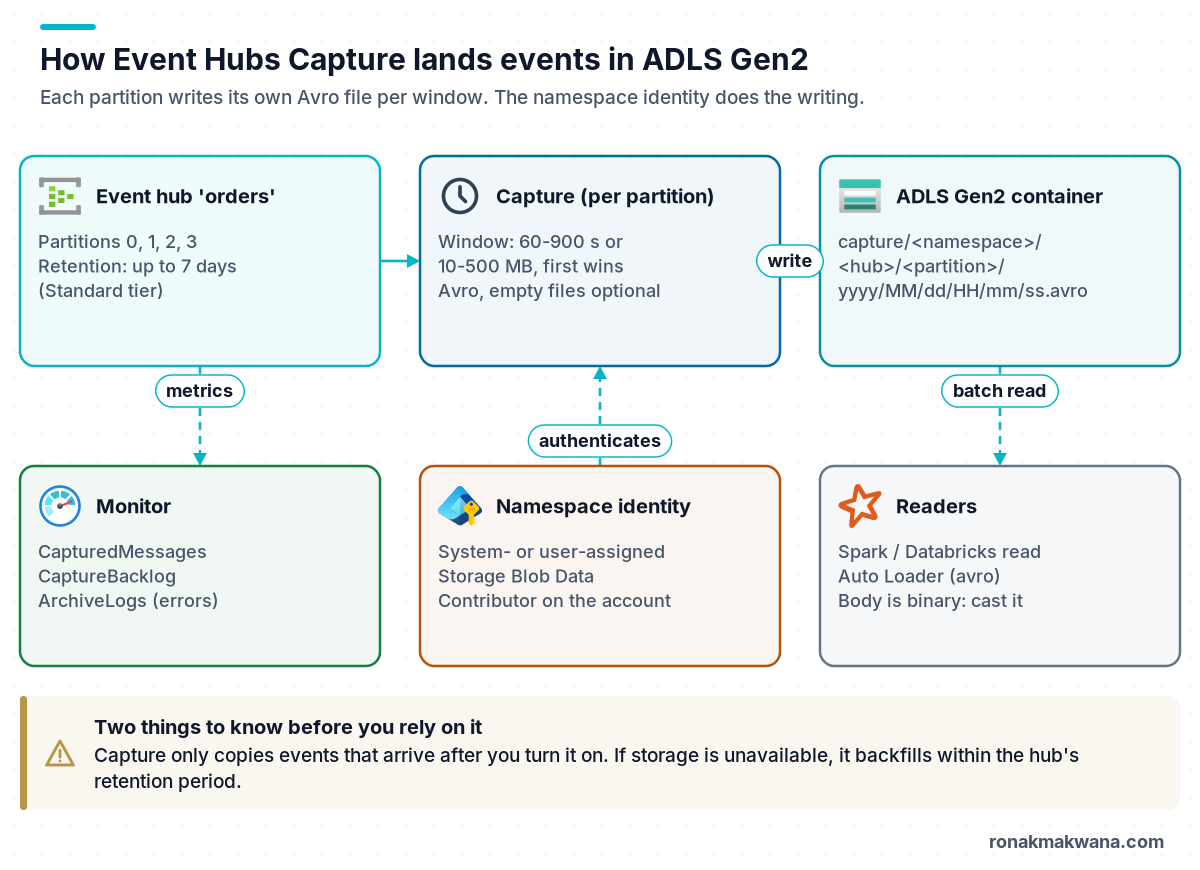
Capture copies events from the hub’s internal storage into your storage account on a schedule you set. Microsoft Learn documents these behaviours (Capture overview, enable Capture in the portal):
- Format: Apache Avro. Parquet output is only available through the Stream Analytics no-code editor, which is a separate job (capture Event Hubs data in Parquet).
- Windows: each partition writes its own block blob when the time or the size window is reached, “first wins”.
- Empty files: by default Capture writes empty files when no events arrived in a window, so downstream jobs see a steady cadence. You can switch that off (
skipEmptyArchives). - No history: enabling Capture on an existing hub only copies events that arrive afterwards.
- Outages: if the storage account is temporarily unavailable, Capture keeps the data for the hub’s retention period and backfills once storage is back.
- Throughput: Capture reads from internal storage, so it doesn’t use the throughput unit egress quota your other readers depend on.
Capture isn’t a transformation step. It doesn’t filter, convert or deduplicate, and it doesn’t write Delta tables. Think of it as the raw, replayable archive behind a streaming pipeline, the “archive the raw stream” layer in real-time data processing architectures on Azure. If you need retention beyond the hub’s own limit (seven days on Standard), Capture is the documented route (Event Hubs FAQ; see also how Event Hubs partitions and retention work).
Prerequisites
- An Event Hubs namespace on the Standard tier or higher, and permission to change it.
- A StorageV2 account with hierarchical namespace enabled (that’s what makes it ADLS Gen2) and a container for Capture. Learn says Capture doesn’t support premium storage accounts. If you build the account with code, see creating an ADLS Gen2 account with hierarchical namespace in Terraform.
- Permission to create role assignments on the storage account (for example Owner, User Access Administrator or Role Based Access Control Administrator).
- For the account that saves the Capture settings: data-plane write permission on the storage account. Without it, saving fails with
Linked access check failed for capture storage destination(Capture overview). - Azure CLI signed in, if you use the CLI blocks. Bicep CLI, if you deploy with Bicep.
Step 1: Turn on the namespace managed identity
Capture authenticates as the namespace’s identity, not the event hub’s. With a system-assigned identity the principal’s lifecycle follows the namespace. With a user-assigned identity you can create it and grant the role before the namespace exists, which suits locked-down deployments and Learn’s cross-subscription case (enable managed identity for a namespace).
Azure CLI: enable the system-assigned identity
# Not executed for this post; syntax from Microsoft Learn (az eventhubs namespace identity assign).
az eventhubs namespace identity assign \
  --resource-group rg-streaming --namespace-name evhns-telemetry-prod \
  --system-assigned true

# Principal (object) ID of the system-assigned identity, used for the role assignment:
az eventhubs namespace show -g rg-streaming -n evhns-telemetry-prod \
  --query identity.principalId -o tsv
Step 2: Grant the identity write access to ADLS Gen2
Learn’s documented role for the Capture identity is Storage Blob Data Contributor on the storage account (authentication modes for Capture). It’s a data-plane role, so the Contributor or Owner management roles aren’t a substitute. Learn shows the assignment at account scope; if you scope it to the capture container instead, test that in a non-production namespace first, because the Capture pages don’t document container scope.
Azure CLI: assign Storage Blob Data Contributor
# Not executed for this post; syntax from Microsoft Learn (az role assignment create).
PRINCIPAL_ID=$(az eventhubs namespace show -g rg-streaming -n evhns-telemetry-prod \
  --query identity.principalId -o tsv)
STORAGE_ID=$(az storage account show -g rg-lake -n stlakeprod01 --query id -o tsv)

az role assignment create \
  --assignee-object-id "$PRINCIPAL_ID" --assignee-principal-type ServicePrincipal \
  --role "Storage Blob Data Contributor" --scope "$STORAGE_ID"
Two other permissions are easy to confuse with this one:
- The person or pipeline saving the Capture settings needs
Microsoft.Storage/storageAccounts/blobServices/containers/writeandMicrosoft.Storage/storageAccounts/blobServices/containers/blobs/writeat the storage account scope. Learn’s fix for the “Linked access check failed” error is Storage Blob Data Owner; the built-in Storage Blob Data Contributor definition also lists both permissions (storage built-in roles). - ACLs: with hierarchical namespace, Azure role assignments are evaluated first, and if one grants enough access the ACLs are ignored (ADLS Gen2 access control model). With the role above you don’t need ACLs for Capture. Your readers are a different story; if Spark gets a 403 on the capture folder, see diagnosing ADLS 403 errors from Databricks.
Step 3: Choose the windows and file layout
This is the decision that matters most later, because it fixes how many files your readers have to list and open. The settings, from the template and CLI references (ARM template for Capture, az eventhubs eventhub):
| Setting | Range | Default | What it controls |
|---|---|---|---|
intervalInSeconds | 60–900 | 300 | Time window per partition |
sizeLimitInBytes | 10–500 MB | 300 MB | Size window per partition |
skipEmptyArchives | true / false | false in Learn’s template | Whether quiet windows write empty files |
archiveNameFormat | all 9 tokens required | see below | Blob path inside the container |
encoding | Avro | Avro | Output format |
The default name format is {Namespace}/{EventHub}/{PartitionId}/{Year}/{Month}/{Day}/{Hour}/{Minute}/{Second}. The CLI reference says all nine tokens are mandatory “irrespective of order”. Keep the default unless you have a strong reason: the readers in Step 6 depend on that depth.
How many files will you get?
With empty files switched on, each partition writes at least one file per time window, even when idle. That gives a baseline you can work out before you deploy. The numbers below are arithmetic from the documented windowing (partitions × 86,400 ÷ window seconds), not measurements:
| Partitions | 1-minute window | 5-minute window | 15-minute window |
|---|---|---|---|
| 4 | 5,760 files/day | 1,152 files/day | 384 files/day |
| 8 | 11,520 files/day | 2,304 files/day | 768 files/day |
| 32 | 46,080 files/day | 9,216 files/day | 3,072 files/day |
Busy partitions can produce more files than this: if a partition receives more than the size window within the time window, the size window fires first (Learn’s example: a 15-minute, 100 MB window receiving 1 MB per second writes on size). Quiet partitions with skipEmptyArchives on produce fewer. For an analytics landing zone, a longer time window with empty files skipped usually gives fewer, larger files, which is what ADLS Gen2 best practices recommend for read performance. The trade-off is freshness: a 15-minute window means files can trail the stream by up to 15 minutes. If you need lower latency than that, read the hub directly (streaming from Event Hubs into Databricks) and keep Capture as the archive.
Step 4: Enable Capture with Bicep
The file below creates a Standard namespace with a system-assigned identity, assigns Storage Blob Data Contributor on an existing ADLS Gen2 account, creates the capture container, and creates an event hub with Capture enabled. The property names come from the Microsoft.EventHub/namespaces/eventhubs 2024-01-01 template reference.
capture.bicep
// Event Hubs Capture to ADLS Gen2 with the namespace's system-assigned managed identity.
// Compiled with `bicep build` (Bicep CLI 0.49.2) for this post: no errors or warnings. NOT deployed.
param location string = resourceGroup().location
param namespaceName string
param eventHubName string = 'orders'
param partitionCount int = 4
param storageAccountName string          // existing StorageV2 account with hierarchical namespace enabled
param captureContainerName string = 'capture'

@minValue(60)
@maxValue(900)
param captureIntervalSeconds int = 300

@minValue(10485760)
@maxValue(524288000)
param captureSizeBytes int = 314572800

var storageBlobDataContributor = 'ba92f5b4-2d11-453d-a403-e96b0029c9fe'

resource lake 'Microsoft.Storage/storageAccounts@2023-05-01' existing = {
  name: storageAccountName
}

resource blobService 'Microsoft.Storage/storageAccounts/blobServices@2023-05-01' existing = {
  parent: lake
  name: 'default'
}

resource captureContainer 'Microsoft.Storage/storageAccounts/blobServices/containers@2023-05-01' = {
  parent: blobService
  name: captureContainerName
}

resource ns 'Microsoft.EventHub/namespaces@2024-01-01' = {
  name: namespaceName
  location: location
  sku: {
    name: 'Standard'
    tier: 'Standard'
    capacity: 1
  }
  identity: {
    type: 'SystemAssigned'
  }
  properties: {
    minimumTlsVersion: '1.2'
  }
}

// Capture agent writes as the namespace identity.
resource captureWriter 'Microsoft.Authorization/roleAssignments@2022-04-01' = {
  name: guid(lake.id, ns.id, storageBlobDataContributor)
  scope: lake
  properties: {
    roleDefinitionId: subscriptionResourceId('Microsoft.Authorization/roleDefinitions', storageBlobDataContributor)
    principalId: ns.identity.principalId
    principalType: 'ServicePrincipal'
  }
}

resource hub 'Microsoft.EventHub/namespaces/eventhubs@2024-01-01' = {
  parent: ns
  name: eventHubName
  dependsOn: [
    captureWriter
    captureContainer
  ]
  properties: {
    partitionCount: partitionCount
    messageRetentionInDays: 7
    captureDescription: {
      enabled: true
      encoding: 'Avro'
      intervalInSeconds: captureIntervalSeconds
      sizeLimitInBytes: captureSizeBytes
      skipEmptyArchives: true
      destination: {
        name: 'EventHubArchive.AzureBlockBlob'
        identity: {
          type: 'SystemAssigned'
        }
        properties: {
          storageAccountResourceId: lake.id
          blobContainer: captureContainerName
          archiveNameFormat: '{Namespace}/{EventHub}/{PartitionId}/{Year}/{Month}/{Day}/{Hour}/{Minute}/{Second}'
        }
      }
    }
  }
}

output namespacePrincipalId string = ns.identity.principalId
Notes on the choices:
destination.nameisEventHubArchive.AzureBlockBlobfor both Blob Storage and ADLS Gen2. ThedataLakeAccountNameanddataLakeFolderPathproperties are what Learn’s template uses for Data Lake Storage Gen1 (Data Lake Store), which is retired; leave them out for Gen2.identity.type: 'SystemAssigned'makes Capture use the namespace’s system-assigned identity. For a user-assigned identity, settype: 'UserAssigned'anduserAssignedIdentityto its resource ID, and attach that identity to the namespace.- The
dependsOnmakes the role assignment exist before Capture is configured. Azure RBAC changes can take a few minutes to apply. Learn documents a backfill when storage is temporarily unavailable; I’d expect the same after a late role assignment, but that isn’t documented or tested here, so check the Archive Logs after the first deployment. messageRetentionInDays: 7is the Standard-tier maximum. Longer retention is a buffer for storage outages, because that’s how long Capture can backfill.
Deploy it with az deployment group create --resource-group rg-streaming --template-file capture.bicep --parameters namespaceName=evhns-telemetry-prod storageAccountName=stlakeprod01 (not executed for this post).
Prefer the CLI or the portal?
For a new event hub, az eventhubs eventhub create takes the same settings as flags. In the portal, Capture is on the event hub’s Capture page; choose Avro, switch Capture on, set the windows, choose the managed identity type and pick the ADLS Gen2 container (enable Capture in the portal).
Azure CLI: new event hub with Capture
# Not executed for this post; flags from the az eventhubs eventhub create reference.
az eventhubs eventhub create \
  --resource-group rg-streaming --namespace-name evhns-telemetry-prod --name orders \
  --partition-count 4 \
  --enable-capture true --capture-interval 300 --capture-size-limit 314572800 \
  --skip-empty-archives true \
  --destination-name EventHubArchive.AzureBlockBlob \
  --storage-account "$STORAGE_ID" --blob-container capture \
  --archive-name-format "{Namespace}/{EventHub}/{PartitionId}/{Year}/{Month}/{Day}/{Hour}/{Minute}/{Second}" \
  --mi-system-assigned true
Step 5: Verify that files arrive
Send a few events after Capture is on, wait at least one time window, then list the container and check the metrics. Remember: events from before you enabled Capture won’t appear.
Azure CLI: list captured files and read the Capture metrics
# Not executed for this post; syntax from Microsoft Learn (az storage fs file list, az monitor metrics list).
az storage fs file list --account-name stlakeprod01 --file-system capture \
  --path evhns-telemetry-prod/orders --auth-mode login --exclude-dir -o table

NS_ID=$(az eventhubs namespace show -g rg-streaming -n evhns-telemetry-prod --query id -o tsv)
az monitor metrics list --resource "$NS_ID" \
  --metric CapturedMessages CapturedBytes CaptureBacklog \
  --filter "EntityName eq 'orders'" --interval PT5M -o table
Expected result (from the documented behaviour, not a live run):
- Paths such as
evhns-telemetry-prod/orders/0/2026/11/26/09/05/00.avro, one folder tree per partition. ADLS Gen2 shows the path segments as real directories. CapturedMessagesandCapturedBytesroughly follow incoming traffic, andCaptureBacklogstays low. The namespace-level metrics have anEntityNamedimension for filtering by event hub (Event Hubs monitoring reference).- With
skipEmptyArchivesoff, quiet partitions still produce small files on every window. That’s normal.
Step 6: Read the Avro files with Spark
Every Capture file has the same Avro schema, documented on Exploring captured Avro files: SequenceNumber (long), Offset, EnqueuedTimeUtc (both strings), SystemProperties and Properties (maps whose values are a long/double/string/bytes union) and Body (nullable bytes). Your payload is inside Body.
To check the reading code without an Azure environment, I generated a small tree of files in that schema (two partitions, three 5-minute windows, two empty files and one deliberately duplicated row) with fastavro, then read it with open-source PySpark 4.0.1 and the spark-avro_2.13:4.0.1 package on Java 21. These are synthetic files, not output from a real Capture run.
PySpark: read Capture files and unpack Body
# Executed locally (PySpark 4.0.1 + spark-avro 4.0.1) against synthetic Capture-schema files, with root
# pointed at a local folder. The abfss:// path itself was NOT run against Azure or Databricks for this post.
from pyspark.sql import functions as F, types as T

root = "abfss://[email protected]/evhns-telemetry-prod/orders"
files = root + "/*/*/*/*/*/*/*.avro"   # {PartitionId}/{Year}/{Month}/{Day}/{Hour}/{Minute}/{Second}.avro

body_schema = T.StructType([
    T.StructField("orderId", T.StringType()),
    T.StructField("amount", T.DoubleType()),
    T.StructField("status", T.StringType())])

raw = spark.read.format("avro").load(files)

events = (raw
  .withColumn("file_path", F.col("_metadata.file_path"))
  .withColumn("partition_id",
              F.regexp_extract("file_path", r"/orders/(\d+)/\d{4}/", 1).cast("int"))
  .withColumn("body", F.from_json(F.col("Body").cast("string"), body_schema))
  .withColumn("source", F.col("Properties")["source"]["member2"])   # string property: see below
  .select("partition_id", "SequenceNumber", "EnqueuedTimeUtc", "source", "body.*"))

deduped = events.dropDuplicates(["partition_id", "SequenceNumber"])
Result of the local run: Spark read 12 rows from the 4 non-empty files; the 2 empty files contributed no rows and caused no errors. After dropDuplicates on partition and sequence number, 11 rows were left, with orderId, amount, status parsed from Body and the source property unpacked:
Local run output (synthetic data)
# Output of deduped.orderBy("partition_id", "SequenceNumber").show(truncate=False) in the local run
+------------+--------------+----------------------+------+-------+------+-------+
|partition_id|SequenceNumber|EnqueuedTimeUtc       |source|orderId|amount|status |
+------------+--------------+----------------------+------+-------+------+-------+
|0           |0             |11/26/2026 08:59:00 AM|web   |o-0-0  |10.0  |created|
|0           |1             |11/26/2026 08:59:01 AM|web   |o-0-1  |11.5  |created|
|0           |2             |11/26/2026 08:59:02 AM|web   |o-0-2  |13.0  |created|
|0           |3             |11/26/2026 09:09:00 AM|web   |o-0-3  |14.5  |created|
|0           |4             |11/26/2026 09:09:01 AM|web   |o-0-4  |16.0  |created|
|1           |0             |11/26/2026 08:59:00 AM|web   |o-1-0  |10.0  |created|
|1           |1             |11/26/2026 08:59:01 AM|web   |o-1-1  |11.5  |created|
|1           |2             |11/26/2026 09:04:00 AM|web   |o-1-2  |13.0  |created|
|1           |3             |11/26/2026 09:04:01 AM|web   |o-1-3  |14.5  |created|
|1           |4             |11/26/2026 09:04:02 AM|web   |o-1-4  |16.0  |created|
|1           |5             |11/26/2026 09:04:03 AM|web   |o-1-5  |17.5  |created|
+------------+--------------+----------------------+------+-------+------+-------+
Three things the local run showed
Propertiesvalues arrive as a struct, not a string. Because the map’s value type is a union, Spark exposes each value asstruct<member0:bigint, member1:double, member2:string, member3:binary>. A string property you set on the producer is inmember2. The documentedenableStableIdentifiersForUnionTypeoption renames them tomember_long,member_double,member_stringandmember_bytes, which is easier to read in code (Spark Avro data source guide). Both forms worked locally.- The partition isn’t a column. Capture paths aren’t
key=valuefolders, so Spark doesn’t discover the partition ID. Take it from_metadata.file_pathas above, or from your own payload. - Don’t detect empty files by size. Learn’s Python sample skips blobs of exactly 508 bytes as empty (Capture Python quickstart). The empty files I wrote with fastavro were 510 bytes, because the header size depends on the writer. Count records instead; Spark and
fastavroboth return zero rows for an empty file.
About deduplication: SequenceNumber identifies an event’s position within its partition (Event Hubs features), so (partition, sequence number) is a safe key when the same file or folder is read twice. It won’t catch a producer that sent the same business event twice, because each send gets a new sequence number. For that you need a business key such as orderId.
Two more cautions. Learn documents EnqueuedTimeUtc as a string but not its exact format, so inspect a real file before you parse it into a timestamp (my synthetic files used an arbitrary format). And for continuous ingestion, don’t re-list the whole tree on a schedule: Auto Loader supports the avro format and tracks which files it has already processed (Avro files on Azure Databricks). The setup is the same as in Databricks Auto Loader from ADLS Gen2, with cloudFiles.format = "avro".
Troubleshooting
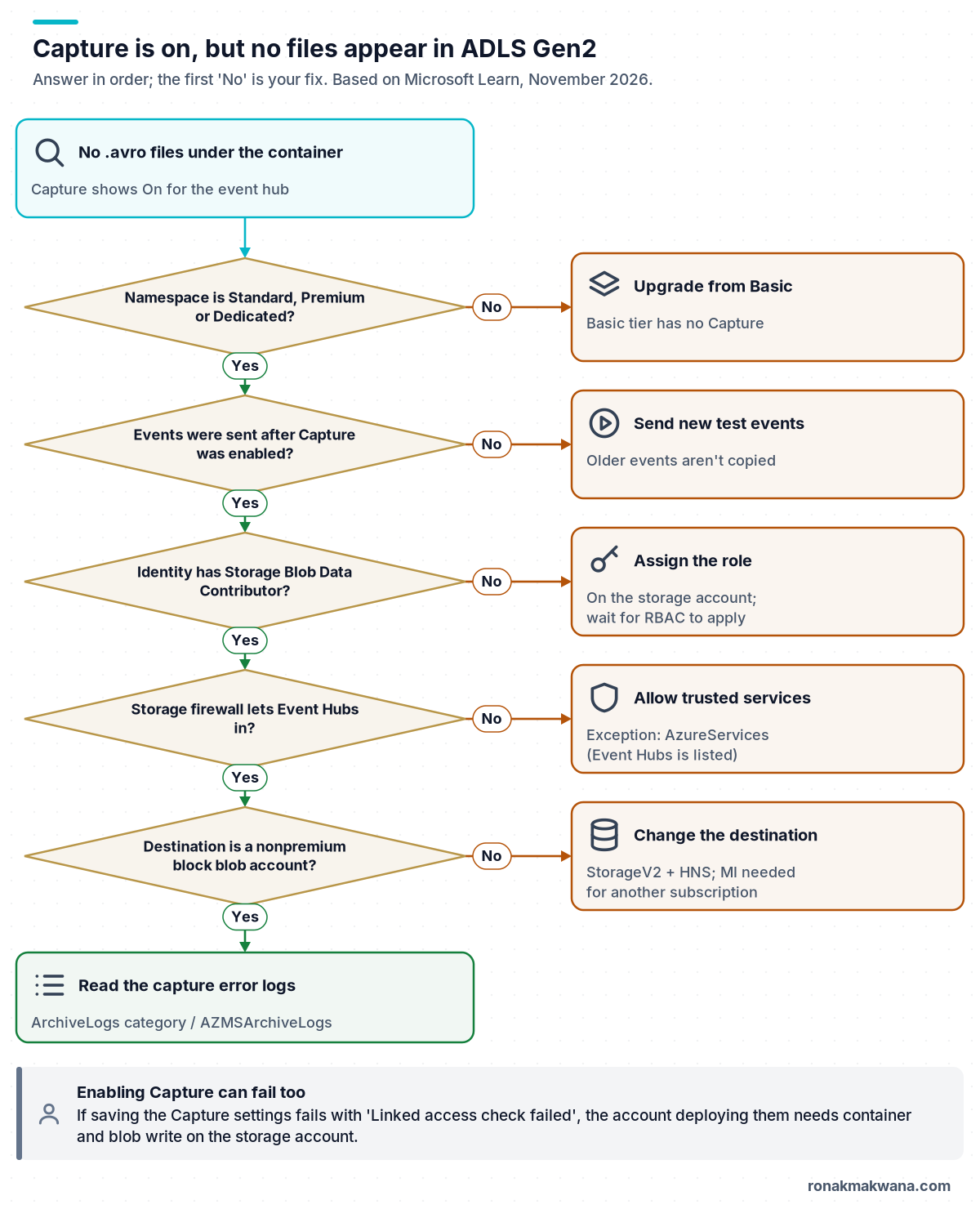
| Symptom | Likely cause | Fix |
|---|---|---|
| No Capture option on the hub | Basic tier | Standard or higher |
Saving fails: Linked access check failed | Your account lacks blob write on storage | Storage Blob Data Owner (Learn’s fix) |
| Capture on, no files | Identity lacks the data role | Storage Blob Data Contributor on the account |
| No files, storage firewall on | Event Hubs blocked | Allow trusted services (AzureServices) |
| Older events missing | Captured only after enabling | Replay from the hub, if still retained |
| Thousands of tiny files | Short window, many partitions | Longer window, skip empty files |
Body shows bytes | Avro bytes type | Cast to string, then from_json |
| Different subscription fails | Resource provider not registered | Register Microsoft.EventHub there |
Details for the less obvious rows:
- Storage firewall. If public network access is disabled or restricted on the storage account, add the trusted services exception. Event Hubs is on the trusted services list for “Archive data by using Event Hubs Capture” (trusted Azure services). With the CLI it’s
az storage account update --bypass AzureServices; that flag replaces the current list, so includeLogging Metricstoo if you already use them (manage network exceptions). - Another subscription. Capture to a storage account in a different subscription needs a managed identity, and the
Microsoft.EventHubresource provider must be registered in the subscription that owns the storage account (authentication modes for Capture). - Capture errors at run time. Turn on the Archive Logs diagnostic category for the namespace. Entries go to
AzureDiagnosticsor, with resource-specific tables,AZMSArchiveLogs, with the partition, the failing step (ArchiveFlushWriterorDestinationInit) and the storage error message (monitoring reference). A risingCaptureBacklogwith errors in that log points at the destination, not the producers.
KQL: recent Capture errors
// Not executed for this post. Resource-specific table name from the Event Hubs monitoring reference.
AZMSArchiveLogs
| where TimeGenerated > ago(24h)
| order by TimeGenerated desc
| take 50
Security, reliability, monitoring and cost
Security. A managed identity means no storage keys or SAS tokens in the Capture configuration, which is the approach Learn calls preferred (authentication modes). Keep the role on the one lake account Capture writes to, not the resource group. Give readers read-only data roles. The same identity-first approach applies to the rest of the pipeline; see securing Azure data pipelines with managed identity and Key Vault.
Reliability. Capture backfills after a storage outage only within the hub’s retention, so set retention to cover the time it would take you to notice and fix a broken destination. Learn points to Blob Storage redundancy options for the destination account. Because Capture runs per partition, one partition’s files can arrive before another’s; downstream jobs should process whatever files exist rather than wait for a complete set.
Monitoring. Alert on CaptureBacklog growing over several windows and on any ArchiveLogs entries. A CapturedMessages count of zero while IncomingMessages is non-zero is the clearest sign that Capture has stopped writing.
Cost. On Standard, Capture is billed per throughput unit per hour, and it applies when any event hub in the namespace has Capture on. It’s included on Premium and Dedicated (Capture billing, Event Hubs pricing). Storage transactions and capacity are billed on your storage account, and the pricing page notes that shorter windows mean more frequent storage transactions. Use lifecycle management rules to move older capture folders to cooler tiers or delete them (lifecycle management). No prices are quoted here because they vary by region and change over time.
What was tested for this post
- Run locally: the PySpark reader in Step 6, against synthetic files written in the documented Capture schema (PySpark 4.0.1, spark-avro 4.0.1, Java 21, fastavro 1.13.1).
- Compiled, not deployed:
capture.bicepwithbicep build(Bicep CLI 0.49.2), no errors or warnings. - Not executed: every Azure CLI command, the KQL query and the Databricks
abfss://variant. No Azure resources were created. - Calculated, not measured: the files-per-day table.
Learn is inconsistent in two places worth knowing. The portal quickstart’s prerequisites mention a premium block blob account and say the ADLS Gen2 account must be in the same subscription, while the Capture overview says premium storage isn’t supported and that the same-subscription rule applies only when you don’t use a managed identity. This post follows the overview and the managed identity page.
Related guides
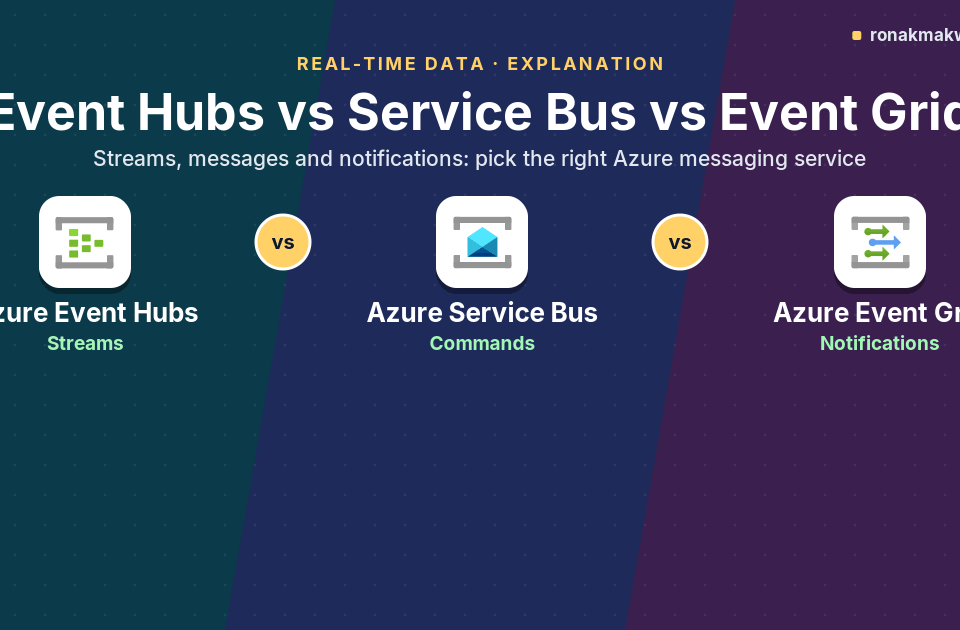
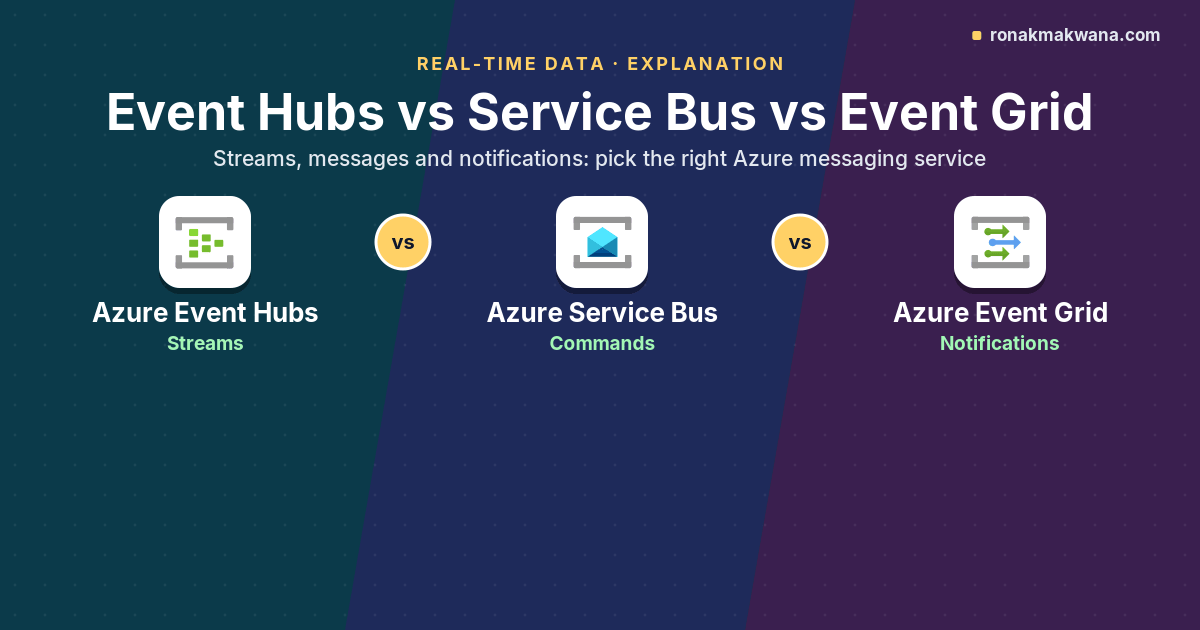
For how the hub itself works, start with Event Hubs partitions and consumer groups. To choose between messaging services, see Event Hubs vs Service Bus vs Event Grid. For incremental loading of the captured files, use Auto Loader from ADLS Gen2 into Unity Catalog. More posts are in the Real-Time Data category.
Sources
- Capture events through Azure Event Hubs in Azure Blob Storage or Azure Data Lake Storage (Microsoft Learn)
- Quickstart: Enable capturing of events streaming through Azure Event Hubs (Microsoft Learn)
- Authentication modes for capturing events to destinations in Azure Event Hubs (Microsoft Learn)
- Enable managed identity for an Azure Event Hubs namespace (Microsoft Learn)
- Exploring captured Avro files in Azure Event Hubs (Microsoft Learn)
- Capture Event Hubs data in Azure Storage and read it by using Python (Microsoft Learn)
- Create a namespace with event hub and enable Capture using a template (Microsoft Learn)
- Microsoft.EventHub namespaces/eventhubs 2024-01-01 template reference (Microsoft Learn)
- az eventhubs eventhub (Azure CLI reference)
- az eventhubs namespace identity (Azure CLI reference)
- az role assignment (Azure CLI reference)
- az storage fs file (Azure CLI reference)
- az monitor metrics (Azure CLI reference)
- Monitoring data reference for Azure Event Hubs (Microsoft Learn)
- Event Hubs frequently asked questions (Microsoft Learn)
- Features and terminology in Azure Event Hubs (Microsoft Learn)
- Trusted Azure services for Azure Storage (Microsoft Learn)
- Manage network security exceptions for Azure Storage (Microsoft Learn)
- Azure built-in roles for Storage (Microsoft Learn)
- Access control model in Azure Data Lake Storage (Microsoft Learn)
- Azure Blob Storage lifecycle management overview (Microsoft Learn)
- Capture data from Event Hubs in Parquet format (Microsoft Learn)
- Read and write Avro files on Azure Databricks (Microsoft Learn)
- Apache Avro data source guide (Apache Spark documentation)
- Event Hubs pricing (Microsoft Azure)