To create an Azure Data Lake Storage Gen2 (ADLS Gen2) account with Terraform, create a normal storage account with account_kind = "StorageV2", account_tier = "Standard" and is_hns_enabled = true. The hierarchical namespace (HNS) is what turns blob storage into ADLS Gen2. Set it when you create the account: in the azurerm provider, changing is_hns_enabled forces Terraform to destroy and recreate the storage account. Then add the filesystem with azurerm_storage_data_lake_gen2_filesystem and directories with azurerm_storage_data_lake_gen2_path. In azurerm 5.x, both take storage_account_id.
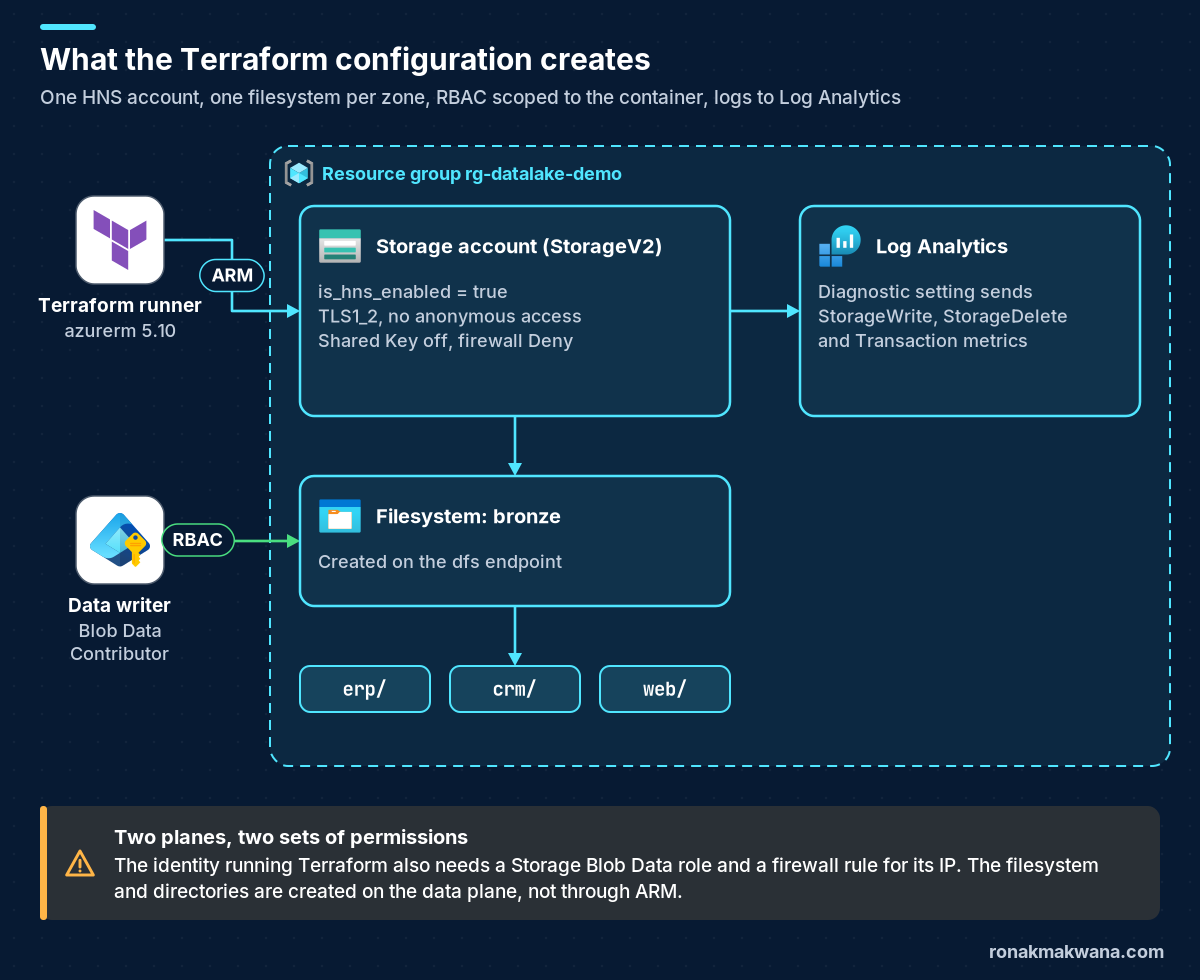
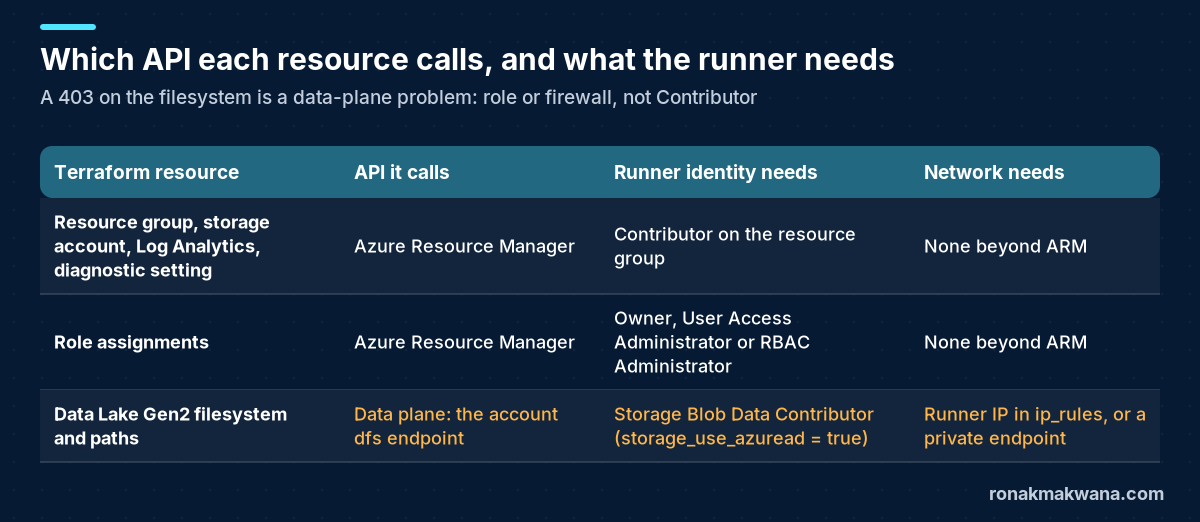
This tutorial gives you a complete configuration for azurerm 5.x. It sets secure defaults (TLS 1.2, no anonymous access, Shared Key off, a deny-by-default firewall), creates a filesystem with directories, grants a Storage Blob Data Contributor role scoped to the filesystem, and sends blob logs to Log Analytics. It also explains the part that trips most first runs: the filesystem and directories are created on the storage data plane, so the identity running Terraform needs a data role and network access as well as Contributor.
What was tested: on 22 October 2026 I ran terraform init, terraform fmt -check and terraform validate on the exact files in this post, using Terraform 1.17.0, azurerm 5.10.0 and time 0.14.2. All three succeeded, and the output is shown below. The configuration was not applied to a live Azure subscription. No credentials were configured, so terraform plan and apply were not run, and the plan summary, Azure CLI checks and Azure error messages in this post are labelled as not executed. Names are synthetic and 203.0.113.10 is a documentation-only IP address.
The short answer
- The setting:
is_hns_enabled = trueonazurerm_storage_account, withaccount_tier = "Standard"andaccount_kind = "StorageV2"(standard general-purpose v2). The only other account type that supports Data Lake Storage is premium block blob:account_tier = "Premium"withaccount_kind = "BlockBlobStorage". - Set it at creation:
is_hns_enabledis ForceNew in the provider, so flipping it on an existing account plans a destroy and recreate. To keep the data of an existing blob account, Microsoft offers a one-way upgrade outside Terraform. Then update the Terraform code to match. - Filesystem and directories: use
azurerm_storage_data_lake_gen2_filesystemandazurerm_storage_data_lake_gen2_pathwithresource = "directory". Both takestorage_account_id. In 5.0 the deprecatedstorage_account_nameargument was removed fromazurerm_storage_container,azurerm_storage_queue,azurerm_storage_shareandazurerm_storage_table. - Permissions: creating the filesystem is a data-plane call. With Shared Key disabled, set
storage_use_azuread = truein the provider block and give the runner a Storage Blob Data role. Make sure the storage firewall lets the runner’s IP through.
Prerequisites
- Terraform 1.9 or later (tested with 1.17.0). The provider constraint is
~> 5.10. azurerm 5.0.0 was released on 28 July 2026, and 5.10.0 was the latest version on 22 October 2026. - An Azure subscription and an identity for Terraform: your Azure CLI login, a service principal, or a workload identity in CI/CD. It needs Contributor on the resource group or subscription, and permission to create role assignments (Owner, User Access Administrator or Role Based Access Control Administrator).
- The public IP address your Terraform runner uses to reach Azure. It goes into the storage firewall. Note that
ip_rulesrejects private RFC 1918 ranges and /31 or /32 prefixes, so give a single address without a prefix. - The object ID (not the application ID) of the identity that will load data, for example an Azure Data Factory managed identity.
- The resource providers Microsoft.Storage, Microsoft.OperationalInsights and Microsoft.Insights registered in the subscription, or permission to register them. azurerm 5.x no longer registers about 60 providers automatically. This configuration lists the three it needs.
Step 1: Pin Terraform and the azurerm 5.x provider
Create a new folder with four files. Start with versions.tf:
versions.tf
terraform {
  required_version = ">= 1.9"

  required_providers {
    azurerm = {
      source  = "hashicorp/azurerm"
      version = "~> 5.10"
    }
    time = {
      source  = "hashicorp/time"
      version = "~> 0.14"
    }
  }
}

provider "azurerm" {
  features {}

  # Create filesystems and directories with Microsoft Entra ID instead of the account key.
  storage_use_azuread = true

  # azurerm 5.x registers no resource providers by default.
  resource_providers_to_register = [
    "Microsoft.Storage",
    "Microsoft.OperationalInsights",
    "Microsoft.Insights",
  ]
}
Three provider-level changes in azurerm 5.0 matter here:
resource_provider_registrationsnow defaults tonone, andskip_provider_registrationwas removed. If you copy an older provider block that still hasskip_provider_registration = true,terraform validatefails with An argument named “skip_provider_registration” is not expected here. I reproduced this error during testing.resource_providers_to_registerregisters only what this configuration needs.storage_use_azuread = truemakes the provider call the blob and Data Lake APIs with Microsoft Entra ID instead of the account key. You need it onceshared_access_key_enabled = falseis set on the account.- The
timeprovider is only used for a short wait after the role assignment (see step 4).
Step 2: Declare variables with naming guardrails
Storage account names must be 3 to 24 characters, use only lowercase letters and numbers, and be unique across all of Azure. The validation block catches a bad name before Azure does. It can’t check global uniqueness, which only Azure knows.
variables.tf
variable "resource_group_name" {
  type        = string
  description = "Resource group for the data lake."
  default     = "rg-datalake-demo"
}

variable "location" {
  type        = string
  description = "Azure region, for example uksouth."
  default     = "uksouth"
}

variable "storage_account_name" {
  type        = string
  description = "Globally unique, 3-24 characters, lowercase letters and numbers only."

  validation {
    condition     = can(regex("^[a-z0-9]{3,24}$", var.storage_account_name))
    error_message = "Use 3-24 lowercase letters and numbers, with no hyphens or underscores."
  }
}

variable "replication_type" {
  type        = string
  description = "LRS, ZRS, GRS, GZRS, RAGRS or RAGZRS."
  default     = "ZRS"

  validation {
    condition     = contains(["LRS", "ZRS", "GRS", "GZRS", "RAGRS", "RAGZRS"], var.replication_type)
    error_message = "Unsupported replication type."
  }
}

variable "allowed_ip_ranges" {
  type        = list(string)
  description = "Public IPv4 addresses or CIDR ranges allowed through the storage firewall. Include the address your Terraform runner uses."

  validation {
    condition     = length(var.allowed_ip_ranges) > 0
    error_message = "Add at least one address, otherwise Terraform itself is blocked from the data plane."
  }
}

variable "filesystem_name" {
  type        = string
  description = "Name of the ADLS Gen2 filesystem (container). One container per zone keeps RBAC scopes clean."
  default     = "bronze"
}

variable "directories" {
  type        = set(string)
  description = "Top-level directories to create in the filesystem, for example one per source system."
  default     = ["erp", "crm", "web"]
}

variable "data_writer_principal_id" {
  type        = string
  description = "Object ID of the identity that loads data (for example a Data Factory managed identity)."
}

variable "diagnostic_log_categories" {
  type        = set(string)
  description = "Blob service log categories to send to Log Analytics. StorageRead can be high volume."
  default     = ["StorageWrite", "StorageDelete"]
}

variable "tags" {
  type    = map(string)
  default = { workload = "data-lake", env = "dev" }
}
Step 3: Create the storage account with HNS and secure defaults
This is the first part of main.tf:
main.tf (part 1 of 3)
data "azurerm_client_config" "current" {}

resource "azurerm_resource_group" "lake" {
  name     = var.resource_group_name
  location = var.location
  tags     = var.tags
}

resource "azurerm_storage_account" "lake" {
  name                     = var.storage_account_name
  resource_group_name      = azurerm_resource_group.lake.name
  location                 = azurerm_resource_group.lake.location
  account_kind             = "StorageV2"
  account_tier             = "Standard"
  account_replication_type = var.replication_type
  access_tier              = "Hot"

  # This is what makes it ADLS Gen2. Changing it forces a new account.
  is_hns_enabled = true

  # Secure defaults, stated explicitly so a reviewer can see them.
  https_traffic_only_enabled       = true
  min_tls_version                  = "TLS1_2"
  allow_nested_items_to_be_public  = false
  shared_access_key_enabled        = false
  default_to_oauth_authentication  = true
  cross_tenant_replication_enabled = false

  network_rules {
    default_action = "Deny"
    bypass         = ["AzureServices"]
    ip_rules       = var.allowed_ip_ranges
  }

  blob_properties {
    delete_retention_policy {
      days = 14
    }
    container_delete_retention_policy {
      days = 14
    }
    # versioning_enabled and change_feed_enabled stay off: not supported with a hierarchical namespace.
  }

  tags = var.tags

  lifecycle {
    prevent_destroy = true
  }
}
What each setting does, and why it’s here:
| Setting | Why |
|---|---|
is_hns_enabled = true | Turns on the hierarchical namespace: real directories, POSIX-style ACLs and atomic directory renames. ForceNew, so it must be right on day one. |
account_kind = "StorageV2", account_tier = "Standard" | Standard general-purpose v2 is one of the two account types Microsoft lists for Data Lake Storage. The other is premium block blob. |
min_tls_version = "TLS1_2" | azurerm 5.x accepts only TLS1_2 here and defaults new accounts to it. Setting it explicitly documents the intent. |
allow_nested_items_to_be_public = false | Blocks anonymous blob access at account level. This is already the default in 5.0, but it’s set explicitly for reviewers. |
shared_access_key_enabled = false | Rejects requests signed with account keys, including service and account SAS tokens. Only Entra ID requests and user delegation SAS work. |
default_to_oauth_authentication = true | Makes the Azure portal use your Entra ID identity rather than the key when browsing data. |
network_rules | Deny by default, allow listed public IPs, and let trusted Azure services through. Your CI runner isn’t a trusted Azure service, so it needs its own rule. |
blob_properties | Blob and container soft delete for 14 days. Both are supported with HNS. Versioning, change feed and point-in-time restore are not. |
prevent_destroy = true | Makes any plan that would destroy the account fail, including a replacement caused by a ForceNew argument. |
Disabling Shared Key is the stricter choice, but check what reads this lake first. Microsoft warns that some Azure tools and services still use Shared Key and stop working when it’s disallowed. If one of your consumers needs an account key or a service SAS, set the variable to true for that account and record why. See securing Azure data pipelines with managed identity and Key Vault for the identity-based alternative.
Step 4: Add the filesystem, directories and RBAC
main.tf (part 2 of 3)
# Data-plane access for the identity running Terraform, so it can create the filesystem.
resource "azurerm_role_assignment" "deployer_blob_data" {
  scope                = azurerm_storage_account.lake.id
  role_definition_name = "Storage Blob Data Contributor"
  principal_id         = data.azurerm_client_config.current.object_id
}

# Role assignments can take up to 10 minutes to take effect.
resource "time_sleep" "rbac_propagation" {
  create_duration = "120s"
  depends_on      = [azurerm_role_assignment.deployer_blob_data]
}

resource "azurerm_storage_data_lake_gen2_filesystem" "lake" {
  name               = var.filesystem_name
  storage_account_id = azurerm_storage_account.lake.id

  depends_on = [time_sleep.rbac_propagation]
}

resource "azurerm_storage_data_lake_gen2_path" "dirs" {
  for_each = var.directories

  path               = each.value
  filesystem_name    = azurerm_storage_data_lake_gen2_filesystem.lake.name
  storage_account_id = azurerm_storage_account.lake.id
  resource           = "directory"
}

# Least privilege for the workload: one filesystem, not the whole account.
# The filesystem's id attribute is a data-plane URL, so build the ARM scope.
resource "azurerm_role_assignment" "writer_filesystem" {
  scope                = "${azurerm_storage_account.lake.id}/blobServices/default/containers/${azurerm_storage_data_lake_gen2_filesystem.lake.name}"
  role_definition_name = "Storage Blob Data Contributor"
  principal_id         = var.data_writer_principal_id
  principal_type       = "ServicePrincipal"
}
Four details make this part reliable:
- The deployer role. Because the provider uses Entra ID for the data plane, the identity running Terraform needs a Storage Blob Data role on the account. Contributor alone is not enough: it’s a management-plane role. Microsoft says role assignments can take up to 10 minutes to take effect, and the
time_sleeponly shortens the window. If the first apply still fails with a 403 on the filesystem, wait and runterraform applyagain. Many teams grant this role once, outside the stack, to the pipeline identity instead. - The filesystem’s
idis not an ARM ID. It’s the data-plane URL (https://<account>.dfs.core.windows.net/bronze), so you can’t use it as a role assignment scope. Build the ARM scope as<storage account id>/blobServices/default/containers/<name>, which is the container scope format in Microsoft’s role assignment guide. - Least privilege. The data writer gets Storage Blob Data Contributor on one filesystem, not on the account. One container per zone (bronze, silver, gold) keeps those scopes clean, as described in ADLS Gen2 best practices for enterprise data platforms.
- ACLs.
azurerm_storage_data_lake_gen2_pathsupportsaceblocks if you need folder-level ACLs. The provider documentation warns that ACL inheritance changed outside Terraform shows up as drift on the next apply. Keep coarse access in RBAC and use ACLs only where you need them.
Step 5: Send blob logs and metrics to Log Analytics
main.tf (part 3 of 3)
resource "azurerm_log_analytics_workspace" "lake" {
  name                = "log-${var.storage_account_name}"
  location            = azurerm_resource_group.lake.location
  resource_group_name = azurerm_resource_group.lake.name
  sku                 = "PerGB2018"
  retention_in_days   = 30
  tags                = var.tags
}

# Resource logs live on the blob service, not on the account resource.
resource "azurerm_monitor_diagnostic_setting" "blob" {
  name                       = "diag-blob-to-law"
  target_resource_id         = "${azurerm_storage_account.lake.id}/blobServices/default"
  log_analytics_workspace_id = azurerm_log_analytics_workspace.lake.id

  dynamic "enabled_log" {
    for_each = var.diagnostic_log_categories
    content {
      category = enabled_log.value
    }
  }

  enabled_metric {
    category = "Transaction"
  }
}
Storage resource logs belong to the blob service sub-resource, so the diagnostic setting targets <account id>/blobServices/default, not the account itself. The blob service’s log categories are StorageRead, StorageWrite and StorageDelete, and they land in the StorageBlobLogs table. The Transaction metric category can be exported through diagnostic settings. The capacity metrics can’t, but they’re still available as platform metrics. In azurerm 5.0 the old metric block was removed, so use enabled_metric.
Cost note: StorageRead is left out by default. On a busy lake it can produce far more log volume than writes and deletes, and Log Analytics charges by data ingested. Add it when you need read auditing.
Step 6: Outputs and variables file
outputs.tf
output "storage_account_id" {
  value = azurerm_storage_account.lake.id
}

output "dfs_endpoint" {
  value = azurerm_storage_account.lake.primary_dfs_endpoint
}

output "abfss_root" {
  description = "Root URI for Spark, Databricks and Synapse."
  value       = "abfss://${azurerm_storage_data_lake_gen2_filesystem.lake.name}@${azurerm_storage_account.lake.name}.dfs.core.windows.net/"
}
The abfss_root output is the URI that Spark, Databricks and Synapse use. If a notebook later reports that a path doesn’t exist, Databricks AnalysisException: Path does not exist on ADLS Gen2 walks through the usual causes. Copy terraform.tfvars.example to terraform.tfvars and fill in real values:
terraform.tfvars.example
storage_account_name     = "stlakedemo2026uks"
allowed_ip_ranges        = ["203.0.113.10"]
data_writer_principal_id = "00000000-0000-0000-0000-000000000000"
Run it and check the result
Validation (executed)
This is the output from the box I used, with no Azure credentials configured. terraform validate doesn’t need credentials or a subscription ID. It checks syntax, references and provider schemas.
Output of version, init, fmt -check and validate (22 October 2026; the exit= lines come from my wrapper script)
$ terraform version
Terraform v1.17.0
on linux_amd64
+ provider registry.terraform.io/hashicorp/azurerm v5.10.0
+ provider registry.terraform.io/hashicorp/time v0.14.2


$ terraform init
Initializing the backend...

Initializing provider plugins...
- Finding hashicorp/time versions matching "~> 0.14"...
- Finding hashicorp/azurerm versions matching "~> 5.10"...
- Installing hashicorp/time v0.14.2...
- Installed hashicorp/time v0.14.2 (signed by HashiCorp)
- Installing hashicorp/azurerm v5.10.0...
- Installed hashicorp/azurerm v5.10.0 (signed by HashiCorp)

Terraform has created a lock file .terraform.lock.hcl to record the provider
selections it made above. Include this file in your version control repository
so that Terraform can guarantee to make the same selections by default when
you run "terraform init" in the future.

Terraform has been successfully initialized!
exit=0

$ terraform fmt -check -recursive
exit=0

$ terraform validate
Success! The configuration is valid.

exit=0
Plan and apply (not executed)
With credentials, run terraform plan -out tfplan and then terraform apply tfplan. Counting the resources in this configuration with the default three directories, the plan should propose 11 to add: the resource group, storage account, two role assignments, the time_sleep, the filesystem, three directory paths, the Log Analytics workspace and the diagnostic setting. This count comes from reading the configuration, not from a real plan. In the plan, the storage account should show is_hns_enabled = true and the filesystem ID as (known after apply).
After apply, these Azure CLI checks confirm the result. They were not executed.
Post-apply checks (illustrative, not executed)
az storage account show -n stlakedemo2026uks -g rg-datalake-demo \
  --query "{hns:isHnsEnabled, tls:minimumTlsVersion, sharedKey:allowSharedKeyAccess, publicBlob:allowBlobPublicAccess}"

az storage fs directory list -f bronze --account-name stlakedemo2026uks \
  --auth-mode login -o table
Expect hns to be true, tls to be TLS1_2, and both sharedKey and publicBlob to be false. The directory list should show erp, crm and web. Run the second command from an IP that’s in allowed_ip_ranges.
Turning on HNS for an existing storage account
In azurerm 5.10.0 the is_hns_enabled schema is marked ForceNew: true in the provider source. Changing it from false to true in Terraform therefore plans a replacement: a new, empty account with the same name. Your blobs aren’t migrated. With prevent_destroy set, the plan fails instead of destroying anything, which is why that lifecycle setting is in the configuration.
To keep existing data, Microsoft provides an in-place upgrade from the portal, PowerShell or Azure CLI. The main points from Microsoft Learn:
- It’s one-way. You can’t revert, so try it on a non-production account first.
- Run a validation step first. Features that HNS accounts don’t support (blob versioning, for example) fail validation and must be turned off. Blob soft delete, container soft delete, snapshots, encryption scopes and immutable storage must also be disabled during the upgrade, and you have to let existing soft-deleted blobs expire before you can start.
- Accounts that contain page blobs can’t be upgraded. Writes are disabled while the upgrade runs, and Microsoft recommends pausing reads too.
- In Azure CLI the commands are
az storage account hns-migration start --type validationand then--type upgrade.
After the upgrade, set is_hns_enabled = true in your configuration before the next plan. Otherwise Terraform sees a mismatch on a ForceNew argument and proposes a replacement again. This last step follows from how ForceNew arguments behave. I haven’t tested it against an upgraded account.
Security, reliability and cost choices
- Redundancy: Microsoft recommends ZRS in the primary region for Data Lake Storage workloads, so it’s the default here. LRS is cheaper but keeps all copies in one datacenter. GZRS adds a secondary region for regional disasters. Changing between non-zonal and zonal types forces replacement in azurerm, except for the LRS↔ZRS, GRS↔GZRS and RAGRS↔RAGZRS pairs, where the provider starts a customer-initiated migration. Even so, choose deliberately.
- Access tier: Hot suits active lake zones. For older data, use lifecycle management policies to move it to Cool, Cold or Archive. These are supported with HNS on standard accounts. The best-practices article above has a policy example.
- Transaction pricing: HNS accounts are billed under Azure Data Lake Storage pricing. Microsoft notes that transaction costs can differ depending on whether clients use the blob or the dfs endpoint, so check the pricing page for your region instead of assuming blob prices.
- Data protection: soft delete with HNS restores deleted files and directories, but it doesn’t protect against overwrites. Blob versioning isn’t available on HNS accounts. Back up critical zones separately if overwrites are a risk.
- Network: the firewall here is the minimum. For production, a private endpoint for the
dfsandblobsub-resources is the stronger option. Your runner then needs network line of sight to it, for example a self-hosted agent in the virtual network.
Troubleshooting
403 AuthorizationPermissionMismatch when creating the filesystem
Microsoft’s message for this code is This request isn’t authorized to perform this operation using this permission. The identity running Terraform has no Storage Blob Data role on the account or container, or the assignment hasn’t taken effect yet. Owner and Contributor are management roles and don’t grant data access. Check the role assignment, wait up to 10 minutes, then apply again. (Error text from Microsoft’s 403 troubleshooting guide. I didn’t reproduce it.)
403 AuthorizationFailure: This request isn’t authorized to perform this operation
This is the storage firewall. Your runner’s public IP isn’t in ip_rules, public network access is disabled, or the request comes from a subnet without a network rule. Hosted CI agents change IP addresses, so either allow-list their published ranges, run a self-hosted agent with a stable egress IP, or use a private endpoint. The AzureServices bypass doesn’t cover CI runners.
403 KeyBasedAuthenticationNotPermitted
Shared Key is disabled on the account, but something is still signing requests with the key. In Terraform this usually means storage_use_azuread isn’t set in the provider block. Outside Terraform, it’s a tool or service using an account key or a service SAS.
The plan wants to replace the storage account
Look for # forces replacement next to is_hns_enabled, account_tier, name, location or a non-zonal↔zonal account_replication_type change. With prevent_destroy set, Terraform stops with Instance cannot be destroyed, which is the point. For HNS, see the upgrade section above.
Unsupported argument storage_account_name
This is a 4.x-era configuration on azurerm 5.x. I reproduced it on 5.10.0 by adding an azurerm_storage_container with storage_account_name. terraform validate returned two errors: The argument “storage_account_id” is required and An argument named “storage_account_name” is not expected here. Pass azurerm_storage_account.lake.id to storage_account_id instead. The Data Lake Gen2 filesystem and path resources already use storage_account_id.
validate passes, but apply fails on versioning
In another test I set versioning_enabled = true on the HNS account. terraform validate still reported Success!, because that rule isn’t part of the schema. The provider source checks it during create and update and returns `versioning_enabled` can't be true when `is_hns_enabled` is true. I read that error in the provider source but didn’t trigger it against Azure. A passing validate doesn’t prove an apply will succeed, so run a plan and a test apply in a sandbox subscription before you rely on the configuration.
Storage account name errors
The variable validation rejects uppercase letters, hyphens and names outside 3 to 24 characters at plan time. A name that’s valid but already used anywhere in Azure fails only at apply, because names must be globally unique. Add a short suffix, for example a region or environment code.
MissingSubscriptionRegistration
azurerm 5.x registers no resource providers unless you ask it to. Keep resource_providers_to_register, or register Microsoft.Storage, Microsoft.OperationalInsights and Microsoft.Insights once with an identity that has permission to do so.
What I tested and what I didn’t
- Executed on 22 October 2026:
terraform init,terraform fmt -checkandterraform validateon these exact files with Terraform 1.17.0, azurerm 5.10.0 and time 0.14.2. All passed: validate reported 0 errors and 0 warnings. I also ran three negative validate tests:storage_account_nameon a container (2 errors),skip_provider_registrationin the provider block (1 error), andversioning_enabled = truewith HNS (passed validate). - Checked in the provider source and docs (v5.10.0):
is_hns_enabledis ForceNew, HNS is allowed only for the StorageV2, BlockBlobStorage and BlobStorage kinds, versioning is rejected with HNS, and the 5.0 upgrade guide changes quoted above. - Not executed:
terraform plan,terraform apply, the Azure CLI checks, the HNS upgrade commands, and every Azure-side error message. No Azure subscription was used.
Where to go next
Once the lake exists, handling schema drift when ADF writes Parquet to ADLS Gen2 covers a common first pipeline problem. To deploy this Terraform with the rest of your data platform through pipelines, the release structure in CI/CD for Azure Data Factory with Azure DevOps carries over. Use a service connection identity that has the data role and network access described above. More guides are in the Azure Data Engineering category.
Sources
- azurerm_storage_account (Terraform Registry)
- azurerm_storage_data_lake_gen2_filesystem (Terraform Registry)
- azurerm_storage_data_lake_gen2_path (Terraform Registry)
- Azure provider 5.0 upgrade guide (Terraform Registry)
- Azure provider configuration: storage_use_azuread, resource provider registration (Terraform Registry)
- azurerm_role_assignment (Terraform Registry)
- azurerm_monitor_diagnostic_setting (Terraform Registry)
- time_sleep (Terraform Registry)
- The lifecycle meta-argument: prevent_destroy (HashiCorp Developer)
- storage_account_resource.go at v5.10.0: is_hns_enabled ForceNew and HNS checks (GitHub)
- Create a storage account for Azure Data Lake Storage (Microsoft Learn)
- Upgrading Azure Blob Storage with Azure Data Lake Storage capabilities (Microsoft Learn)
- Upgrade Azure Blob Storage with Azure Data Lake Storage capabilities: how-to (Microsoft Learn)
- Blob Storage feature support in Azure Storage accounts (Microsoft Learn)
- Storage account overview: account types and naming rules (Microsoft Learn)
- Prevent authorization with Shared Key (Microsoft Learn)
- Remediate anonymous read access to blob data (Microsoft Learn)
- Enforce a minimum required version of TLS for requests to a storage account (Microsoft Learn)
- Azure Storage firewall and virtual network rules (Microsoft Learn)
- Soft delete for blobs (Microsoft Learn)
- Azure Storage redundancy (Microsoft Learn)
- Assign an Azure role for access to blob data (Microsoft Learn)
- Access control model in Azure Data Lake Storage (Microsoft Learn)
- Monitoring data reference for Azure Blob Storage (Microsoft Learn)
- Troubleshoot 403 errors in Azure Blob Storage (Microsoft Learn)
- Troubleshoot Azure RBAC: role assignment propagation (Microsoft Learn)
- Azure Data Lake Storage pricing (Microsoft Azure)