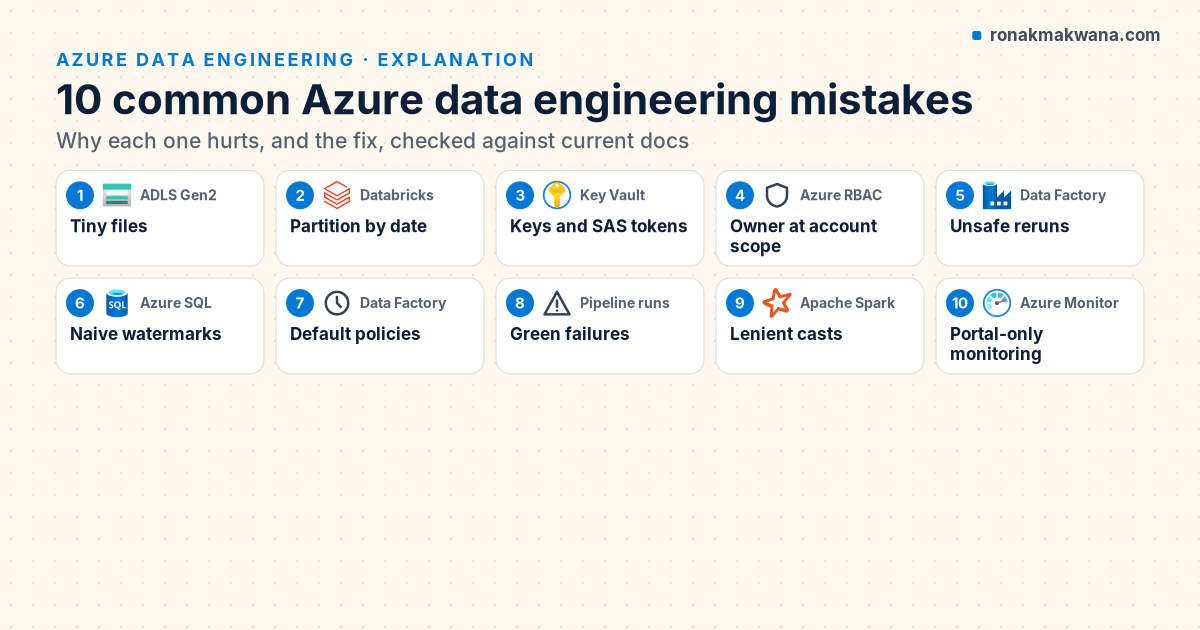
Most problems in Azure data platforms don’t come from exotic bugs. They come from a handful of decisions that look harmless on day one: a few small files, a connection string pasted into a linked service, a retry left at its default. Each is easy to avoid if you know about it, and expensive to unwind once a dozen pipelines depend on it.
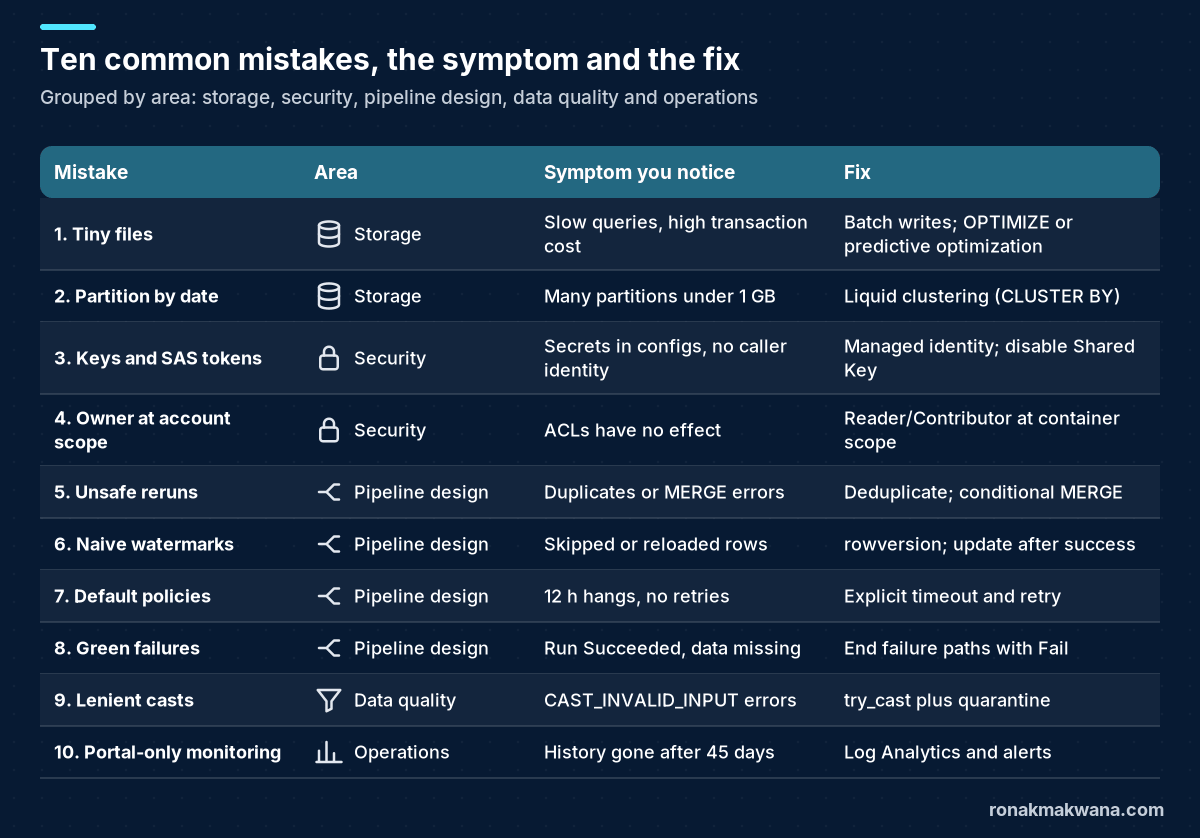
This article walks through ten of those mistakes, why each one hurts, and the specific fix, with the relevant default or limit quoted from current Microsoft Learn and Apache Spark documentation. Where an earlier post in this series goes deeper, it’s linked.
Applies to: Azure Data Lake Storage Gen2, Azure Data Factory (V2) and Azure Databricks with Unity Catalog. Behaviour and defaults were checked in October 2026.
1. Landing thousands of tiny files
Ingestion that writes one file per API page, per message or per minute quickly produces millions of files of a few kilobytes each. The ADLS Gen2 best-practices guide is explicit about the cost: analytics engines pay a per-file overhead for listing, access checks and metadata operations, and read and write operations are billed in 4 MB increments, so a 10 KB file costs the same per operation as a 4 MB one. Microsoft recommends organising data into files of 256 MB to 100 GB.
Fix: batch at the source where you can (a Copy activity that writes one file per run rather than per page), and compact in the lakehouse. For Unity Catalog managed tables, predictive optimization runs OPTIMIZE and VACUUM for you. Databricks enables it by default for accounts created on or after 11 November 2024 and says the rollout to existing accounts is expected to finish by August 2026, so check your account rather than assuming. For tables it doesn’t cover, schedule compaction yourself:
-- Compact small files in a Delta table (run on a schedule, not after every write)
OPTIMIZE contoso.silver.orders;

-- Remove files no longer referenced by the table (default retention applies)
VACUUM contoso.silver.orders;
2. Partitioning every Delta table by date
Partitioning by order_date feels natural, but on a modest table it multiplies the small-file problem: each day’s partition holds a sliver of data. The Databricks partitioning guidance says most tables with less than 100 TB of data don’t need partitioning, and that if you do partition, each partition should contain at least 1 GB. It recommends liquid clustering for all new tables instead.
Fix: create tables with CLUSTER BY on the columns you filter by, and let the platform manage layout. To move an existing partitioned table, a simple route is to rebuild it:
CREATE TABLE contoso.silver.orders_clustered
CLUSTER BY (order_date, customer_id)
AS SELECT * FROM contoso.silver.orders;
Liquid clustering is generally available for Delta tables on Databricks Runtime 15.4 LTS and above. For Unity Catalog managed tables, CLUSTER BY AUTO lets Databricks choose the clustering keys from your query patterns; it relies on predictive optimization.
3. Storing keys and connection strings
An account key in a linked service or a SAS token in a notebook works immediately, which is exactly why it spreads. Those secrets don’t expire on their own, they grant broad access, and you can’t tell from storage logs which pipeline used them.
Fix: use managed identities for every Azure-to-Azure hop (Data Factory to storage, SQL and Key Vault; Databricks to storage through a Unity Catalog storage credential), keep the remaining third-party secrets in Key Vault, and then turn off Shared Key authorization on the storage account so nobody can quietly reintroduce a key:
resource lake 'Microsoft.Storage/storageAccounts@2025-01-01' = {
  name: 'stcontosolakedev'
  location: location
  kind: 'StorageV2'
  sku: { name: 'Standard_ZRS' }
  properties: {
    isHnsEnabled: true
    allowSharedKeyAccess: false
    minimumTlsVersion: 'TLS1_2'
  }
}
The full walkthrough, including role assignments and Key Vault references, is in Securing Data Pipelines with Managed Identity and Key Vault.
4. Granting Storage Blob Data Owner at account scope
When a pipeline gets a 403, the quickest fix is a powerful role at a wide scope. In ADLS Gen2, Azure RBAC is evaluated before POSIX ACLs, and Storage Blob Data Owner effectively acts as a superuser, so a broad role assignment makes your carefully designed ACLs irrelevant.
Fix: give each identity the narrowest data role it needs (Storage Blob Data Reader or Contributor) at container scope, and use ACLs for finer, folder-level access. Remember that default ACLs apply only to items created after they’re set. ADLS Gen2 Best Practices for Enterprise Data Lakes covers the layout and access model in detail.
5. Loads that aren’t safe to rerun
Every pipeline gets rerun eventually: after a failure, a backfill or an accidental double trigger. A load that appends blindly will duplicate data each time. A common variant is a MERGE fed by a batch that contains several versions of the same key. Delta Lake refuses that merge because it’s ambiguous which source row should win. Running it locally on Spark 4.0.4 with Delta Lake 4.0.1 produced:
[DELTA_MULTIPLE_SOURCE_ROW_MATCHING_TARGET_ROW_IN_MERGE] Cannot perform Merge as
multiple source rows matched and attempted to modify the same ...
And if the duplicated key isn’t in the target yet, the Delta documentation notes that duplicates within the new data are simply inserted.
Fix: deduplicate the batch to one row per key, and make the merge conditional so replaying an older batch can’t overwrite newer data:
from pyspark.sql import functions as F
from pyspark.sql.window import Window

latest = (spark.table("updates_raw")
          .withColumn("rn", F.row_number().over(
              Window.partitionBy("customer_id").orderBy(F.col("modified_at").desc())))
          .filter("rn = 1").drop("rn"))
latest.createOrReplaceTempView("updates")

merge_sql = """
MERGE INTO silver_customers AS t
USING updates AS s
  ON t.customer_id = s.customer_id
WHEN MATCHED AND s.modified_at > t.modified_at THEN UPDATE SET *
WHEN NOT MATCHED THEN INSERT *
"""
for attempt in (1, 2):            # run the same batch twice, as a retry would
    spark.sql(merge_sql)
    print(attempt, spark.table("silver_customers").count())
With one existing customer and a batch containing two versions of customer 1 and one new customer 2, both runs print a count of 2, and customer 1 holds the later email address. For file-based loads, the equivalent is overwriting a well-defined slice (one window’s folder or partition) instead of appending.
6. Watermarks that skip or double-load rows
Incremental loads based on MAX(modified_date) look simple but have two classic failure modes: rows committed late with an earlier timestamp get skipped, and updating the watermark before the copy succeeds loses a window when the copy fails.
Fix: in SQL Server and Azure SQL, use a rowversion column and cap each run at MIN_ACTIVE_ROWVERSION(), so uncommitted transactions aren’t skipped; and update the watermark table only on the success path, after the copy finishes. Incremental Data Loading in ADF Using Watermark Columns builds this end to end.
7. Trusting default timeouts and retries
Data Factory activity policies default to a 12-hour timeout and zero retries (with a 30-second retry interval if you add retries). That means a hung query can hold a run for half a day, while a two-second network blip fails the whole pipeline.
Fix: set the policy on every activity that touches an external system, based on how long it normally takes:
"policy": {
  "timeout": "0.01:00:00",
  "retry": 2,
  "retryIntervalInSeconds": 120,
  "secureOutput": false,
  "secureInput": false
}
Only add retries to activities that are idempotent (see mistake 5); retrying a non-idempotent write just repeats the damage.
8. Failure handlers that turn runs green
Adding an Upon Failure path that logs the error seems responsible, but Data Factory decides the pipeline’s status from its leaf activities. In the documented Try-Catch pattern, where the failure handler is the only thing after the failing activity, the pipeline reports Success when the handler succeeds. Your monitoring sees green while the data never arrived.
Fix: end every failure path with a Fail activity that re-raises a meaningful error code and message, or use the Do-If-Else shape, which Microsoft documents as resulting in Failure. Implementing Error Handling and Retry Logic in ADF shows both patterns and the outcome rules.
9. Assuming casts fail quietly
Older Spark code often relied on CAST returning NULL for bad input. Since Spark 4.0, spark.sql.ansi.enabled defaults to true, so an invalid cast throws at runtime. On Spark 4.0.4 locally:
SELECT CAST('12,50' AS DECIMAL(18,2))
-- [CAST_INVALID_INPUT] The value '12,50' of the type "STRING" cannot be cast to
-- "DECIMAL(18,2)" because it is malformed.

SELECT try_cast('12,50' AS DECIMAL(18,2)) AS bad, try_cast('12.50' AS DECIMAL(18,2)) AS good
-- bad = NULL, good = 12.50
Failing loudly is usually better than silently writing nulls, but a single malformed value from a source system shouldn’t stop a whole silver load either.
Fix: keep bronze as strings, convert with try_cast in silver, and route rows where a non-null input produced a null output into a quarantine table you actually review. Treat a rising quarantine count as an alert, not a log line.
10. Monitoring only in the portal
The Data Factory monitoring view is convenient, but Microsoft notes that Data Factory stores pipeline run data for only 45 days. Without diagnostic settings, you lose the history you need for trend analysis and post-incident reviews, and nobody gets told when a run fails at 3 a.m.
Fix: send diagnostic logs to a Log Analytics workspace using resource-specific tables, alert on the failed pipeline runs metric, and keep a few saved queries for recurring failures:
ADFPipelineRun
| where TimeGenerated > ago(7d)
| where Status == "Failed"
| summarize Failures = count(), LastFailure = max(End) by PipelineName, FailureType
| order by Failures desc
Two more worth checking
Running scheduled work on all-purpose clusters. Databricks recommends serverless jobs compute for notebook tasks, with classic jobs compute as the alternative; all-purpose compute is meant for interactive work and is listed separately on the Azure Databricks pricing page. Set auto termination on any all-purpose compute you keep.
Copying patterns without checking limits. A Lookup activity returns at most 5,000 rows or 4 MB, and a ForEach runs at most 50 iterations in parallel. Designs that ignore these work in development and fail on production volumes.
A quick review checklist
- Typical file size in each lake zone is in the hundreds of megabytes, not kilobytes.
- No Delta table is partitioned below 1 GB per partition; new tables use liquid clustering.
- No linked service, notebook or repository contains an account key, SAS token or password for an Azure resource; Shared Key access is disabled.
- No pipeline identity holds Storage Blob Data Owner, or any data role above container scope without a written reason.
- Every load can be rerun for the same window without changing the result.
- Watermarks advance only after a successful copy.
- Every external activity has an explicit timeout and a deliberate retry setting.
- Every failure path ends in a Fail activity or a Do-If-Else shape.
- Silver transformations use
try_castwith a monitored quarantine table. - Diagnostic logs flow to Log Analytics and failed runs raise an alert.
About this article
The MERGE deduplication example and the CAST/try_cast behaviour were run locally on Apache Spark 4.0.4 with Delta Lake 4.0.1, using synthetic Contoso and Fabrikam data, and the output shown is from that run. The Bicep, Data Factory JSON, OPTIMIZE/CLUSTER BY statements and KQL query weren’t run against live Azure or Databricks resources. Defaults and limits are quoted from the sources below. Last checked against official documentation: October 2026.
Sources
- Best practices for using Azure Data Lake Storage (Microsoft Learn)
- When to partition tables on Azure Databricks (Microsoft Learn)
- Use liquid clustering for tables (Microsoft Learn)
- Predictive optimization for Unity Catalog managed tables (Microsoft Learn)
- Upsert into a Delta Lake table using merge (Microsoft Learn)
- Pipelines and activities (Microsoft Learn)
- Errors and conditional execution (Microsoft Learn)
- ANSI compliance (Apache Spark documentation)
- Monitor Azure Data Factory (Microsoft Learn)
- Configure compute for jobs (Microsoft Learn)