
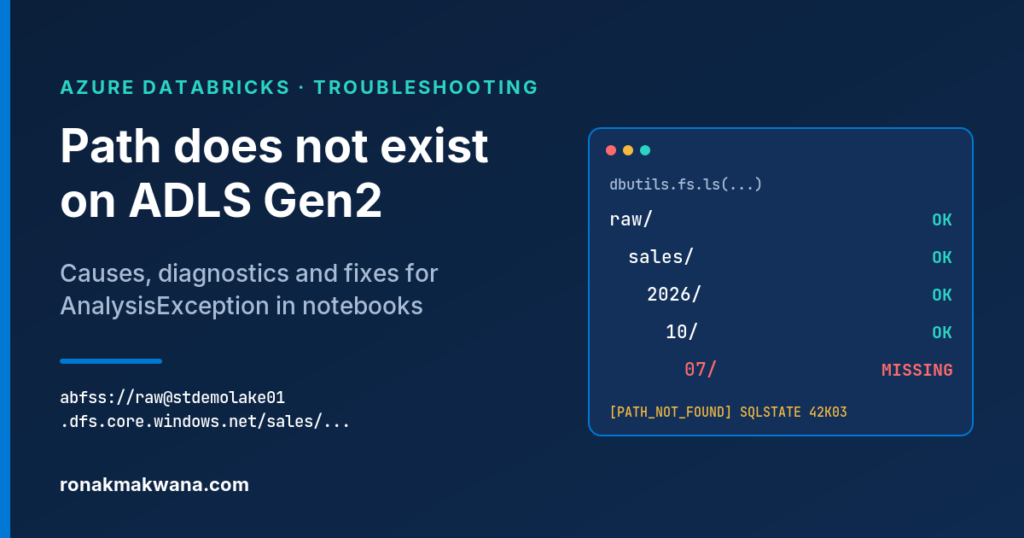
Your notebook reads a folder in ADLS Gen2 and, instead of a DataFrame, you get an AnalysisException saying the path does not exist. Sometimes the folder really isn’t there. More often it is, and Spark is looking somewhere slightly different: another container, another access layer, a date formatted differently, or a moment before the upstream copy finished.
This guide covers the exact error text, what Spark is checking when it raises it, a repeatable way to find the first wrong part of the path, and the fix for each cause.
Applies to: Azure Databricks notebooks and jobs reading files from ADLS Gen2 through abfss:// URIs, Unity Catalog external locations and volumes, or legacy DBFS mounts. Error formats and behaviour were checked against Microsoft Learn, Databricks and Apache Spark documentation (and Spark source code where the docs are silent) on 7 October 2026, when the supported LTS runtimes were Databricks Runtime 14.3, 15.4, 16.4, 17.3 and 18. Names are synthetic (storage account stdemolake01, container raw). The snippets were not run against a live Databricks workspace. Only the path-walking helper’s logic was checked locally against a mocked dbutils. Try them on non-production data first.
The exact error
On current runtimes the message carries an error condition and a SQLSTATE:
AnalysisException: [PATH_NOT_FOUND] Path does not exist: abfss://[email protected]/sales/2026/10/07. SQLSTATE: 42K03Databricks documents PATH_NOT_FOUND with SQLSTATE 42K03 and the message Path does not exist: <path>., and its rendered error messages end with the SQLSTATE. Apache Spark introduced the PATH_NOT_FOUND condition in Spark 3.4. Older runtimes built on Spark 3.3 or earlier show the plain form:
org.apache.spark.sql.AnalysisException: Path does not exist: abfss://[email protected]/sales/2026/10/07Three things help before you start debugging:
- It fails on the read line, not on an action. While Spark resolves a file read it checks that every non-glob path exists and that every glob pattern matches at least one path. The
spark.read...load()call itself throws. - The path in the message is the path Spark resolved. Copy it from the error, not from your code. Parameters and string formatting are often where it goes wrong.
- Handle it by condition, not by message text. Databricks warns that message text isn’t stable across releases. SQLSTATE
42K03is shared by several not-found conditions, so match the condition name.
from pyspark.errors import PySparkException

path = "abfss://[email protected]/sales/2026/10/07/"
try:
    df = spark.read.format("parquet").load(path)
except PySparkException as ex:
    # Databricks docs use getErrorClass(); PySpark 4.0+ also has getCondition()
    if ex.getErrorClass() == "PATH_NOT_FOUND":
        print("Spark could not find:", ex.getMessageParameters().get("path"))
    raise
Similar errors that mean something else
Check the condition name first. These are documented separately and need different fixes:
UNABLE_TO_INFER_SCHEMA: the path resolved but Spark found no files to infer a schema from. With Parquet, a folder that exists but holds no data files typically lands here rather than atPATH_NOT_FOUND.NO_PARENT_EXTERNAL_LOCATION_FOR_PATH: Unity Catalog has no external location that covers the path.INSUFFICIENT_PERMISSIONS_EXT_LOCorCLOUD_ACCESS_DENIED: an access problem, not a missing path.UC_VOLUME_NOT_FOUND: the volume named in a/Volumes/...path doesn’t exist.DBFS_MOUNT_NOT_SUPPORTED: mount methods called on standard access mode or serverless compute.DELTA_PATH_DOES_NOT_EXIST: the Delta Lake version, raised when the path doesn’t exist or isn’t a Delta table.- HTTP 403
AuthorizationPermissionMismatch(“This request is not authorized to perform this operation using this permission”): the identity reached the account but lacks data permissions.
Permissions and missing paths usually look different. In the open-source Hadoop ABFS driver, a 404 from storage becomes a FileNotFoundException, which Spark reports as a missing path, while 403 and 401 become AccessDeniedException. If you see a 403, fix access, not the path.
Anatomy of an abfss URI
A direct ADLS Gen2 URI has the form abfss://<container>@<storage-account>.dfs.core.windows.net/<path>. The container comes before the @, the account after it, and the endpoint is dfs.
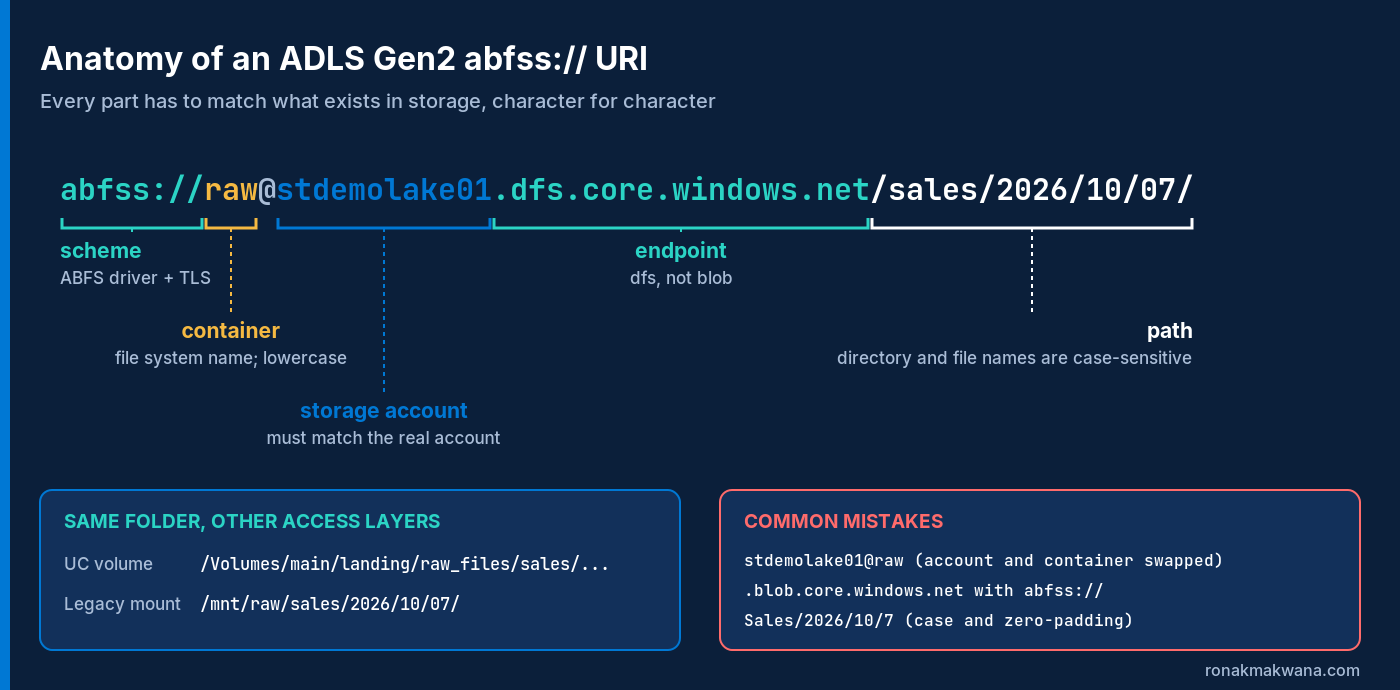
abfss:// URI has to match storage exactly.Diagnose: find the first wrong segment
The fastest route is mechanical: confirm the string, then list from the container root down until a segment is missing.
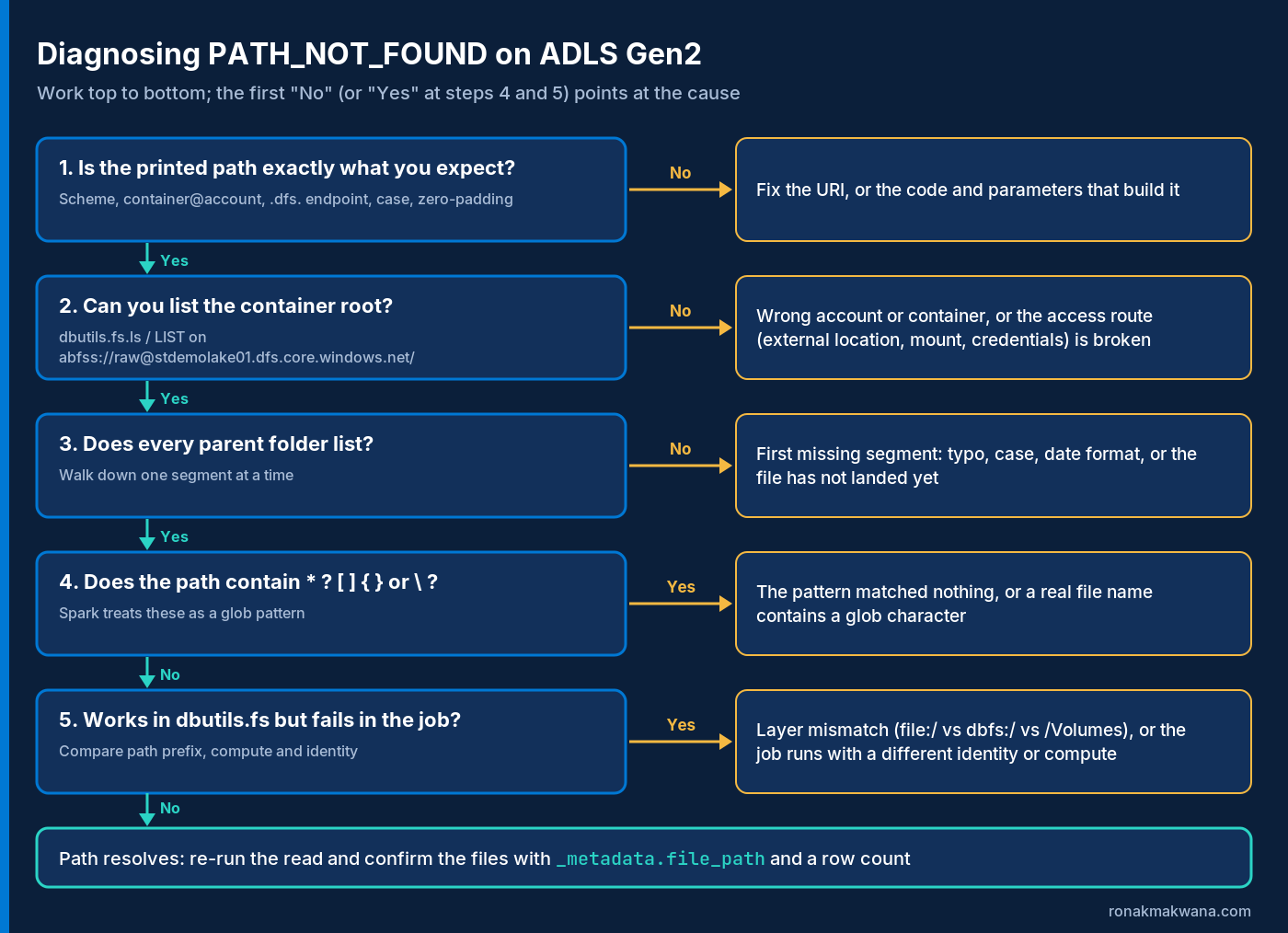
1. Print the exact path
print(repr(path))repr() shows trailing spaces, doubled slashes and newline characters that a normal print hides. If the path is built from widgets or job parameters, print each parameter as well.
2. List the root, then walk down
dbutils.fs.ls and %fs ls accept abfss:// URIs and /Volumes paths. This helper lists one level at a time and stops at the first segment that isn’t there. ADLS directory and blob names are case-sensitive, so it also reports names that differ only in case.
def find_missing_segment(root, relative_path):
    """List each folder from root downwards and stop at the first segment that is not there."""
    current = root.rstrip("/") + "/"
    try:
        dbutils.fs.ls(current)
    except Exception as e:
        print(f"Cannot list the root {current}\n  {str(e)[:300]}")
        return current
    for segment in [s for s in relative_path.strip("/").split("/") if s]:
        names = [f.name.rstrip("/") for f in dbutils.fs.ls(current)]
        if segment not in names:
            near = [n for n in names if n.lower() == segment.lower()]
            print(f"Missing: '{segment}' under {current}")
            print(f"  Case-insensitive match: {near}" if near else f"  Entries here: {sorted(names)[:25]}")
            return current + segment
        current += segment + "/"
    print(f"Every segment exists: {current.rstrip('/')}")
    return None

find_missing_segment("abfss://[email protected]/", "sales/2026/10/07")
find_missing_segment("/Volumes/main/landing/raw_files/", "sales/2026/10/07")
Pass only the literal part of the path, before any wildcard. If the root itself can’t be listed, the problem is the account, the container or the access route, not the folders.
3. On Unity Catalog, check locations and grants in SQL
-- Which external locations exist, and which URL covers your path?
SHOW EXTERNAL LOCATIONS;
DESCRIBE EXTERNAL LOCATION ext_raw;
SHOW GRANTS ON EXTERNAL LOCATION ext_raw;

-- List the folder through Unity Catalog
LIST 'abfss://[email protected]/sales/2026/10/' LIMIT 50;

-- Volumes: confirm the name and, for external volumes, where it points
SHOW VOLUMES IN main.landing;
DESCRIBE VOLUME main.landing.raw_files;
LIST '/Volumes/main/landing/raw_files/sales/2026/10/';
LIST is Unity Catalog only, and the URL must sit inside an external location you can access (or you pass a named credential). Reading files directly needs READ FILES on the external location; reading through a volume needs READ VOLUME.
4. Confirm which access route the notebook uses
# Legacy DBFS mounts: where does each /mnt path really point?
display(dbutils.fs.mounts())

# Legacy direct access: is a credential configured for this account?
print(spark.conf.get("fs.azure.account.auth.type.stdemolake01.dfs.core.windows.net", "not set"))
Treat the spark.conf check as a hint only. Unity Catalog doesn’t use cluster filesystem settings when it accesses storage, and serverless compute supports only a limited set of Spark configurations. On those, rely on the SQL checks above.
5. Check from outside Databricks
az login

# What is really there? Uses your Microsoft Entra ID sign-in, not an account key
az storage fs file list --account-name stdemolake01 --file-system raw \
  --path sales/2026/10 --recursive false --auth-mode login --output table

# Is hierarchical namespace enabled on the account?
az storage account show --name stdemolake01 --resource-group rg-demo-data --query isHnsEnabled
With --auth-mode login you need a data role such as Storage Blob Data Reader; being the account owner isn’t enough. If the CLI shows the files and Databricks doesn’t, the problem is on the Databricks side: the route, the identity or the path string. If the CLI can’t see them either, the data isn’t where you think it is.
Causes and fixes
Malformed abfss URI
- Container and account swapped:
abfss://stdemolake01@raw...instead ofabfss://raw@stdemolake01.... - Wrong endpoint. The Data Lake Storage endpoint is
<account>.dfs.core.windows.net;blob.core.windows.netis the Blob endpoint, used by the legacy WASB driver (wasbs://), which Databricks has deprecated in favour of ABFS. - Wrong or missing container. The Hadoop ABFS docs list “No such file or directory” when listing a container as meaning there’s no container with that name.
- A container created in the Azure portal on a hierarchical-namespace account can return
404 FilesystemNotFound. Databricks lists this as a known issue and describes the workaround.
Fix: copy the base URL from DESCRIBE EXTERNAL LOCATION (or the account’s dfs endpoint), then append the relative path in code.
Typos, case and date formats
Directory and blob names are case-sensitive and container names must be lowercase, so Sales/ and sales/ are different folders. Date-based folders fail quietly on formatting: 2026/10/7 isn’t 2026/10/07. Build them from a real date:
from datetime import date

run_date = date.fromisoformat(dbutils.widgets.get("run_date"))   # e.g. "2026-10-07"
path = f"abfss://[email protected]/sales/{run_date:%Y/%m/%d}/"
Also check which time zone produced the date. Serverless compute defaults the Spark session time zone to UTC, so a date computed in Spark near midnight can differ from one the upstream system calculated in local time.
A glob or partition pattern matches nothing
Spark treats any path containing { } [ ] * ? or a backslash as a glob. For a batch read, a glob that matches nothing raises PATH_NOT_FOUND with the pattern in the message. That also catches real file names that contain brackets, such as export[1].csv.
base = "abfss://[email protected]/sales/2026/10/"
df = (spark.read.format("parquet")
      .option("pathGlobFilter", "*.parquet")   # filters file names only
      .option("recursiveFileLookup", "true")   # reads nested folders; turns off partition inference
      .load(base))
For a key=value partitioned tree, point the read at the table root and let partition discovery do the work instead of hard-coding one partition. Don’t reach for ignoreMissingFiles: per the Spark docs it only covers files deleted after the DataFrame is constructed, not a path that never existed.
The file hasn’t landed yet
When Azure Data Factory starts the notebook before the copy finishes, or writes to a different folder than the notebook expects, the folder legitimately doesn’t exist yet. Fix it in the pipeline:
- Run the Databricks Notebook activity on success of the copy activity, and pass the exact folder as a
baseParametersvalue so both sides use the same string. - Add a Validation activity, which waits until the dataset exists (with a timeout and sleep interval), or a Get Metadata activity with the
existsfield, which returnsexists: falseinstead of failing. - For files that arrive continuously, use Auto Loader, which processes new files as they arrive instead of reading a fixed folder.
If the same upstream pipeline also changes file shape, see How to Fix ADF Mapping Data Flows That Break on Schema Drift When Writing Parquet to ADLS Gen2. Inside the notebook, fail early with a clear message so the pipeline can retry or alert:
ROOT = "abfss://[email protected]/"
missing = find_missing_segment(ROOT, f"sales/{run_date:%Y/%m/%d}")
if missing:
    raise FileNotFoundError(f"Input not landed (or path wrong): {missing}")
The wrong file system layer
- Driver-local files. A file written with pandas or
%shto/tmplives on the driver’s ephemeral disk. Spark can’t read that location, anddbutils.fsneedsfile:/to see it. Copy it somewhere shared:dbutils.fs.cp("file:/tmp/x.csv", "/Volumes/main/landing/raw_files/x.csv"). - Workspace files. Spark, SQL and
dbutilsneed thefile:/scheme:file:/Workspace/Shared/sample-data/data.json. - DBFS paths vs the FUSE form. Spark and
dbutils.fsuse/mnt/...;/dbfs/mnt/...is the local form for pandas,osand%sh. Don’t mix them. - Volumes use the same
/Volumes/...path in Spark, SQL, Python and shell;dbfs:/is optional.
Stale, missing or misdirected mounts
DBFS mounts are deprecated, don’t work with Unity Catalog or serverless compute, and new accounts are provisioned without them. If you still use them:
- A mount created or changed from one cluster isn’t visible to other running clusters until you run
dbutils.fs.refreshMounts()on them. - Run
display(dbutils.fs.mounts())to see which container a mount point actually targets./mnt/rawpointing at an old container gives a perfectly valid path to the wrong place. - On standard access mode or serverless compute, mount methods raise
DBFS_MOUNT_NOT_SUPPORTED; switch to dedicated access mode or, better, to an external location or volume. - Mounts that use a rotated or expired secret fail with errors such as
401 Unauthorizeduntil you unmount and remount.
Unity Catalog volume path mistakes
- The format is
/Volumes/<catalog>/<schema>/<volume>/<path>, and the first three parts must match Unity Catalog object names. - You can’t list
/Volumes/<catalog>or/Volumes/<catalog>/<schema>; include the volume name. - Use exactly
/Volumes. Databricks reserves common typos such as/volumesand/Volume, and/dbfs/Volumescan’t be used to access volumes. - Volumes need Unity Catalog-enabled compute on Databricks Runtime 13.3 LTS or above. On 12.2 LTS and below, writes to
/Volumescan succeed but land on the cluster’s ephemeral disk, so the file appears missing later.
Special characters in names
Pass names to Spark unescaped. Hadoop treats path strings as URIs with unescaped elements, so write ship region, not ship%20region. Watch for the glob characters above, and note that Unity Catalog external location paths must contain only standard ASCII characters. When in doubt, copy the name from a listing rather than retyping it.
Hierarchical namespace disabled
Unity Catalog external locations and ABFS mounts both require hierarchical namespace. If isHnsEnabled returns false or nothing, you’re on a flat Blob Storage account, and those patterns won’t work as described here.
Permissions that look like missing data
For a 403, fix access. With a service principal on the legacy route, Databricks’ setup assigns the Storage Blob Data Contributor role on the storage account. With ACL-only access, the identity needs Execute on the container root and on every folder down to the file. On Unity Catalog, grant READ FILES on the external location or READ VOLUME on the volume.
Verify the fix
- Re-run
find_missing_segmentand confirm it prints “Every segment exists”. - Read the data and confirm which files were picked up and that the row count is plausible:
df = spark.read.format("parquet").load(path)
df.select("_metadata.file_path").distinct().show(truncate=False)
print(df.count())- Run it once through the real job or pipeline, not only interactively. Jobs can run on different compute and as a different identity from your notebook session.
- Keep the upstream check (Validation or Get Metadata) so a late file produces a clear wait or failure instead of a Spark exception.
Quick checklist
| Symptom | Likely cause | Fix |
|---|---|---|
| Container root can’t be listed | Wrong account or container, account and container swapped, blob endpoint | Copy the base URL from the external location or the dfs endpoint |
| A parent lists, the next segment is missing | Typo, case difference, date padding | Build paths from real dates; copy names from listings |
| Folder appears later in the day | Upstream copy not finished | Chain on success; Validation or Get Metadata exists; Auto Loader |
Error shows a pattern with * or [ ] | Glob matched nothing, or a name contains glob characters | Read the parent with pathGlobFilter; rename at source |
/mnt/... works on one cluster only | Mount not refreshed, or pointing elsewhere | dbutils.fs.refreshMounts(); check dbutils.fs.mounts(); migrate to UC |
| Works in pandas, fails in Spark | Driver-local or FUSE path given to Spark | Copy to a volume; use the right prefix for each tool |
/Volumes/... not found | Wrong catalog, schema or volume name, or runtime below 13.3 LTS | SHOW VOLUMES, DESCRIBE VOLUME; upgrade compute |
| Path exists, no files | Folder exists but holds no data files (UNABLE_TO_INFER_SCHEMA) | Point at the folder that holds the data files |
403 AuthorizationPermissionMismatch | Missing RBAC role, ACL Execute or UC grant | Grant data role, ACLs, READ FILES or READ VOLUME |
Sources
- Error conditions in Azure Databricks (Microsoft Learn)
- Error handling in Azure Databricks (Microsoft Learn)
- Apache Spark source: DataSource.scala (path existence and empty glob checks)
- Apache Spark source: SparkHadoopUtil.isGlobPath
- Apache Spark 3.3 source: pre-error-class message format
- Generic file source options (Apache Spark docs)
- Parquet files and partition discovery (Apache Spark docs)
- Databricks Runtime release notes versions and compatibility (Microsoft Learn)
- Connect to Azure Data Lake Storage and Blob Storage (Microsoft Learn)
- Work with files on Azure Databricks (Microsoft Learn)
- What are Unity Catalog volumes? (Microsoft Learn)
- Mounting cloud object storage on Azure Databricks (Microsoft Learn)
- Best practices for DBFS and Unity Catalog (Microsoft Learn)
- Databricks Utilities (dbutils) reference (Microsoft Learn)
- Create an external location for ADLS Gen2 (Microsoft Learn)
- LIST (Microsoft Learn)
- SHOW EXTERNAL LOCATIONS (Microsoft Learn)
- DESCRIBE EXTERNAL LOCATION (Microsoft Learn)
- SHOW GRANTS (Microsoft Learn)
- SHOW VOLUMES (Microsoft Learn)
- DESCRIBE VOLUME (Microsoft Learn)
- Unity Catalog privileges and securable objects (Microsoft Learn)
- Serverless compute limitations (Microsoft Learn)
- File metadata column (Microsoft Learn)
- What is Auto Loader? (Microsoft Learn)
- Use the Azure Data Lake Storage URI (ABFS) (Microsoft Learn)
- Storage account overview and endpoints (Microsoft Learn)
- Naming and referencing containers, blobs and metadata (Microsoft Learn)
- Access control lists in Azure Data Lake Storage (Microsoft Learn)
- az storage fs file (Azure CLI reference)
- az storage account (Azure CLI reference)
- Authorize access to blob data with Azure CLI (Microsoft Learn)
- Hadoop Azure Support: ABFS, troubleshooting (Apache Hadoop docs)
- Apache Hadoop source: ABFS HTTP status to exception mapping
- Hadoop Path class (Apache Hadoop API docs)
- Validation activity (Microsoft Learn)
- Get Metadata activity (Microsoft Learn)
- Run a Databricks notebook with the Databricks Notebook activity (Microsoft Learn)