A mapping data flow that ran fine for months suddenly fails, or worse, succeeds and quietly drops data. Often the upstream files changed shape: a vendor added a column, renamed one, or widened a type. That is schema drift, and mapping data flows can handle it well, but only if every transformation from source to sink is built for it.
This tutorial shows how to make an Azure Data Factory mapping data flow tolerate schema drift when you read changing files and land them as Parquet in Azure Data Lake Storage (ADLS) Gen2. It covers the four places drift breaks a flow: the source projection, expressions that name columns directly, the sink mapping, and Parquet’s own naming and type rules.
Applies to: Azure Data Factory and Azure Synapse Analytics mapping data flows (Spark-based, Azure integration runtime), ADLS Gen2 with Parquet. Settings and error codes were checked against Microsoft Learn on 6 October 2026. The data flow script below follows Microsoft’s documented syntax but has not been run against a live factory for this post; validate it in debug mode before you rely on it.
Prerequisites
- An Azure subscription where you can create resources, and an Azure Data Factory (or Synapse) workspace.
- An ADLS Gen2 storage account (hierarchical namespace enabled) with two containers,
rawandcurated, plus a linked service the factory can use to reach it. - Permission to turn on data flow debug, which starts a Spark cluster that’s billed while it runs.
- Python 3 with
pyarrowinstalled if you want to generate the sample files.
The scenario
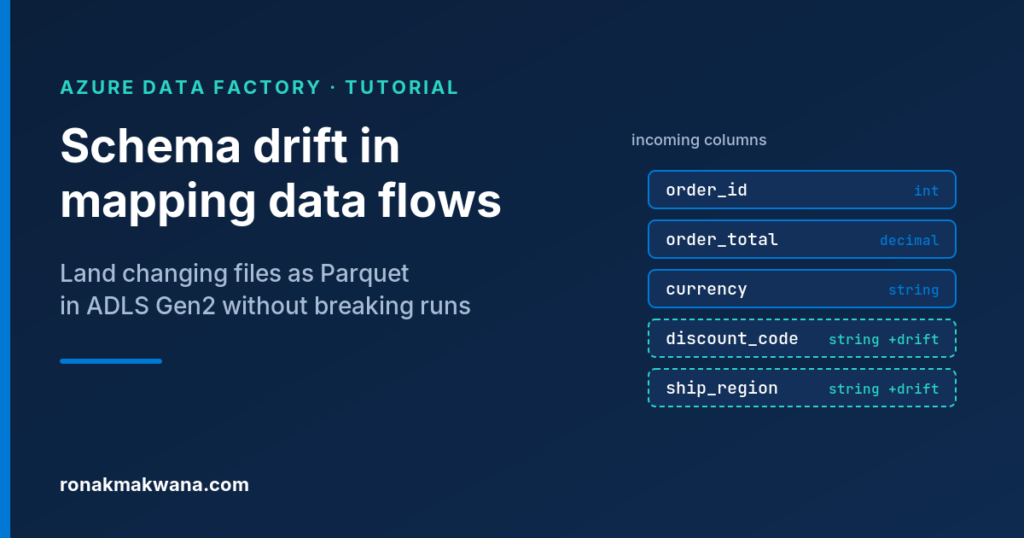
We’ll use a synthetic example. A daily orders feed lands in a raw container. On day one the files have three columns: order_id, order_total (integer) and currency. On day two the producer adds discount_code and ship region (note the space) and changes order_total to a decimal. Our data flow reads raw/orders/*.parquet and writes Parquet to a curated container.
If you want to reproduce it, this short Python script (it needs pyarrow) writes both files. I ran the generator itself; it produces the schemas shown in the comments.
"""Generate two synthetic Parquet files that simulate schema drift."""
from decimal import Decimal
import pyarrow as pa
import pyarrow.parquet as pq

day1 = pa.table({
    "order_id": pa.array([1001, 1002, 1003], pa.int32()),
    "order_total": pa.array([120, 75, 310], pa.int32()),
    "currency": ["GBP", "GBP", "EUR"],
})

day2 = pa.table({
    "order_id": pa.array([1004, 1005], pa.int32()),
    "order_total": pa.array([Decimal("99.90"), Decimal("15.25")], pa.decimal128(18, 2)),
    "currency": ["GBP", "USD"],
    "discount_code": ["AUTUMN10", None],
    "ship region": ["UK-South", "EU-West"],
})

pq.write_table(day1, "orders_2026-10-01.parquet")  # order_id, order_total, currency
pq.write_table(day2, "orders_2026-10-02.parquet")  # + discount_code, "ship region"
Upload both files to raw/orders/ in a test storage account before you start.
Step 1: Work out which failure you actually have
Schema drift shows up in a few distinct ways. Match your symptom first, because the fix is different for each one.
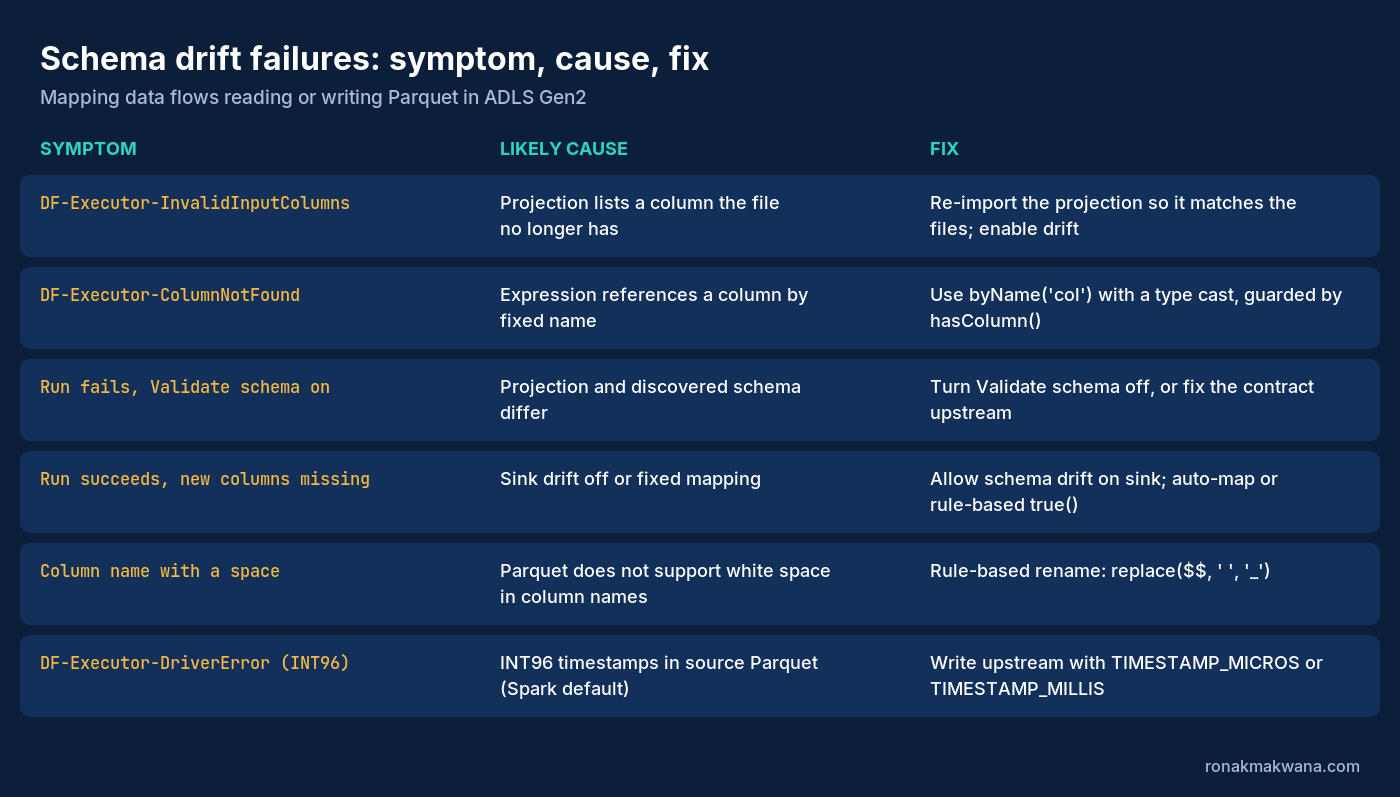
DF-Executor-InvalidInputColumns: “The column in source configuration cannot be found in source data’s schema.” Your source projection lists a column the files no longer contain. Microsoft’s guidance is to make sure the configured columns are a subset of the actual source schema.DF-Executor-ColumnNotFound: “Column name used in expression is unavailable or invalid.” An expression refers to a column by its fixed name and that column isn’t in the stream.- The run fails with Validate schema turned on. With that option set, the data flow fails whenever the incoming data doesn’t match the defined schema. That is by design.
- The run succeeds but new columns are missing from the output. The source or sink isn’t allowing drift, or the sink uses fixed mapping, so anything not listed is dropped.
DF-Executor-DriverErrormentioning INT96. The source Parquet stores timestamps as INT96, which Microsoft says mapping data flows don’t support.
Step 2: Configure the source for late binding
Open the source transformation and go to the Source settings tab.
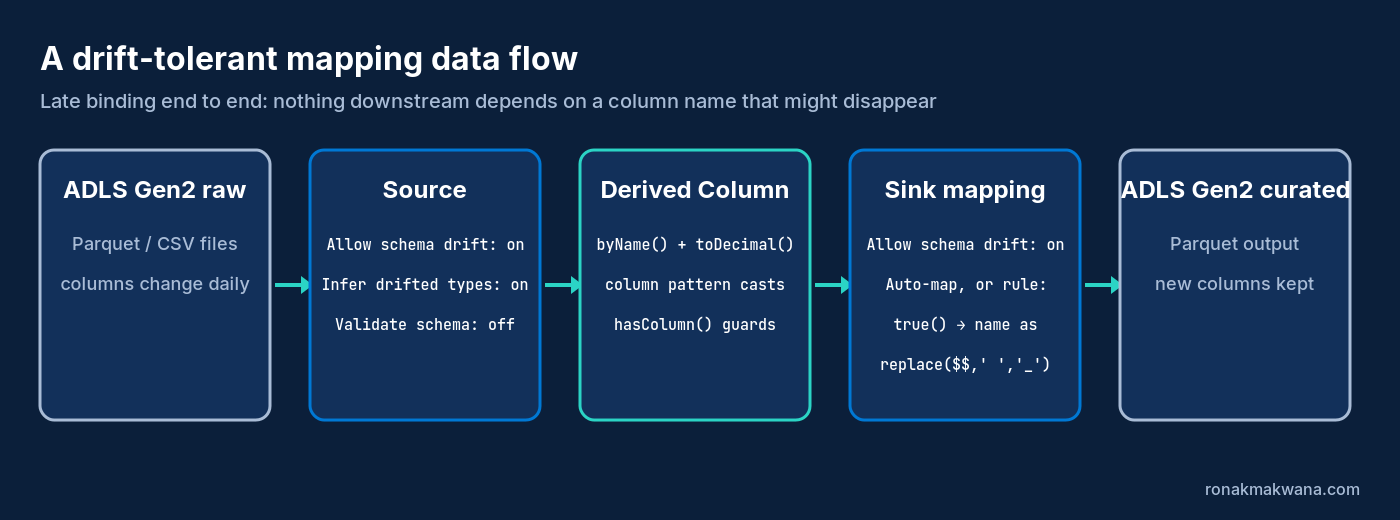
- Check Allow schema drift. Every incoming column is now read at run time and passed through the flow, even if it isn’t in the projection.
- Check Infer drifted column types. Without it, every drifted column arrives as a string.
- Clear Validate schema unless you deliberately want the run to fail when the shape changes (more on that at the end).
- On the Source options tab, set the wildcard path to
orders/*.parquetand, optionally, set Column to store file name so every row records which file it came from. That makes drift much easier to trace later.
Two related choices matter here:
- Prefer an inline dataset for flexible schemas. Microsoft recommends inline datasets for flexible schemas and parameterised sources. A dataset object with an imported schema gives you a fixed projection, which is exactly what drift breaks.
- Be careful with “Use projected schema” (under Schema options on the Projection tab for inline sources). It skips schema discovery on every file and applies the stored projection, which is faster but means new columns in later files won’t be discovered. Leave it off for drifting feeds.
If you’re already seeing DF-Executor-InvalidInputColumns, re-import the schema on the Projection tab (debug must be on) so the projection only lists columns that really exist, then rely on drift for anything new.
Microsoft is upfront about the trade-off. Once you accept drift you lose early binding: drifted columns don’t appear in schema views as you build downstream transformations. The next steps work around that.
Step 3: Stop naming drifted columns directly
Any expression like order_total * 1.2 binds to a column at design time. When that column is missing or drifted, you get DF-Executor-ColumnNotFound. Use these tools instead.
Reference by name at run time with byName()
byName('column') looks a column up by name when the flow runs. If there’s no match it returns NULL rather than failing, and the result must be wrapped in a type conversion function. In a Derived Column transformation:
order_total   = toDecimal(byName('order_total'), 18, 2)
discount_code = toString(byName('discount_code'))
On day one discount_code doesn’t exist, so it comes through as NULL. On day two it carries the value. Either way the flow keeps running. If you need to branch on whether a column exists, hasColumn('discount_code') returns a boolean.
Let ADF generate the mappings with Map Drifted
With debug on, open Data preview on the source and select Refresh. If drifted columns are detected, select Map Drifted. ADF adds a Derived Column that defines each drifted column with its detected type, for example toInteger(byName('movieId')) in Microsoft’s example, so those columns show up in schema views downstream. It’s a quick way to get typed references, but remember it only knows about the columns in the files you previewed.
Normalise types with a column pattern
When the same column arrives as an integer in one file and a decimal in another, cast by pattern instead of by name. In a Derived Column, choose Add column pattern and use a match condition on name, type, stream, origin or position. Setting the column name to $$ keeps each matched column’s original name. For example, to make every column whose name ends in _total a decimal:
Match condition:  endsWith(name, '_total')
Column name:      $$
Value:            toDecimal($$, 18, 2)
Patterns match both defined and drifted columns, so this keeps working when the next _total column appears.
Step 4: Make the sink write whatever arrives
Drift handling at the source is wasted if the sink drops the columns. Open the sink transformation:
- On the Sink tab, check Allow schema drift.
- On the Mapping tab, turn on Auto mapping. With drift allowed and auto mapping on, all incoming columns are written. If you turn auto mapping off, you must use rule-based mapping to write drifted columns.
Fix column names Parquet won’t accept
Microsoft’s Parquet format documentation states that white space in column names isn’t supported for Parquet files. Our day-two file has ship region, so the names need cleaning before the write. Add a Select transformation before the sink with a rule-based mapping that matches every column and renames it:
Match condition:  true()
Name as:          replace($$, ' ', '_')
A rule-based mapping on its own drops every column that doesn’t match its condition, which is why this one matches true(). The rule matches drifted columns too, so ship region becomes ship_region whenever it shows up.
Step 5: The whole flow as data flow script
This is the shape of the finished flow in data flow script, which you can view and edit with the Script button on the data flow toolbar. Property names come from Microsoft’s Parquet, source, select and derived column docs; your generated script will also contain connector-specific properties for your storage account. As noted above, I haven’t executed this script against a live factory.
source(allowSchemaDrift: true,
    validateSchema: false,
    inferDriftedColumnTypes: true,
    format: 'parquet',
    wildcardPaths:['orders/*.parquet'],
    rowUrlColumn: 'source_file') ~> RawOrders
RawOrders derive(order_total = toDecimal(byName('order_total'), 18, 2),
    discount_code = toString(byName('discount_code'))) ~> TypedOrders
TypedOrders select(mapColumn(
        each(match(true()), replace($$, ' ', '_') = $$)
    ),
    skipDuplicateMapInputs: true,
    skipDuplicateMapOutputs: true) ~> CleanNames
CleanNames sink(allowSchemaDrift: true,
    validateSchema: false,
    format: 'parquet',
    truncate: false,
    skipDuplicateMapInputs: true,
    skipDuplicateMapOutputs: true) ~> CuratedOrders
Step 6: Test it with both files
- Turn on Data flow debug.
- Point the source at the day-one file only and check Data preview on each transformation.
discount_codeshould be NULL and there should be noship_regioncolumn. - Switch the wildcard back to
orders/*.parquetand preview again. You should now seediscount_codepopulated for the day-two rows andship_regionafter the Select. - Use the Inspect tab on the Derived Column to confirm
order_totalis a decimal for both files. - Run the pipeline with a Data Flow activity and check the activity output and the files written to
curated.
The INT96 timestamp edge case
If a source file stores timestamps as INT96, the read can fail with DF-Executor-DriverError saying INT96 is a legacy timestamp type that ADF data flow doesn’t support. This catches people out because INT96 is still the default when Apache Spark writes Parquet: the Spark docs list INT96 as the default value of spark.sql.parquet.outputTimestampType. The fix is upstream. Set that option to TIMESTAMP_MICROS (or TIMESTAMP_MILLIS if millisecond precision is enough) in the job that produces the files, then rewrite them.
Remember the readers downstream
Once your curated folder holds files written on different days, those files will have different schemas. Anything that reads the folder has to cope with that too. In Spark, Parquet schema merging is off by default and you enable it per read with the mergeSchema option. In another mapping data flow, turn on schema drift on that source as well.
When not to allow drift
Drift tolerance is the right default for raw-to-curated landing, where losing a new column is worse than carrying it. It’s the wrong default where a downstream table or report depends on an exact contract. There, keep Validate schema on so the run fails loudly, and alert on the failure rather than letting unexpected columns flow into a model nobody designed for them.
Checklist
- Source: Allow schema drift on, Infer drifted column types on, Validate schema off (for landing flows).
- Inline dataset for drifting feeds; “Use projected schema” off.
- No hard-coded references to columns that might vanish: use
byName()with a type conversion, or column patterns. - Sink: Allow schema drift on, plus auto mapping or a rule-based mapping that matches
true(). - Rename columns with spaces before writing Parquet.
- Check upstream files for INT96 timestamps.
- Make sure downstream readers can merge schemas.
Clean up
- Turn off Data flow debug so the debug cluster stops billing.
- Delete the test files in
raw/orders/and the output incurated, or delete the test storage account if you created one just for this. - Delete the test data flow and pipeline if you don’t want to keep them.
Sources
- Schema drift in mapping data flow (Microsoft Learn)
- Source transformation in mapping data flows (Microsoft Learn)
- Column patterns in mapping data flows (Microsoft Learn)
- Parquet format in Azure Data Factory and Synapse (Microsoft Learn)
- Select transformation in mapping data flows (Microsoft Learn)
- Derived column transformation in mapping data flows (Microsoft Learn)
- Data transformation expression usage in mapping data flows (Microsoft Learn)
- Common error codes and messages for mapping data flows (Microsoft Learn)
- Data flow script (Microsoft Learn)
- Parquet files, schema merging and configuration (Apache Spark docs)
Related Azure engineering guides
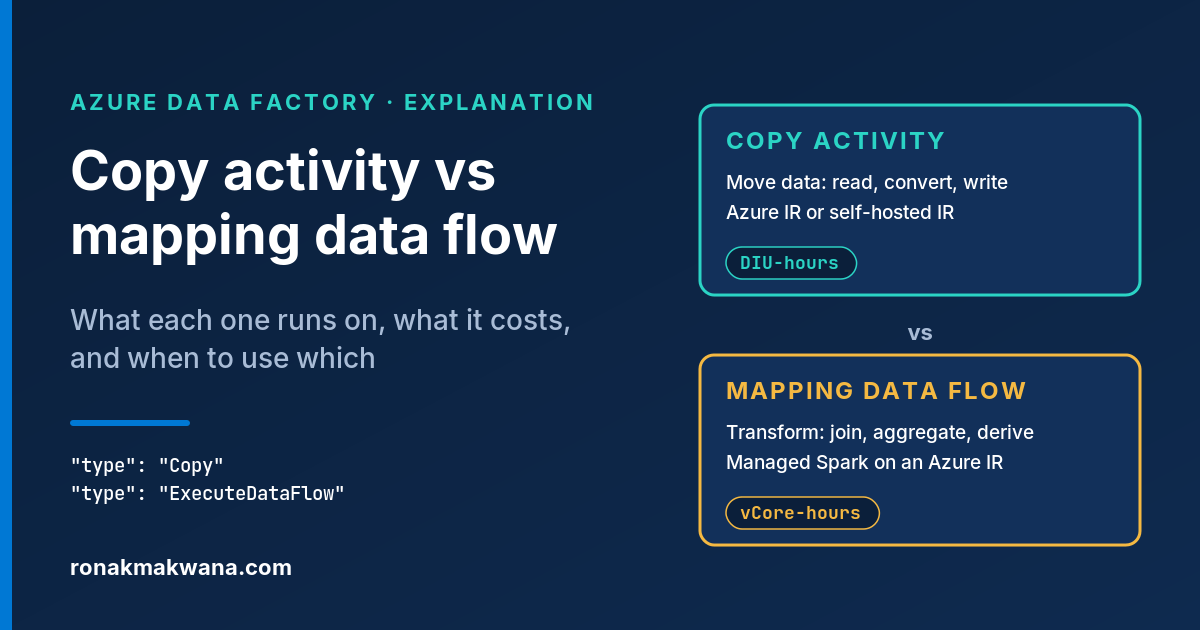
For the wider pipeline design, see ADF Copy Activity vs Mapping Data Flow. If the resulting files fail in a notebook, use the Databricks ADLS Gen2 path troubleshooting guide.