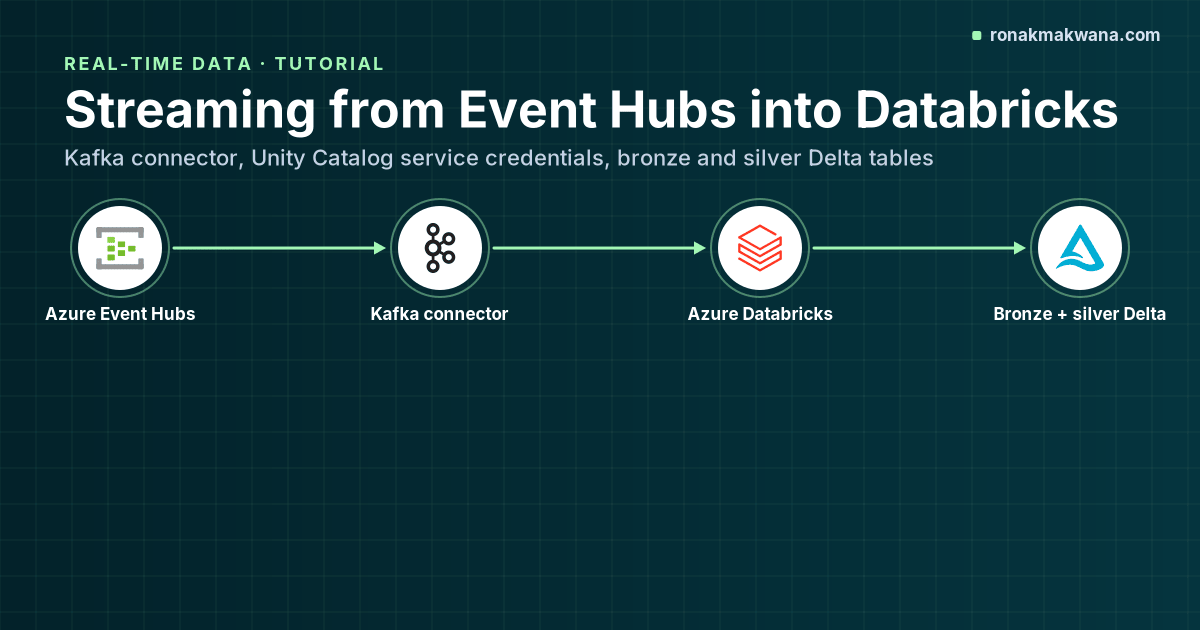
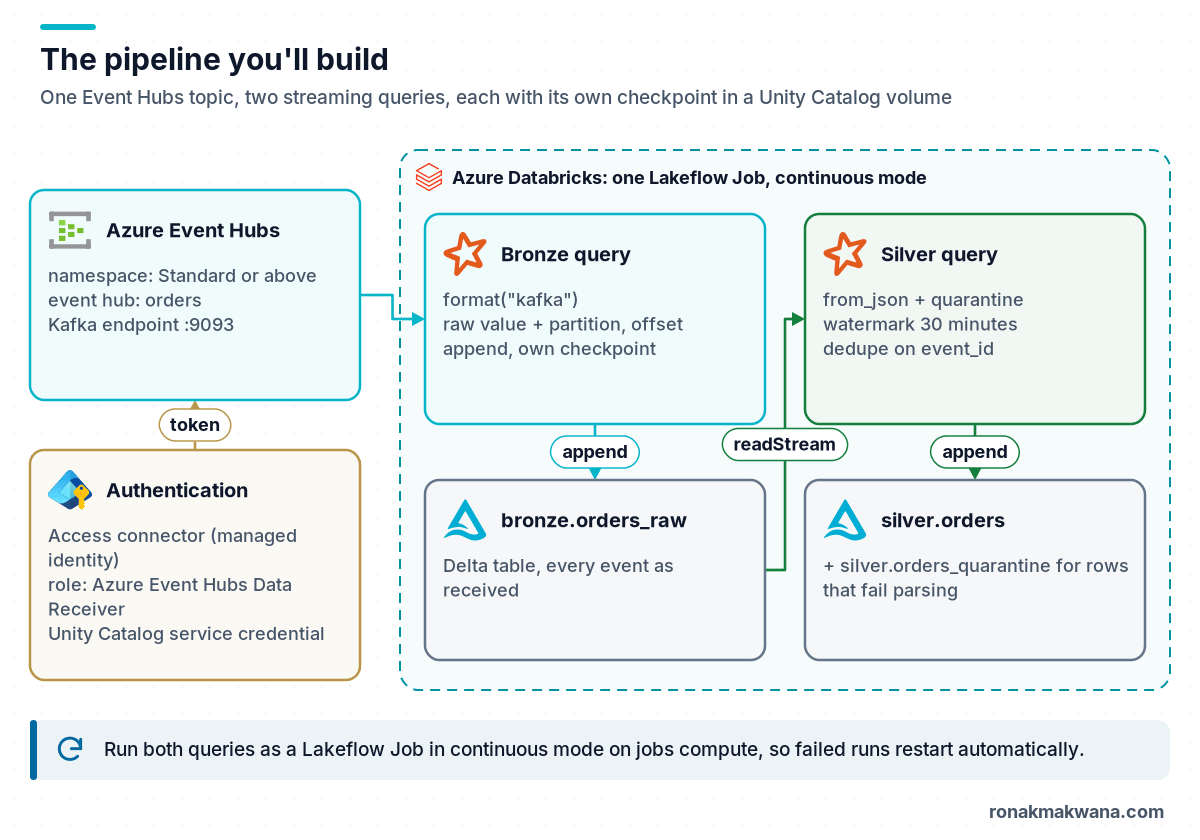
This tutorial builds a streaming pipeline that reads order events from Azure Event Hubs into Delta tables on Azure Databricks. It uses the approach the Databricks documentation now recommends: the built-in Kafka connector pointed at the Event Hubs Kafka endpoint, authenticated with a Unity Catalog service credential backed by a managed identity, so there’s no connection string or client secret in your code.
You’ll create a bronze table that stores the raw events exactly as received, and a silver table that parses, validates and deduplicates them. Both are Structured Streaming queries with their own checkpoints. If you’re new to the bronze/silver/gold pattern, read Understanding the Medallion Architecture first; for the Event Hubs concepts used here, see Azure Event Hubs Explained.
Prerequisites
- An Event Hubs namespace on the Standard, Premium or Dedicated tier. Kafka protocol support isn’t available on Basic.
- An event hub named
orders(the Kafka “topic”) with producers sending JSON events like{"event_id": "e1", "order_id": "SO-1", "status": "created", "amount": "10.50", "event_time": "2026-06-08T09:00:00Z"}. - An Azure Databricks workspace enabled for Unity Catalog, with compute running Databricks Runtime 16.1 or above (service credentials for Event Hubs need 16.1+). Databricks Runtime 17.3 LTS or 18 LTS are good choices.
- The
CREATE SERVICE CREDENTIALprivilege on the metastore, and Owner or User Access Administrator on the Event Hubs namespace to assign roles.
Step 1: Create the access connector and grant it Event Hubs access
- In the Azure portal, create an Access Connector for Azure Databricks in the same region as the workspace, with a system-assigned managed identity.
- On the Event Hubs namespace (or just the
ordersevent hub), assign the role Azure Event Hubs Data Receiver to the access connector’s managed identity.
With Azure CLI, the role assignment looks like this (replace the IDs with your own):
PRINCIPAL_ID=$(az databricks access-connector show \
  --resource-group rg-streaming --name ac-streaming \
  --query identity.principalId -o tsv)

EH_ID=$(az eventhubs eventhub show \
  --resource-group rg-streaming --namespace-name contoso-orders --name orders \
  --query id -o tsv)

az role assignment create \
  --assignee-object-id "$PRINCIPAL_ID" --assignee-principal-type ServicePrincipal \
  --role "Azure Event Hubs Data Receiver" \
  --scope "$EH_ID"
Step 2: Create the Unity Catalog service credential
In Catalog Explorer, go to External data > Credentials > Create credential, choose Service credential, name it eh-orders-reader and paste the access connector’s resource ID. Grant access to the principal that will run the job:
GRANT ACCESS ON SERVICE CREDENTIAL `eh-orders-reader` TO `orders-pipeline-sp`;
Step 3: Create the schemas, tables location and checkpoint volume
CREATE CATALOG IF NOT EXISTS sales;
CREATE SCHEMA IF NOT EXISTS sales.bronze;
CREATE SCHEMA IF NOT EXISTS sales.silver;
CREATE SCHEMA IF NOT EXISTS sales.ops;

-- Checkpoints live in a managed volume, one folder per query
CREATE VOLUME IF NOT EXISTS sales.ops.checkpoints;
Databricks is explicit that each streaming query needs its own checkpoint location and that queries must never share one.
Step 4: Stream raw events into bronze
The bronze query does as little as possible: it keeps the raw payload as a string plus the Kafka metadata (partition, offset, enqueued timestamp). If parsing logic changes later, you can rebuild silver from bronze without going back to Event Hubs, whose retention is limited.
from pyspark.sql.functions import col, current_timestamp

EH_SERVER = "contoso-orders.servicebus.windows.net"

kafka_options = {
    "kafka.bootstrap.servers": f"{EH_SERVER}:9093",
    "subscribe": "orders",
    "databricks.serviceCredential": "eh-orders-reader",
    "startingOffsets": "earliest",        # only used on the very first run
    "maxOffsetsPerTrigger": "200000",     # caps each micro-batch
}

raw = spark.readStream.format("kafka").options(**kafka_options).load()

bronze = raw.select(
    col("key").cast("string").alias("partition_key"),
    col("value").cast("string").alias("raw_value"),
    col("partition").alias("eh_partition"),
    col("offset").alias("eh_offset"),
    col("timestamp").alias("enqueued_time"),
    current_timestamp().alias("ingested_at"),
)

(bronze.writeStream
    .queryName("orders_bronze")
    .option("checkpointLocation", "/Volumes/sales/ops/checkpoints/orders_bronze")
    .trigger(processingTime="10 seconds")
    .toTable("sales.bronze.orders_raw"))
Two connector details worth knowing. The Kafka source returns key and value as binary, so cast or deserialise them explicitly. And when you use a service credential, don’t also set the SASL options (kafka.sasl.mechanism, kafka.sasl.jaas.config, kafka.security.protocol and friends); Databricks documents that these conflict.
You also don’t need to create an Event Hubs consumer group for this. The Spark Kafka source generates a unique group ID per query and tracks offsets in the checkpoint, not in Kafka. Kafka consumer groups count against the namespace’s Kafka consumer group quota (1,000 on Standard and above).
Step 5: Parse, quarantine and deduplicate into silver
The silver query reads the bronze Delta table as a stream, parses the JSON with an explicit schema, sends unparseable rows to a quarantine table and deduplicates on event_id. Event Hubs delivers at least once, so duplicates are normal; dropDuplicatesWithinWatermark (Databricks Runtime 13.3 LTS and above, and Apache Spark 3.5+) removes them while keeping state bounded by the watermark.
from pyspark.sql.functions import col, from_json, to_timestamp
from pyspark.sql.types import StructType, StructField, StringType, DecimalType

value_schema = StructType([
    StructField("event_id", StringType()),
    StructField("order_id", StringType()),
    StructField("status", StringType()),
    StructField("amount", DecimalType(18, 2)),
    StructField("event_time", StringType()),
])

def parse_events(df):
    return (df
        .withColumn("e", from_json(col("raw_value"), value_schema))
        .select("partition_key", "e.*", "eh_partition", "eh_offset",
                "enqueued_time", "ingested_at", "raw_value")
        .withColumn("event_time", to_timestamp("event_time")))

parsed = parse_events(spark.readStream.table("sales.bronze.orders_raw"))

def write_quarantine(batch_df, batch_id):
    # Runs once per micro-batch with the rows that failed to parse
    batch_df \
        .select("raw_value", "eh_partition", "eh_offset", "ingested_at") \
        .write.mode("append").saveAsTable("sales.silver.orders_quarantine")

(parsed.where(col("event_id").isNull())
    .writeStream.queryName("orders_quarantine")
    .option("checkpointLocation", "/Volumes/sales/ops/checkpoints/orders_quarantine")
    .foreachBatch(write_quarantine)
    .start())

good = (parsed.where(col("event_id").isNotNull())
    .withWatermark("event_time", "30 minutes")
    .dropDuplicatesWithinWatermark(["event_id"])
    .drop("raw_value"))

(good.writeStream
    .queryName("orders_silver")
    .option("checkpointLocation", "/Volumes/sales/ops/checkpoints/orders_silver")
    .trigger(processingTime="10 seconds")
    .toTable("sales.silver.orders"))
The quarantine path uses foreachBatch to show the pattern; a plain toTable() works just as well for a single append. Keep in mind that foreachBatch is at-least-once by default, so make any writes inside it idempotent if you extend it, for example with a Delta MERGE keyed on partition and offset.
Choose the watermark from how late duplicates can realistically arrive. Databricks notes that duplicates arriving within the threshold are always removed, while those outside it might not be.
Step 6: Run it as a job, not a notebook
For production, Databricks recommends running streams as Lakeflow Jobs on jobs compute, scheduled in continuous mode, without compute autoscaling, and with display() and count() calls removed. Continuous mode allows only one running instance and starts a new run after a failure with exponential backoff, which means a transient error doesn’t leave the stream stopped.
On serverless compute, time-based triggers like processingTime aren’t supported; use trigger(availableNow=True) with a continuous job, or move the pipeline to Lakeflow Spark Declarative Pipelines. The SQL version of the bronze step there looks like this:
CREATE OR REFRESH STREAMING TABLE sales.bronze.orders_raw AS
SELECT
  CAST(key AS STRING)   AS partition_key,
  CAST(value AS STRING) AS raw_value,
  partition             AS eh_partition,
  offset                AS eh_offset,
  timestamp             AS enqueued_time
FROM STREAM read_kafka(
  bootstrapServers  => 'contoso-orders.servicebus.windows.net:9093',
  subscribe         => 'orders',
  serviceCredential => 'eh-orders-reader'
);
Step 7: Verify
Check the tables and the stream’s progress:
-- Duplicates should be zero in silver
SELECT event_id, COUNT(*) AS n
FROM sales.silver.orders
GROUP BY event_id
HAVING COUNT(*) > 1;

-- Latest data and per-partition offsets in bronze
SELECT eh_partition, MAX(eh_offset) AS max_offset, MAX(enqueued_time) AS latest
FROM sales.bronze.orders_raw
GROUP BY eh_partition
ORDER BY eh_partition;
In the streaming query’s progress JSON, the Kafka source reports avgOffsetsBehindLatest, maxOffsetsBehindLatest and estimatedTotalBytesBehindLatest. A value that keeps growing means the query is falling behind the producers.
I ran the parsing, quarantine filter and watermark deduplication logic locally against Apache Spark 4.0.4, using a file stream of Kafka-shaped rows (binary key and value) that included one duplicate delivery and one malformed payload. The silver output contained one row per event_id:
+--------+--------+-------+------+-------------------+------------+---------+
|event_id|order_id|status |amount|event_time         |eh_partition|eh_offset|
+--------+--------+-------+------+-------------------+------------+---------+
|e1      |SO-1    |created|10.50 |2026-06-08 09:00:00|0           |0        |
|e2      |SO-1    |paid   |10.50 |2026-06-08 09:00:05|1           |1        |
|e3      |SO-2    |created|99.00 |2026-06-08 09:00:07|1           |3        |
+--------+--------+-------+------+-------------------+------------+---------+
quarantined rows: 1
Troubleshooting
- “Failed to create a new KafkaAdminClient”: usually a wrong server name or authentication setting. Check the bootstrap server (
<namespace>.servicebus.windows.net:9093) and that you haven’t mixed SASL options with the service credential. - Query runs but returns no rows: wrong topic name, or
startingOffsetsislatest(the default) and nothing new has been sent. RESTRICTED_STREAMING_OPTION_PERMISSION_ENFORCED: you referenced an unshaded Kafka class name. Databricks requires thekafkashaded.prefix in authentication options.- Restart fails after a code change: changing the subscribed topic, the stateful operations or the sink type isn’t compatible with the existing checkpoint. Start a new checkpoint when the change requires it.
Clean up
- Stop the job (pause the continuous trigger) and delete it.
- Drop the tables and volume:
DROP TABLE sales.silver.orders,DROP TABLE sales.silver.orders_quarantine,DROP TABLE sales.bronze.orders_raw,DROP VOLUME sales.ops.checkpoints. - Delete the service credential, the role assignment and the access connector if you created them only for this tutorial.
About this article
The Databricks-specific parts (Kafka connector with a service credential, Unity Catalog SQL, Lakeflow Jobs and the read_kafka streaming table) follow the Azure Databricks documentation but were not run against a live workspace or Event Hubs namespace for this article. The parsing, quarantine filter and dropDuplicatesWithinWatermark logic was run locally on Apache Spark 4.0.4 with a simulated Kafka-shaped file stream and Parquet sinks instead of Delta; the output above is from that run. The Azure CLI commands were not executed.
Last checked against official documentation: October 2026.
Sources
- Connect to Apache Kafka (Azure Databricks)
- Kafka connector authentication, including Event Hubs (Azure Databricks)
- Create service credentials (Azure Databricks)
- Apply watermarks to control data processing thresholds (Azure Databricks)
- Structured Streaming checkpoints (Azure Databricks)
- Production considerations for Structured Streaming (Azure Databricks)
- Run jobs continuously (Azure Databricks)
- Event Hubs for Apache Kafka (Microsoft Learn)
- Structured Streaming + Kafka integration guide (Apache Spark)