Azure Event Hubs looks simple from the outside: producers send events, consumers read them. Most production problems with it, though, come from three concepts that are easy to gloss over at design time: partitions, consumer groups and checkpoints. Get them right and the service scales cleanly. Get them wrong and you’ll see out-of-order processing, idle consumers, duplicate work or a partition count you can’t change.
This article explains how Event Hubs is put together, how to choose a partition count, how consumer groups and checkpoints work, and how the tiers differ. It includes Bicep for a namespace with consumer groups and Python producer and consumer code that uses Microsoft Entra ID instead of connection strings. For where Event Hubs fits in the wider picture, see Designing Real-Time Data Processing Architectures on Azure.
The building blocks
- Namespace: the management container. It owns the network endpoint (
<name>.servicebus.windows.net), networking rules and the capacity you pay for. - Event hub: an append-only log inside the namespace. Microsoft’s docs describe it as equivalent to a Kafka topic.
- Partition: an ordered sequence of events within an event hub. Each event carries its body, user properties, an offset, a sequence number and the time the service accepted it.
- Consumer group: an independent view of the whole event hub. Each group tracks its own position.
- Checkpoint: a saved position (per partition, per consumer group) that lets a consumer resume where it left off.
Partitions: ordering and parallelism
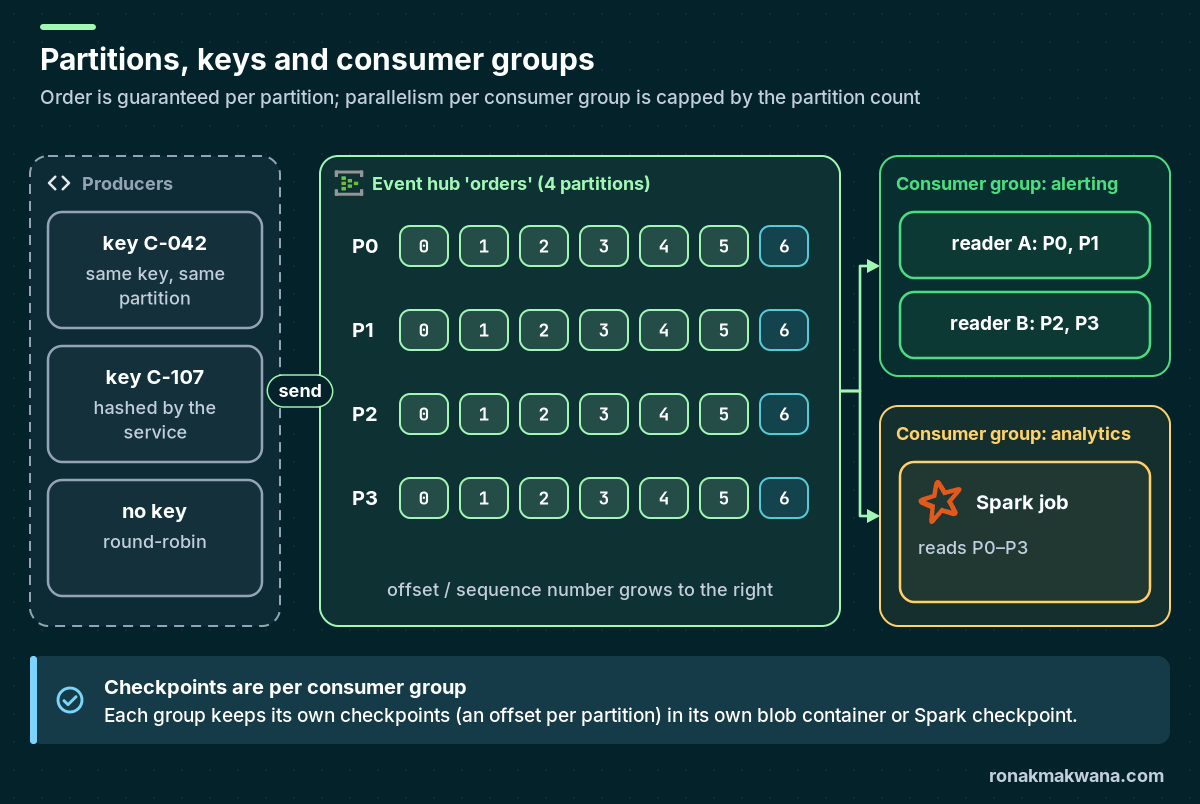
A partition is the unit of both ordering and parallelism. Event Hubs preserves order within a partition, not across the event hub. Inside one consumer group, only one active (epoch) reader owns a partition at a time, so the partition count is the maximum number of parallel consumers per group. Extra processor instances beyond that sit idle.
Partition keys
When a producer sets a partition key, the service hashes it to pick a partition, so all events with the same key stay together and in order. Without a key, events are distributed round-robin. Microsoft recommends against sending directly to a specific partition ID because it ties your availability to that one partition.
Choose the key from your ordering requirement. If you need “all events for an order in sequence”, key by order ID. If you need per-customer order, key by customer ID. Avoid low-cardinality keys (a country code, a status value), because a handful of keys can’t spread load across many partitions and one hot key overloads one partition.
How many partitions?
The partition count is set when you create the event hub. On Basic and Standard it can’t be changed afterwards. On Premium and Dedicated you can increase it but never decrease it, and increasing it changes the key-to-partition mapping, which matters if your consumers rely on ordering. So size it for peak load up front.
Microsoft’s guidance gives per-partition starting points: roughly 1 MB/s ingress and 2 MB/s egress per partition on Standard, and roughly 1–2 MB/s ingress and 2–5 MB/s egress on Premium and Dedicated. Divide your expected ingress and egress by those rates and take the larger result, then validate with a load test.
A worked example with hypothetical numbers: a Standard namespace with a peak of 6 MB/s ingress, read by three consumer groups that each read everything, so about 18 MB/s egress in total.
- Ingress: 6 MB/s ÷ 1 MB/s = 6 partitions.
- Egress: 18 MB/s ÷ 2 MB/s = 9 partitions.
- Take the larger (9), then round up for consumer parallelism and growth, for example to 12 or 16, because you can’t change it later on Standard.
Partition count doesn’t change the price. You pay for capacity units on the namespace: throughput units (TUs) on Basic and Standard, processing units (PUs) on Premium, and capacity units (CUs) on Dedicated. On Basic and Standard, one TU allows 1 MB/s or 1,000 events per second of ingress and 2 MB/s or 4,096 events per second of egress. Standard namespaces can use auto-inflate to raise TUs automatically up to a maximum you set.
Consumer groups
A consumer group is a separate cursor over the same data. Every event hub has a $Default group. Create one group per consuming application (alerting, analytics, archive) so each reads at its own pace and keeps its own checkpoints. Sharing a group between unrelated applications means they compete for partition ownership and steal each other’s events.
Three reader models are worth knowing:
- Epoch (exclusive) consumers: what the SDK processor clients use (
EventProcessorClientin .NET and Java,EventHubConsumerClientwith a checkpoint store in Python and JavaScript). One owner per partition per group; a new owner with a higher owner level disconnects the old one. - Non-epoch receivers: up to 5 per partition per consumer group. They each see the same events, so they don’t add throughput.
- Kafka consumers: use
group.idand the Kafka rebalancing protocol, with the same one-owner-per-partition rule. Kafka consumer groups don’t need to be created in advance.
Tier limits that affect the design
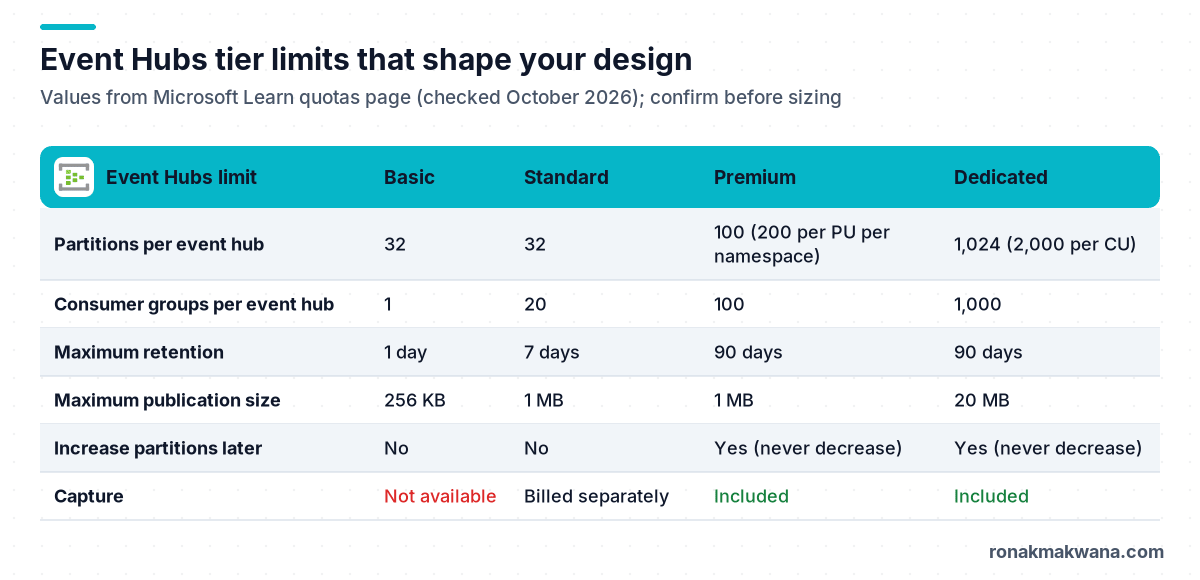
Two limits catch teams out. Basic allows a single consumer group, so it doesn’t support several independent consumers. Standard caps consumer groups at 20 per event hub and retention at 7 days, which is why longer replay windows usually mean Premium, Dedicated or an archive through Event Hubs Capture.
Deploying a namespace with Bicep
This Bicep file creates a Standard namespace with local (SAS) authentication disabled, so clients must use Microsoft Entra ID, plus an event hub with eight partitions, 72 hours of retention and one consumer group per application.
@description('Name of the Event Hubs namespace')
param namespaceName string

param location string = resourceGroup().location

resource ns 'Microsoft.EventHub/namespaces@2024-01-01' = {
  name: namespaceName
  location: location
  sku: {
    name: 'Standard'
    tier: 'Standard'
    capacity: 2
  }
  properties: {
    disableLocalAuth: true
    minimumTlsVersion: '1.2'
    isAutoInflateEnabled: true
    maximumThroughputUnits: 8
  }
}

resource orders 'Microsoft.EventHub/namespaces/eventhubs@2024-01-01' = {
  parent: ns
  name: 'orders'
  properties: {
    partitionCount: 8
    retentionDescription: {
      cleanupPolicy: 'Delete'
      retentionTimeInHours: 72
    }
  }
}

resource consumerGroups 'Microsoft.EventHub/namespaces/eventhubs/consumergroups@2024-01-01' = [for name in [
  'analytics'
  'alerting'
  'archive'
]: {
  parent: orders
  name: name
}]

output namespaceFqdn string = '${ns.name}.servicebus.windows.net'
Grant the producer identity Azure Event Hubs Data Sender and each consumer identity Azure Event Hubs Data Receiver, scoped to the event hub rather than the namespace where you can. The post on managed identity and Key Vault for data pipelines covers the identity side in more detail.
Producing with a partition key (Python)
The azure-eventhub package (version 5.x) creates batches with an optional partition key. Every event in a batch shares that key, so group events by key before batching.
import asyncio
import json
from azure.eventhub import EventData
from azure.eventhub.aio import EventHubProducerClient
from azure.identity.aio import DefaultAzureCredential

NAMESPACE = "contoso-orders.servicebus.windows.net"
EVENT_HUB = "orders"

orders = [
    {"order_id": "SO-1001", "customer_id": "C-042", "status": "created"},
    {"order_id": "SO-1001", "customer_id": "C-042", "status": "paid"},
    {"order_id": "SO-1002", "customer_id": "C-107", "status": "created"},
]

async def main() -> None:
    credential = DefaultAzureCredential()
    producer = EventHubProducerClient(
        fully_qualified_namespace=NAMESPACE,
        eventhub_name=EVENT_HUB,
        credential=credential,
    )
    async with producer, credential:
        by_customer: dict[str, list[dict]] = {}
        for o in orders:
            by_customer.setdefault(o["customer_id"], []).append(o)
        for customer_id, events in by_customer.items():
            batch = await producer.create_batch(partition_key=customer_id)
            for e in events:
                batch.add(EventData(json.dumps(e)))
            await producer.send_batch(batch)

asyncio.run(main())
Consuming with checkpoints (Python)
Checkpointing is the consumer’s responsibility with AMQP clients. The SDK’s blob checkpoint store (azure-eventhub-checkpointstoreblob-aio) stores ownership and checkpoints in Azure Blob Storage and balances partitions across running instances.
import asyncio
import json
from azure.eventhub.aio import EventHubConsumerClient
from azure.eventhub.extensions.checkpointstoreblobaio import BlobCheckpointStore
from azure.identity.aio import DefaultAzureCredential

NAMESPACE = "contoso-orders.servicebus.windows.net"
EVENT_HUB = "orders"
CONSUMER_GROUP = "alerting"
CHECKPOINT_ACCOUNT = "https://contosoehcheckpoints.blob.core.windows.net"
CHECKPOINT_CONTAINER = "orders-alerting"   # one container per consumer group

async def on_event(partition_context, event):
    order = json.loads(event.body_as_str())
    print(partition_context.partition_id, event.sequence_number,
          order["order_id"], order["status"])
    await partition_context.update_checkpoint(event)

async def main() -> None:
    credential = DefaultAzureCredential()
    store = BlobCheckpointStore(
        blob_account_url=CHECKPOINT_ACCOUNT,
        container_name=CHECKPOINT_CONTAINER,
        credential=credential,
    )
    client = EventHubConsumerClient(
        fully_qualified_namespace=NAMESPACE,
        eventhub_name=EVENT_HUB,
        consumer_group=CONSUMER_GROUP,
        checkpoint_store=store,
        credential=credential,
    )
    async with client, credential:
        # "-1" starts from the beginning of each partition when no checkpoint exists
        await client.receive(on_event=on_event, starting_position="-1")

asyncio.run(main())
Checkpointing after every event is simple but chatty. In higher-volume consumers, checkpoint every N events or every few seconds and accept that a restart replays the events since the last checkpoint. That replay is one reason consumers must be idempotent.
Microsoft’s recommendations for the checkpoint storage account: use a separate container per consumer group, don’t use the account or container for anything else, keep it in the same region as the consumers, and disable hierarchical namespace, blob soft delete and versioning on it.
Retention, Capture and compaction
Events are removed when the retention period expires; you can’t delete individual events. Retention defaults to 1 hour on Standard, Premium and Dedicated, so set it explicitly as the Bicep above does. For long-term history use Event Hubs Capture, which writes to Blob Storage or ADLS Gen2 in Avro. If you need the latest value per key rather than full history, log compaction keeps only the most recent event for each key.
Common mistakes
- Choosing Standard with too few partitions and discovering later that the count is fixed.
- Several applications sharing
$Defaultand stealing each other’s partitions. - Running more processor instances than partitions and expecting more throughput.
- Using a low-cardinality partition key that creates one hot partition.
- Relying on the 1-hour default retention and losing data during a consumer outage.
- Reusing a general-purpose storage account (with versioning or soft delete enabled) as the checkpoint store.
About this article
The Bicep file was compiled locally with Bicep CLI 0.48.1 (bicep build) without errors, but it was not deployed. The Python code was syntax-checked and its imports and method signatures verified against azure-eventhub 5.15.1 and azure-eventhub-checkpointstoreblob-aio 1.2.0 in a local virtual environment; it was not run against a live Event Hubs namespace. The partition sizing example uses hypothetical numbers. Limits come from the Microsoft Learn quotas page and can change.
Last checked against official documentation: October 2026.
Sources
- Event Hubs features and terminology (Microsoft Learn)
- Azure Event Hubs quotas and limits (Microsoft Learn)
- Scaling with Event Hubs (Microsoft Learn)
- Automatically scale up throughput units (Microsoft Learn)
- Balance partition load across multiple instances (Microsoft Learn)
- Send or receive events using Python (Microsoft Learn)
- Microsoft.EventHub namespaces/eventhubs template reference (Microsoft Learn)
- Event Hubs for Apache Kafka (Microsoft Learn)