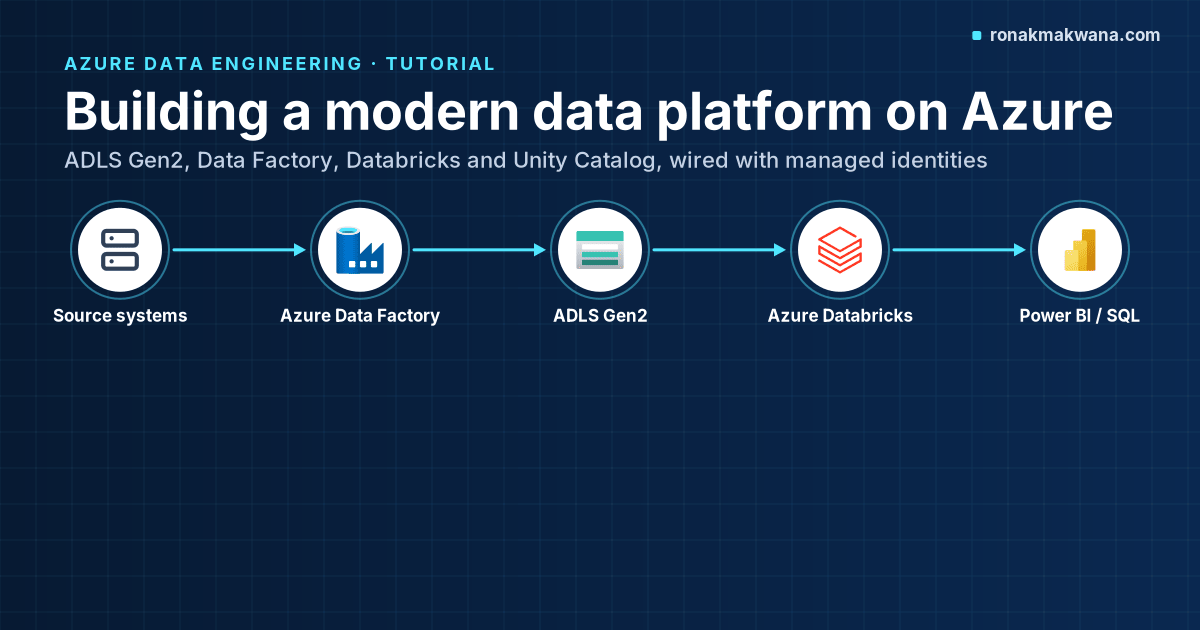
A “modern data platform” on Azure is less about any single service and more about a few decisions made early: where the data lives, which engine transforms it, who orchestrates the work, and how identity and governance are enforced end to end. Get those right and adding the next source or the next report is routine. Get them wrong and every new pipeline is a special case.
This guided build walks through a lakehouse-style platform made of Azure Data Lake Storage (ADLS) Gen2, Azure Data Factory, Azure Databricks with Unity Catalog, Azure Key Vault and Azure Monitor. You’ll deploy the core infrastructure with Bicep, wire up identities without storing keys, set up the catalog structure, and run a first ingest-and-transform cycle.
Applies to: ADLS Gen2, Azure Data Factory (V2), Azure Databricks Premium with Unity Catalog, Bicep. Resource API versions are listed in the template. The Microsoft Azure Architecture Center’s current version of this pattern uses Fabric Data Factory for batch ingestion and mirrors gold tables into OneLake; Azure Data Factory remains a supported choice and is what this post uses, because it’s what most existing Azure estates already run.
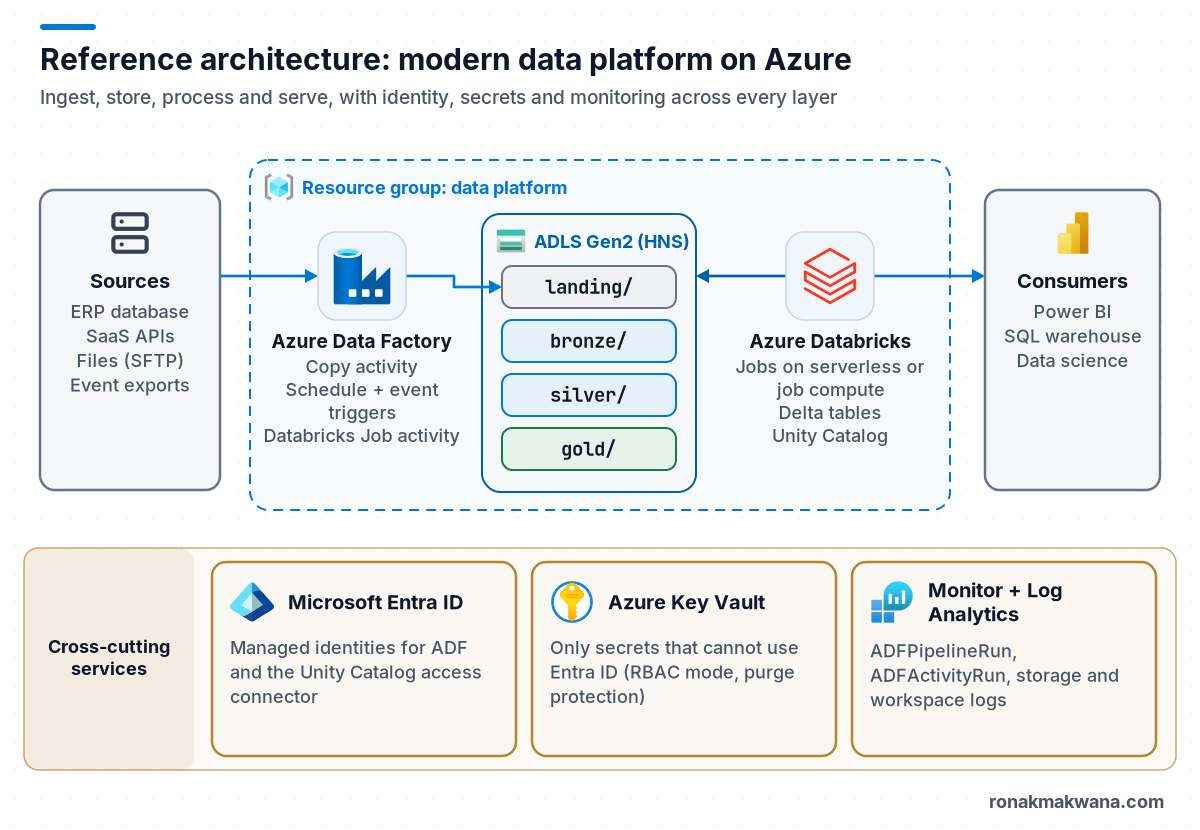
The target architecture
The platform has five layers of responsibility. Keeping them separate is what lets each one evolve on its own.
| Concern | Service | Decision to make early |
|---|---|---|
| Storage | ADLS Gen2 (hierarchical namespace) | One account per environment or per domain; container layout per layer |
| Ingestion and orchestration | Azure Data Factory | Copy activity for movement, Databricks jobs for transformation; how pipelines are parameterised |
| Transformation | Azure Databricks | Delta tables governed by Unity Catalog; job compute or serverless instead of always-on clusters |
| Governance | Unity Catalog (plus Microsoft Purview if you need an estate-wide catalog) | Catalog-per-environment or catalog-per-domain naming |
| Identity and secrets | Microsoft Entra ID, managed identities, Key Vault | No account keys or personal access tokens in pipelines |
| Operations | Azure Monitor, Log Analytics | Diagnostic settings on every resource from day one |
Two design principles drive most of what follows:
- Storage is the contract. Data Factory writes files to a well-known place; Databricks reads from there and writes Delta tables. Neither needs to know how the other works. If you later swap the ingestion tool, the lake layout stays.
- Identities, not secrets. Data Factory reaches the lake with its system-assigned managed identity. Databricks reaches it through an Access Connector for Azure Databricks whose managed identity backs a Unity Catalog storage credential. Key Vault holds only what genuinely can’t use Entra ID, such as a third-party API key.
Prerequisites
- An Azure subscription and a resource group per environment (for example
rg-dataplatform-dev). You need Owner, or Contributor plus User Access Administrator, on the resource group because the template creates role assignments. - Azure CLI with Bicep (
az bicep install), or the standalone Bicep CLI. - An Azure Databricks account with a Unity Catalog metastore in your region. Microsoft’s docs state that workspaces created after 9 November 2023 are enabled for Unity Catalog automatically; the Unity Catalog setup guide also requires the workspace to be on the Premium plan.
- Permission to create an access connector in the subscription (the Databricks docs list Contributor or Owner on the resource group).
Step 1: Decide the lake layout
Use one ADLS Gen2 account per environment, with a container per layer. Microsoft’s ADLS best-practices guidance is to organise data into larger files (it suggests 256 MB to 100 GB) and to keep a predictable directory structure, because analytics engines pay a per-file overhead for listing and metadata operations.
landing/   raw files exactly as delivered     landing/<source>/<entity>/yyyy/MM/dd/
bronze/    raw data as Delta, append-only     governed by Unity Catalog (external location)
silver/    cleaned, typed, deduplicated       governed by Unity Catalog
gold/      business-level aggregates          governed by Unity Catalog
The medallion layering (bronze, silver, gold) is covered in depth in its own post later in this series; for now the important part is that each layer has its own container, so you can grant access per layer.
Step 2: Deploy the core resources with Bicep
This template creates the storage account with hierarchical namespace, the four containers, a data factory with a system-assigned identity, a Premium Databricks workspace, an access connector for Unity Catalog, a Key Vault in RBAC mode, and the two role assignments that let Data Factory and Unity Catalog read and write the lake.
@description('Environment short name')
@allowed([
  'dev'
  'test'
  'prod'
])
param env string

@description('Lowercase letters and numbers only; keeps the storage account name valid')
@minLength(3)
@maxLength(11)
param prefix string = 'contosodp'

param location string = resourceGroup().location

var lakeName = '${prefix}${env}lake'
var layers = [
  'landing'
  'bronze'
  'silver'
  'gold'
]
// Built-in role: Storage Blob Data Contributor
var blobDataContributor = subscriptionResourceId('Microsoft.Authorization/roleDefinitions', 'ba92f5b4-2d11-453d-a403-e96b0029c9fe')

resource lake 'Microsoft.Storage/storageAccounts@2025-01-01' = {
  name: lakeName
  location: location
  kind: 'StorageV2'
  sku: {
    name: 'Standard_ZRS'
  }
  properties: {
    isHnsEnabled: true
    minimumTlsVersion: 'TLS1_2'
    supportsHttpsTrafficOnly: true
    allowBlobPublicAccess: false
    allowSharedKeyAccess: false
  }
}

resource blobService 'Microsoft.Storage/storageAccounts/blobServices@2025-01-01' = {
  parent: lake
  name: 'default'
}

resource layerContainers 'Microsoft.Storage/storageAccounts/blobServices/containers@2025-01-01' = [
  for layer in layers: {
    parent: blobService
    name: layer
  }
]

resource adf 'Microsoft.DataFactory/factories@2018-06-01' = {
  name: '${prefix}-${env}-adf'
  location: location
  identity: {
    type: 'SystemAssigned'
  }
}

resource ucConnector 'Microsoft.Databricks/accessConnectors@2024-05-01' = {
  name: '${prefix}-${env}-uc-connector'
  location: location
  identity: {
    type: 'SystemAssigned'
  }
  properties: {}
}

resource dbx 'Microsoft.Databricks/workspaces@2024-05-01' = {
  name: '${prefix}-${env}-dbx'
  location: location
  sku: {
    name: 'premium'
  }
  properties: {
    managedResourceGroupId: subscriptionResourceId('Microsoft.Resources/resourceGroups', '${prefix}-${env}-dbx-managed')
  }
}

resource kv 'Microsoft.KeyVault/vaults@2023-07-01' = {
  name: '${prefix}-${env}-kv'
  location: location
  properties: {
    tenantId: subscription().tenantId
    sku: {
      family: 'A'
      name: 'standard'
    }
    enableRbacAuthorization: true
    enableSoftDelete: true
    softDeleteRetentionInDays: 90
    enablePurgeProtection: true
  }
}

resource adfLakeAccess 'Microsoft.Authorization/roleAssignments@2022-04-01' = {
  name: guid(lake.id, adf.id, blobDataContributor)
  scope: lake
  properties: {
    roleDefinitionId: blobDataContributor
    principalId: adf.identity.principalId
    principalType: 'ServicePrincipal'
  }
}

resource ucLakeAccess 'Microsoft.Authorization/roleAssignments@2022-04-01' = {
  name: guid(lake.id, ucConnector.id, blobDataContributor)
  scope: lake
  properties: {
    roleDefinitionId: blobDataContributor
    principalId: ucConnector.identity.principalId
    principalType: 'ServicePrincipal'
  }
}

output lakeDfsEndpoint string = lake.properties.primaryEndpoints.dfs
output accessConnectorId string = ucConnector.id
output databricksUrl string = dbx.properties.workspaceUrl
Deploy it per environment:
az deployment group create \
  --resource-group rg-dataplatform-dev \
  --template-file main.bicep \
  --parameters env=dev
A few choices in the template are deliberate:
isHnsEnabled: trueis what makes the account ADLS Gen2. It enables directories, POSIX-style ACLs and atomic renames, which Spark and Delta rely on for efficient commits.allowSharedKeyAccess: falseforces Entra ID authentication. Before turning it off in an existing estate, check that no tool still connects with an account key or a SAS signed by a key.- The role assignments are scoped to the storage account to keep the template short. In production, scope them to individual containers, so for example the ingestion identity can write
landingandbronzebut notgold. - The workspace is Premium because the Unity Catalog setup guide lists the Premium plan as a requirement.
Expected result: the deployment outputs the DFS endpoint (https://<account>.dfs.core.windows.net/), the access connector’s resource ID and the workspace URL.
Step 3: Register the lake with Unity Catalog
Unity Catalog never sees the access connector’s credentials directly. You create a storage credential that points at the access connector, then external locations that bind a storage path to that credential.
- In the workspace, open Catalog > External data > Credentials, create a storage credential of type Azure Managed Identity, and paste the
accessConnectorIdoutput. Name itlake_dev_mi. - Create the external locations, catalog and schemas in SQL:
CREATE EXTERNAL LOCATION IF NOT EXISTS lake_dev_bronze
  URL 'abfss://[email protected]/'
  WITH (STORAGE CREDENTIAL lake_dev_mi)
  COMMENT 'Bronze layer, dev';

CREATE EXTERNAL LOCATION IF NOT EXISTS lake_dev_silver
  URL 'abfss://[email protected]/'
  WITH (STORAGE CREDENTIAL lake_dev_mi);

CREATE EXTERNAL LOCATION IF NOT EXISTS lake_dev_gold
  URL 'abfss://[email protected]/'
  WITH (STORAGE CREDENTIAL lake_dev_mi);

CREATE CATALOG IF NOT EXISTS sales_dev
  MANAGED LOCATION 'abfss://[email protected]/sales_dev';

CREATE SCHEMA IF NOT EXISTS sales_dev.bronze
  MANAGED LOCATION 'abfss://[email protected]/sales_dev';
CREATE SCHEMA IF NOT EXISTS sales_dev.silver;
CREATE SCHEMA IF NOT EXISTS sales_dev.gold
  MANAGED LOCATION 'abfss://[email protected]/sales_dev';

GRANT USE CATALOG ON CATALOG sales_dev TO `data-engineers`;
GRANT USE SCHEMA, SELECT ON SCHEMA sales_dev.gold TO `bi-readers`;
Each layer’s managed tables now land in the matching container, and permissions are granted to Entra ID groups that have been synced to the Databricks account rather than to individuals. If a notebook later fails with a path or permission error against abfss://, the checks in fixing Databricks “Path does not exist” errors on ADLS apply directly.
Step 4: Ingest with Data Factory
In Data Factory, create an ADLS Gen2 linked service that uses the factory’s system-assigned managed identity (no key, no service principal secret). A Copy activity then moves each source entity into landing/<source>/<entity>/yyyy/MM/dd/. Copy is the right tool here because it moves bytes without needing a Spark cluster; see Copy activity vs mapping data flow for when you’d pick a data flow instead. If source files change shape over time, the patterns in handling schema drift when landing Parquet keep the landing step from breaking.
Step 5: Transform in Databricks
A Databricks job reads the day’s landing files and appends them to a bronze Delta table, then builds silver from bronze. This notebook task takes the load date as a job parameter:
from pyspark.sql import functions as F

load_date = dbutils.widgets.get("load_date")          # e.g. 2026/02/02
src = f"abfss://[email protected]/erp/orders/{load_date}/"

raw = (spark.read.format("parquet").load(src)
       .withColumn("_ingested_at", F.current_timestamp())
       .withColumn("_source_file", F.col("_metadata.file_path")))

raw.write.mode("append").saveAsTable("sales_dev.bronze.orders")

silver = (spark.table("sales_dev.bronze.orders")
          .filter(F.col("order_id").isNotNull())
          .withColumn("order_total", F.col("order_total").cast("decimal(18,2)"))
          .dropDuplicates(["order_id"]))

silver.write.mode("overwrite").saveAsTable("sales_dev.silver.orders")
The full overwrite of silver keeps the example short. Real pipelines load incrementally with Delta MERGE, which later posts in this series cover. Run the job on a current Long Term Support runtime; at the time of the last docs check, the Databricks runtime release table listed 17.3 LTS (Apache Spark 4.0) and 18 LTS (Apache Spark 4.1).
Step 6: Orchestrate the job from Data Factory
Data Factory has a dedicated Databricks Job activity (type DatabricksJob) that triggers an existing Databricks job by ID and passes job parameters. According to Microsoft’s documentation it runs the job on serverless compute, so the linked service doesn’t need a cluster definition. The pipeline becomes: Copy to landing, then run the job.
{
  "name": "TransformOrders",
  "type": "DatabricksJob",
  "dependsOn": [ { "activity": "CopyOrdersToLanding", "dependencyConditions": [ "Succeeded" ] } ],
  "linkedServiceName": { "referenceName": "ls_databricks_dev", "type": "LinkedServiceReference" },
  "typeProperties": {
    "jobId": "123456789012345",
    "jobParameters": {
      "load_date": "@formatDateTime(pipeline().TriggerTime, 'yyyy/MM/dd')"
    }
  }
}
Authenticate the Databricks linked service with the factory’s managed identity where your setup allows it, and add that identity to the workspace with permission to run the job.
Step 7: Turn on monitoring from day one
Send diagnostic logs from the factory, the workspace and the storage account to one Log Analytics workspace. For Data Factory, choose the Resource-Specific destination table option so runs land in dedicated tables such as ADFPipelineRun and ADFActivityRun. A first query to keep handy:
ADFActivityRun
| where TimeGenerated > ago(24h)
| where Status == "Failed"
| project TimeGenerated, PipelineName, ActivityName, ActivityType, ErrorCode, ErrorMessage
| order by TimeGenerated desc
What “done” looks like
- A pipeline run lands files under
landing/erp/orders/<date>/, then the job writessales_dev.bronze.ordersandsales_dev.silver.orders. - No account keys, SAS tokens or personal access tokens appear in any linked service or notebook.
- BI users can query
sales_dev.goldand nothing else. - Failed activity runs show up in Log Analytics within minutes.
Common extensions
- Networking: private endpoints for the storage account (both
dfsandblob), Key Vault and Data Factory managed virtual network, plus VNet injection or serverless network policies for Databricks. - CI/CD: Data Factory Git integration with ARM template export, Declarative Automation Bundles (formerly Databricks Asset Bundles) for jobs and notebooks, and this Bicep file in the same pipeline.
- Estate-wide governance: Microsoft Purview scanning ADLS, Unity Catalog and Power BI when you need lineage beyond Databricks.
Clean up
- Delete the resource group:
az group delete --name rg-dataplatform-dev. The Databricks managed resource group is removed with the workspace. - Because purge protection is on, the Key Vault stays in a soft-deleted state for the retention period, and its name can’t be reused until then. Use a unique prefix for throwaway environments.
- Remove the external locations and storage credential from Unity Catalog so they don’t point at a deleted account.
About this article
The Bicep template in this post was compiled locally with Bicep CLI 0.48.1 (bicep build, no errors); it was not deployed to a subscription. The SQL, PySpark, pipeline JSON and KQL are illustrative and were not run against a live environment. Resource names such as contosodp are fictional. Last checked against official documentation: October 2026.
Sources
- Modern analytics architecture with Azure Databricks (Azure Architecture Center)
- Best practices for using Azure Data Lake Storage (Microsoft Learn)
- What is the medallion lakehouse architecture? (Azure Databricks docs)
- What is Unity Catalog? (Azure Databricks docs)
- Unity Catalog setup guide (Azure Databricks docs)
- Connect to an ADLS Gen2 external location (Azure Databricks docs)
- Transform data with a Databricks Job activity (Microsoft Learn)
- Configure diagnostic settings for Data Factory (Microsoft Learn)
- Microsoft.Storage/storageAccounts Bicep reference (Microsoft Learn)
- Databricks Runtime release notes versions and compatibility (Azure Databricks docs)