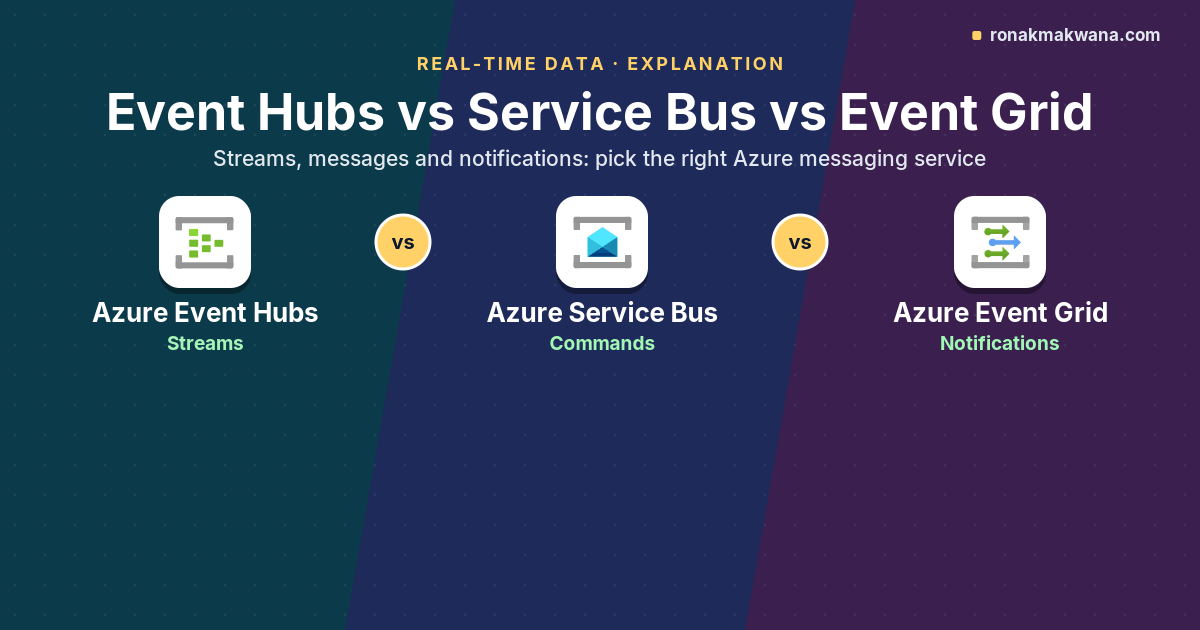
Azure has three messaging services that all move “events” from one place to another, and their names don’t make the differences obvious. Choosing the wrong one usually doesn’t fail on day one. It fails later, when you need to replay a day of data from Service Bus (you can’t), guarantee ordering through Event Grid (it doesn’t), or dead-letter a poison message in Event Hubs (there’s no dead-letter queue).
This article compares Azure Event Hubs, Azure Service Bus and Azure Event Grid by what they’re designed to carry, how consumers read from them, and what they guarantee. It ends with a decision guide and a Bicep example that combines two of them, which is often the right answer.
Three different jobs
Microsoft’s comparison of the messaging services starts with a distinction worth keeping in mind: an event is a lightweight notification of a condition or state change, where the publisher has no expectation about how it’s handled; a message is data that the producer expects a consumer to act on, with a contract between them.
- Event Hubs is for event streams: large volumes of time-ordered events (telemetry, clickstream, logs) that one or more consumers analyse. It’s a partitioned, append-only log with retention and replay.
- Service Bus is for messages: units of work such as orders, payments or commands that must be processed reliably. It’s a broker with queues and topics, settlement, dead-lettering, sessions and transactions.
- Event Grid is for discrete events: notifications like “a blob was created” or “a resource changed” routed to interested handlers. It pushes to subscribers (or lets them pull) and also offers an MQTT broker for device messaging.
Azure Event Hubs: the stream
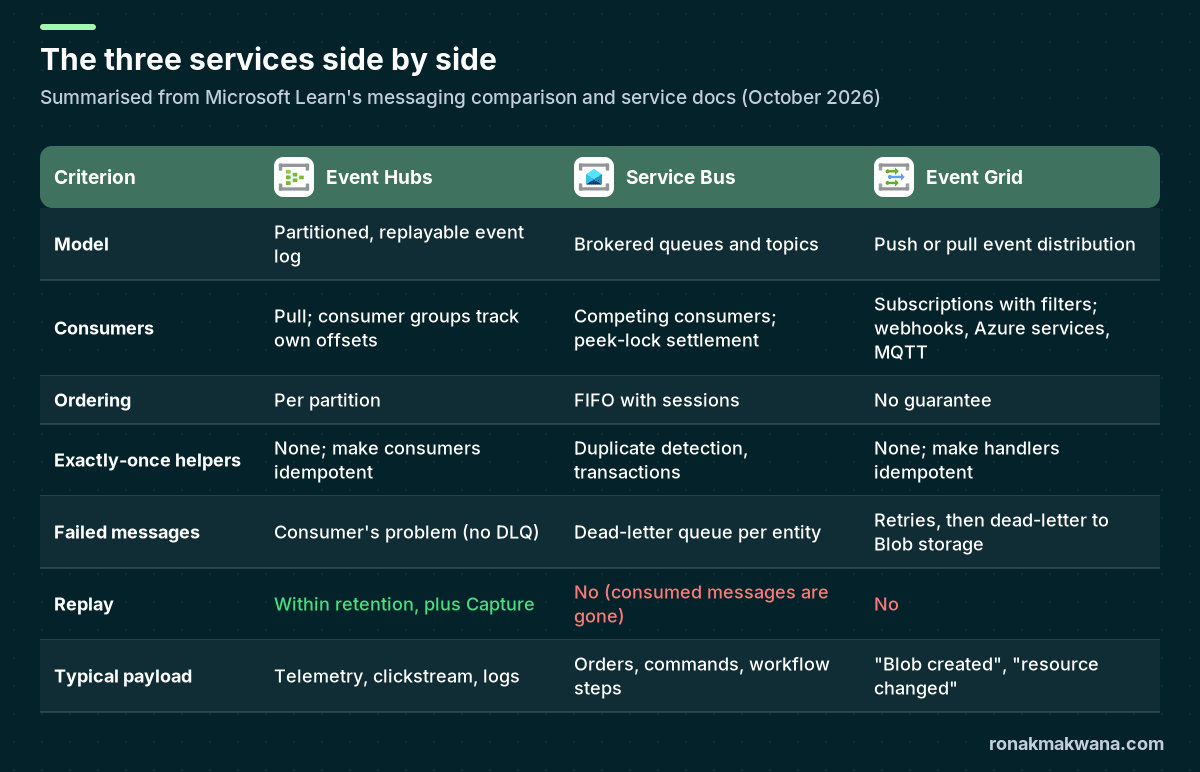
Producers append events to partitions; consumers pull and track their own position through consumer groups and checkpoints. Order is guaranteed within a partition. Events stay until retention expires (up to 7 days on Standard and 90 days on Premium and Dedicated), so a new consumer can read history and a buggy consumer can rewind. Event Hubs also exposes a Kafka-compatible endpoint, and Capture archives the stream to Blob Storage or ADLS Gen2.
What it doesn’t do: there’s no per-message acknowledgement, no dead-letter queue, no duplicate detection and no transactions. If one event can’t be processed, the consumer has to decide what to do with it, typically writing it to a quarantine store and moving on. Details are in Azure Event Hubs Explained.
Azure Service Bus: the reliable work queue
Service Bus delivers each message to one consumer (queues) or to each subscription (topics). Consumers receive in peek-lock mode and explicitly complete, abandon or dead-letter each message. After a configurable number of delivery attempts (maxDeliveryCount), the message moves to the entity’s dead-letter queue. On top of that you get:
- Sessions for FIFO processing per session ID (for example per order).
- Duplicate detection over a configurable time window, based on the message ID.
- Transactions that group operations, such as completing one message and sending another, atomically.
- Scheduled delivery and deferral for workflows.
Limits to remember: messages up to 256 KB on Standard; on Premium the default maximum is 1 MB per entity and can be raised to 100 MB over AMQP. Once a message is completed it’s gone, so Service Bus isn’t a replay store.
Azure Event Grid: the notification router
Event Grid connects event sources (Azure services through system topics, or your own applications through custom topics and namespaces) to handlers through subscriptions with filters on event type and subject. It supports the CloudEvents 1.0 schema. Delivery is push by default: Event Grid waits 30 seconds for a response, retries with exponential backoff, and by default stops after 30 attempts or a 24-hour time-to-live, whichever comes first. If you configure a dead-letter destination (a blob container), undeliverable events go there; otherwise they’re dropped. Event Grid namespaces add pull delivery and an MQTT broker supporting MQTT v3.1.1 and v5.0.
Event Grid makes no ordering guarantee, has no replay, and delivers at least once, so handlers must be idempotent.
Head-to-head on the questions that matter
| Question | Event Hubs | Service Bus | Event Grid |
|---|---|---|---|
| Can several independent apps read the same data? | Yes, through consumer groups | Yes, through topic subscriptions (each gets a copy) | Yes, through multiple subscriptions |
| Can I reprocess yesterday’s data? | Yes, within retention or from Capture | No | No |
| Can I guarantee order? | Per partition (use a partition key) | Per session | No |
| What happens to a message my code can’t handle? | Your code decides | Dead-letter queue after max delivery count | Retried, then dead-lettered to Blob storage if configured |
| How is it scaled and billed? | Throughput, processing or capacity units | Tier; messaging units on Premium | Operations (events published and delivered) |
Check the current pricing pages for each service; the dimensions above are what to model, rather than list prices that change.
A decision guide
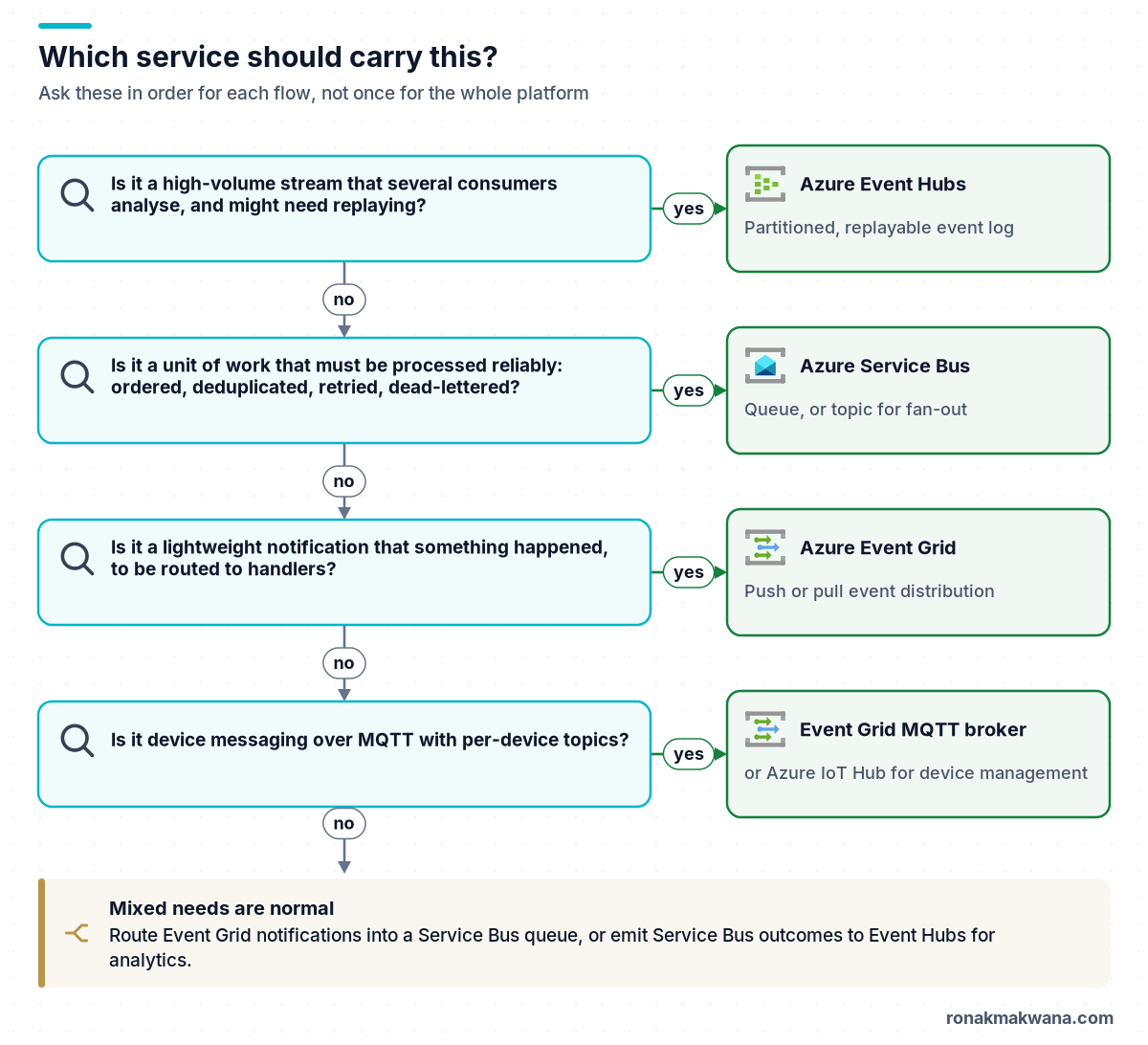
Some common scenarios:
- Device telemetry for dashboards and ML: Event Hubs (or IoT Hub in front of it for device identity). Covered in Designing Real-Time Data Processing Architectures on Azure.
- “Order placed” that must reach billing, fulfilment and email exactly once each: a Service Bus topic with one subscription per downstream system, duplicate detection on, and sessions if per-order ordering matters.
- “A file landed in the lake, start the pipeline”: Event Grid’s
Microsoft.Storage.BlobCreatedevent, filtered by container. Route it to a Service Bus queue if the processing needs retries and dead-lettering that you control. - Audit trail of every state change for analytics: publish outcomes to Event Hubs alongside the Service Bus processing, so analytics can replay without touching the transactional path.
Combining services: Event Grid into Service Bus
A frequent integration pattern uses Event Grid to detect that something happened and Service Bus to process it reliably. This Bicep file (compiled with Bicep CLI 0.48.1) creates a Service Bus namespace with a session-enabled, duplicate-detecting command queue, a plain queue for file notifications, and an Event Grid system topic on a storage account that forwards BlobCreated events from the landing container to that queue using a managed identity, with dead-lettering to a blob container.
param location string = resourceGroup().location
param storageAccountName string
param serviceBusName string

resource storage 'Microsoft.Storage/storageAccounts@2023-05-01' existing = {
  name: storageAccountName
}

resource sb 'Microsoft.ServiceBus/namespaces@2024-01-01' = {
  name: serviceBusName
  location: location
  sku: {
    name: 'Standard'
    tier: 'Standard'
  }
  properties: {
    disableLocalAuth: true
    minimumTlsVersion: '1.2'
  }
}

// Commands that must be processed once, in order per order ID
resource ordersQueue 'Microsoft.ServiceBus/namespaces/queues@2024-01-01' = {
  parent: sb
  name: 'order-commands'
  properties: {
    requiresSession: true
    requiresDuplicateDetection: true
    duplicateDetectionHistoryTimeWindow: 'PT10M'
    maxDeliveryCount: 10
    deadLetteringOnMessageExpiration: true
    defaultMessageTimeToLive: 'P7D'
  }
}

// Plain queue that receives Event Grid notifications
resource fileEvents 'Microsoft.ServiceBus/namespaces/queues@2024-01-01' = {
  parent: sb
  name: 'file-landed'
  properties: {
    maxDeliveryCount: 10
  }
}

resource systemTopic 'Microsoft.EventGrid/systemTopics@2025-02-15' = {
  name: '${storageAccountName}-events'
  location: location
  identity: {
    type: 'SystemAssigned'
  }
  properties: {
    source: storage.id
    topicType: 'Microsoft.Storage.StorageAccounts'
  }
}

resource blobCreated 'Microsoft.EventGrid/systemTopics/eventSubscriptions@2025-02-15' = {
  parent: systemTopic
  name: 'landing-blob-created'
  properties: {
    eventDeliverySchema: 'CloudEventSchemaV1_0'
    filter: {
      includedEventTypes: [
        'Microsoft.Storage.BlobCreated'
      ]
      subjectBeginsWith: '/blobServices/default/containers/landing/'
    }
    deliveryWithResourceIdentity: {
      identity: {
        type: 'SystemAssigned'
      }
      destination: {
        endpointType: 'ServiceBusQueue'
        properties: {
          resourceId: fileEvents.id
        }
      }
    }
    retryPolicy: {
      maxDeliveryAttempts: 30
      eventTimeToLiveInMinutes: 1440
    }
    deadLetterWithResourceIdentity: {
      identity: {
        type: 'SystemAssigned'
      }
      deadLetterDestination: {
        endpointType: 'StorageBlob'
        properties: {
          resourceId: storage.id
          blobContainerName: 'eventgrid-deadletter'
        }
      }
    }
  }
}
Before the subscription can deliver, give the system topic’s managed identity Azure Service Bus Data Sender on the file-landed queue and Storage Blob Data Contributor on the dead-letter container, and create that container. Note that the Basic tier of Service Bus doesn’t support topics, sessions or duplicate detection, which is why the example uses Standard.
Anti-patterns to avoid
- Service Bus as a telemetry firehose. You lose replay and pay per operation for data that only needs streaming.
- Event Hubs for commands. Without settlement or dead-lettering, one poison message either blocks a partition or gets skipped silently.
- Event Grid for anything that needs ordering. Notifications can arrive in any order; re-read the current state of the resource instead of trusting event order.
- Large payloads in events. Send a reference (a blob URL or record ID) and let the handler fetch the data, the claim-check pattern.
About this article
The Bicep file was compiled locally with Bicep CLI 0.48.1 without errors but not deployed, and the role assignments it depends on aren’t included. Limits, defaults and retry behaviour come from the Microsoft Learn pages below and can change; verify them before you size a production system.
Last checked against official documentation: October 2026.
Sources
- Compare Azure messaging services (Microsoft Learn)
- Event Hubs features and terminology (Microsoft Learn)
- What is Azure Service Bus? (Microsoft Learn)
- Service Bus quotas and limits (Microsoft Learn)
- What is Azure Event Grid? (Microsoft Learn)
- Event Grid message delivery and retry (Microsoft Learn)
- Event Grid pull delivery overview (Microsoft Learn)
- Microsoft.EventGrid systemTopics/eventSubscriptions template reference (Microsoft Learn)