Most credential leaks in data platforms aren’t sophisticated. A storage account key pasted into a linked service, a SQL password in a notebook, a SAS token that never expires. Managed identities remove most of those secrets entirely: Azure issues and rotates the credential, and your pipeline never sees it. Azure Key Vault holds the few secrets that are left, and gets accessed by those same identities.
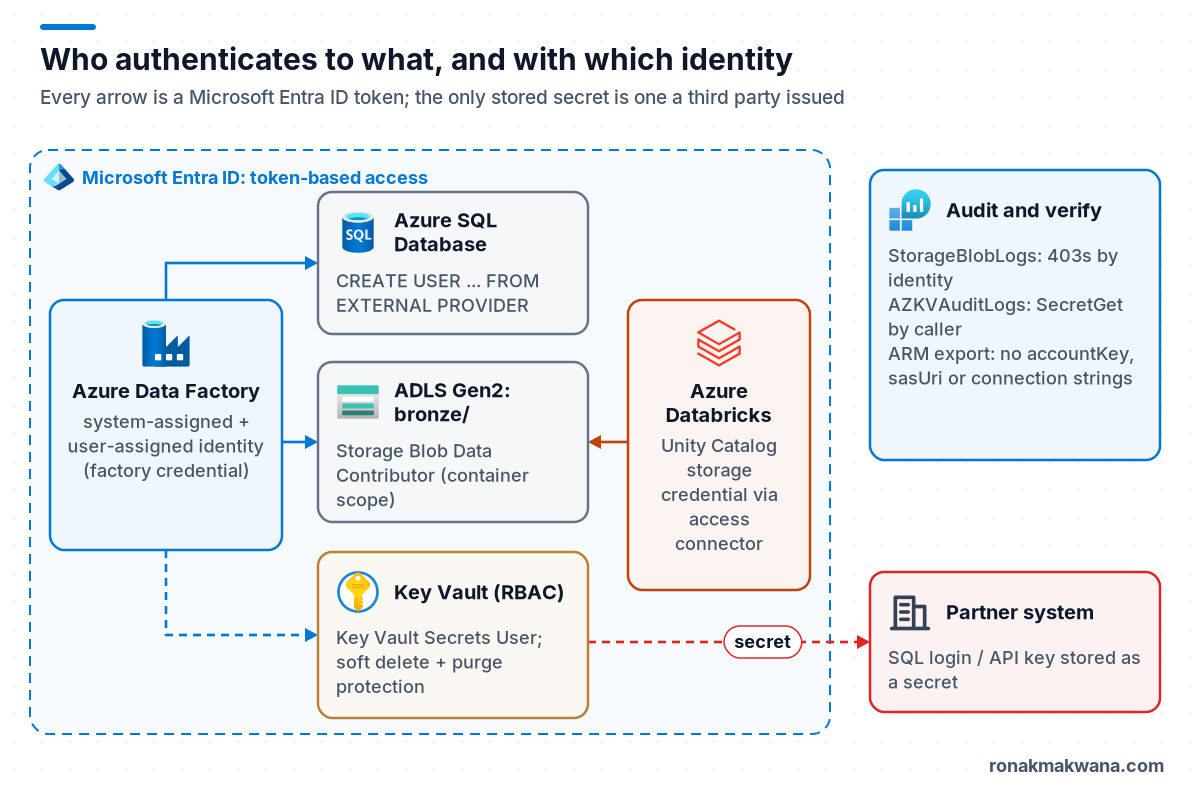
This tutorial secures a typical Data Factory and Databricks pipeline end to end: a user-assigned managed identity for pipelines, least-privilege role assignments in Bicep, Entra-only access to Azure SQL, Key Vault for third-party secrets, Unity Catalog storage credentials for Databricks, and logging to prove who accessed what.
Applies to: Azure Data Factory (V2), Azure Databricks with Unity Catalog, ADLS Gen2, Azure SQL Database, Azure Key Vault. Behaviour and role names checked against Microsoft Learn in October 2026.
Decide: system-assigned or user-assigned?
| System-assigned | User-assigned | |
|---|---|---|
| Lifecycle | Created and deleted with the resource | Independent Azure resource |
| Sharing | One resource only | Can be attached to several resources |
| Role assignments | Recreated whenever the resource is recreated | Survive redeployments of the factory or workspace |
| Good for | Simple, single-factory setups | Infrastructure as code, blue-green factories, pre-provisioned permissions |
Data Factory supports both. To use a user-assigned identity in linked services, you register it as a credential in the factory; the credentials feature consolidates user-assigned identities and service principals, and also lists the system-assigned identity.
Prerequisites
- An existing data factory, ADLS Gen2 account with a
bronzecontainer, and Key Vault, for example from Building a Modern Data Engineering Platform on Microsoft Azure. - Owner or User Access Administrator on the resource group, to create role assignments.
- A Microsoft Entra admin configured on the Azure SQL logical server.
Step 1: Create the identity and least-privilege role assignments
This Bicep creates a user-assigned identity, attaches it to the factory alongside the system-assigned one, registers it as a factory credential, and grants it two data-plane roles: Storage Blob Data Contributor on the bronze container only, and Key Vault Secrets User on the vault. The role definition IDs come from Microsoft’s built-in roles reference.
param location string = resourceGroup().location
param factoryName string
param lakeName string
param vaultName string

// Built-in role definition IDs (Azure RBAC built-in roles reference)
var storageBlobDataContributor = 'ba92f5b4-2d11-453d-a403-e96b0029c9fe'
var keyVaultSecretsUser = '4633458b-17de-408a-b874-0445c86b69e6'

resource pipelineIdentity 'Microsoft.ManagedIdentity/userAssignedIdentities@2023-01-31' = {
  name: 'id-${factoryName}-pipelines'
  location: location
}

resource adf 'Microsoft.DataFactory/factories@2018-06-01' = {
  name: factoryName
  location: location
  identity: {
    type: 'SystemAssigned,UserAssigned'
    userAssignedIdentities: {
      '${pipelineIdentity.id}': {}
    }
  }
}

// Make the user-assigned identity selectable in linked services
resource adfCredential 'Microsoft.DataFactory/factories/credentials@2018-06-01' = {
  parent: adf
  name: 'cred-pipelines'
  properties: {
    type: 'ManagedIdentity'
    typeProperties: {
      resourceId: pipelineIdentity.id
    }
  }
}

resource lake 'Microsoft.Storage/storageAccounts@2025-01-01' existing = {
  name: lakeName
}

resource blobService 'Microsoft.Storage/storageAccounts/blobServices@2025-01-01' existing = {
  parent: lake
  name: 'default'
}

resource bronze 'Microsoft.Storage/storageAccounts/blobServices/containers@2025-01-01' existing = {
  parent: blobService
  name: 'bronze'
}

resource vault 'Microsoft.KeyVault/vaults@2023-07-01' existing = {
  name: vaultName
}

// Write access to one container only
resource bronzeWriter 'Microsoft.Authorization/roleAssignments@2022-04-01' = {
  name: guid(bronze.id, pipelineIdentity.id, storageBlobDataContributor)
  scope: bronze
  properties: {
    roleDefinitionId: subscriptionResourceId('Microsoft.Authorization/roleDefinitions', storageBlobDataContributor)
    principalId: pipelineIdentity.properties.principalId
    principalType: 'ServicePrincipal'
  }
}

// Read secrets (vault must use the Azure RBAC permission model)
resource secretsReader 'Microsoft.Authorization/roleAssignments@2022-04-01' = {
  name: guid(vault.id, pipelineIdentity.id, keyVaultSecretsUser)
  scope: vault
  properties: {
    roleDefinitionId: subscriptionResourceId('Microsoft.Authorization/roleDefinitions', keyVaultSecretsUser)
    principalId: pipelineIdentity.properties.principalId
    principalType: 'ServicePrincipal'
  }
}

output pipelineIdentityClientId string = pipelineIdentity.properties.clientId
Scoping the storage role to a container rather than the account means a compromised or misconfigured pipeline can’t overwrite gold. For finer control inside a container, use ACLs as described in Azure Data Lake Storage Gen2: Best Practices for Enterprise Data Platforms.
Step 2: Use the identity in linked services
The ADLS Gen2 connector accepts a credential reference for user-assigned identity authentication. No key, SAS or secret appears anywhere:
{
  "name": "ls_adls_lake",
  "properties": {
    "type": "AzureBlobFS",
    "typeProperties": {
      "url": "https://contosodpprodlake.dfs.core.windows.net",
      "credential": { "referenceName": "cred-pipelines", "type": "CredentialReference" }
    }
  }
}
For Azure SQL Database, set authenticationType to UserAssignedManagedIdentity (or SystemAssignedManagedIdentity), both documented options for the connector, and create a contained database user for the identity:
-- Run in the target database as the Entra admin
CREATE USER [id-contoso-prod-adf-pipelines] FROM EXTERNAL PROVIDER;
ALTER ROLE db_datareader ADD MEMBER [id-contoso-prod-adf-pipelines];
GRANT EXECUTE ON SCHEMA::etl TO [id-contoso-prod-adf-pipelines];
Once every client uses Entra ID, enable Microsoft Entra-only authentication on the logical server so SQL logins stop working altogether.
Step 3: Keep the remaining secrets in Key Vault
Some sources can’t use Entra ID: a SaaS API key, an SFTP password, or a partner’s database that only issues SQL logins, as in the example below. Those go into Key Vault, and the factory reads them at run time.
- Use the Azure RBAC permission model on the vault. Microsoft’s Key Vault RBAC guide states that starting with API version 2026-02-01, Azure RBAC is the default access control model for newly created vaults; older templates may still create vaults that use access policies.
- Keep soft delete and purge protection on, so a deleted secret can be recovered.
- Create a Key Vault linked service, authenticated with the factory identity, and reference secrets from other linked services:
{
  "name": "ls_partner_sql",
  "properties": {
    "type": "AzureSqlDatabase",
    "typeProperties": {
      "server": "fabrikam-exports.database.windows.net",
      "database": "partner_exports",
      "encrypt": "mandatory",
      "trustServerCertificate": false,
      "authenticationType": "SQL",
      "userName": "contoso_reader",
      "password": {
        "type": "AzureKeyVaultSecret",
        "store": { "referenceName": "ls_keyvault", "type": "LinkedServiceReference" },
        "secretName": "fabrikam-sql-password"
      }
    }
  }
}
Leave out the secret version so the linked service always picks up the latest version after rotation. If a pipeline needs a secret value in an expression (for example an API key header), retrieve it with a Web activity using managed identity authentication and set secureOutput to true on that activity so the value isn’t written to run history.
Step 4: Secure Databricks access the same way
For storage, Unity Catalog uses a storage credential backed by an Access Connector for Azure Databricks, which carries its own managed identity. Grant that identity storage roles exactly as in Step 1 and create external locations on top of it; notebooks then read abfss:// paths or tables without any keys in Spark configuration. If access fails, the diagnosis steps in fixing Databricks “Path does not exist” errors apply.
For non-Azure secrets, notebooks use secret scopes:
api_key = dbutils.secrets.get(scope="partner-apis", key="fabrikam-api-key")
One compatibility detail to plan for: the Databricks secret management documentation states that Azure Key Vault-backed secret scopes support only the Vault access policy permission model, not Azure RBAC, and that creating one requires the Contributor or Owner role on the vault. If your standard is RBAC-mode vaults, you have three options: use a separate access-policy vault just for Databricks-backed scopes, use a Databricks-backed secret scope managed through the Databricks CLI, or avoid the secret altogether where a Unity Catalog connection or credential can hold it. Choose one deliberately rather than switching your main vault’s permission model.
Step 5: Lock down the network path
- Use private endpoints for Key Vault and for the storage account (
dfsandblob), and disable public network access. - Run Data Factory activities on an Azure integration runtime in a managed virtual network with managed private endpoints to those resources.
- Disable Shared Key authorization on storage, so even a leaked account key is useless.
Step 6: Verify, and keep verifying
- Test connections on each linked service. A 403 from storage usually means a missing role or a role assigned at the wrong scope; role assignments can take a few minutes to propagate.
- Search for leftover secrets. Export the factory’s ARM template and search for
accountKey,connectionString,sasUriandSecureString. Anything you find should become a managed identity or a Key Vault reference. - Audit secret access. Send Key Vault diagnostic logs to Log Analytics (resource-specific table
AZKVAuditLogs) and check who reads which secret:
AZKVAuditLogs
| where TimeGenerated > ago(7d)
| where OperationName == "SecretGet"
| extend caller = tostring(Identity)
| summarize reads = count(), lastRead = max(TimeGenerated) by Id, caller, ResultSignature
| order by reads desc
Unexpected callers, or a 403 ResultSignature after a deployment, are the signals to look for.
Rotation
Managed identity credentials are rotated by Azure; there’s nothing to do. For the secrets that remain, put an expiry date on each Key Vault secret, subscribe to near-expiry events with Event Grid, and rotate by adding a new version. Because linked services reference the secret without a version, the next pipeline run picks up the new value. Pair this with the alerting from Designing Production-Ready ETL Pipelines so a failed authentication after rotation is noticed quickly.
Clean up
If you built this in a test resource group, delete the role assignments, the factory credential and the user-assigned identity, and remove the test database user with DROP USER [id-contoso-prod-adf-pipelines];.
About this article
The Bicep in this post was compiled locally with Bicep CLI 0.48.1 (bicep build, no errors) but not deployed. The linked service JSON, T-SQL, Python and KQL are illustrative and weren’t run against live resources; the host and resource names are fictional. Last checked against official documentation: October 2026.
Sources
- Managed identity for Data Factory (Microsoft Learn)
- Using credentials in Data Factory (Microsoft Learn)
- ADLS Gen2 connector for Data Factory (Microsoft Learn)
- Store credentials in Azure Key Vault (Microsoft Learn)
- Azure RBAC for Key Vault (Microsoft Learn)
- Azure built-in roles for Security (Microsoft Learn)
- Secret management in Azure Databricks (Azure Databricks docs)
- Use Azure managed identities in Unity Catalog (Azure Databricks docs)
- Azure Key Vault logging (Microsoft Learn)