Azure Data Lake Storage Gen2 is an Azure Storage account with the hierarchical namespace turned on. That one setting gives you real directories, POSIX-style access control lists (ACLs) and atomic directory operations, and it’s why Spark, Databricks, Synapse and Fabric shortcuts treat it as a file system rather than an object store. Most of the decisions that make a lake easy or painful to run, though, sit around that setting: how many accounts, how folders are laid out, who gets access at which level, and what protects data from deletion.
This post collects those decisions for an enterprise data platform, with the limits and support details that drive them.
Applies to: Standard general-purpose v2 storage accounts with hierarchical namespace (HNS) enabled. Feature support and limits were checked against Microsoft Learn in October 2026.
1. Decide the account topology first
Start with one storage account per environment (dev, test, prod). Development pipelines can’t touch production data by accident, and you can apply stricter network and deletion settings to production. Larger estates often split further, by data domain or by sensitivity, so a domain team can own its account and its access model.
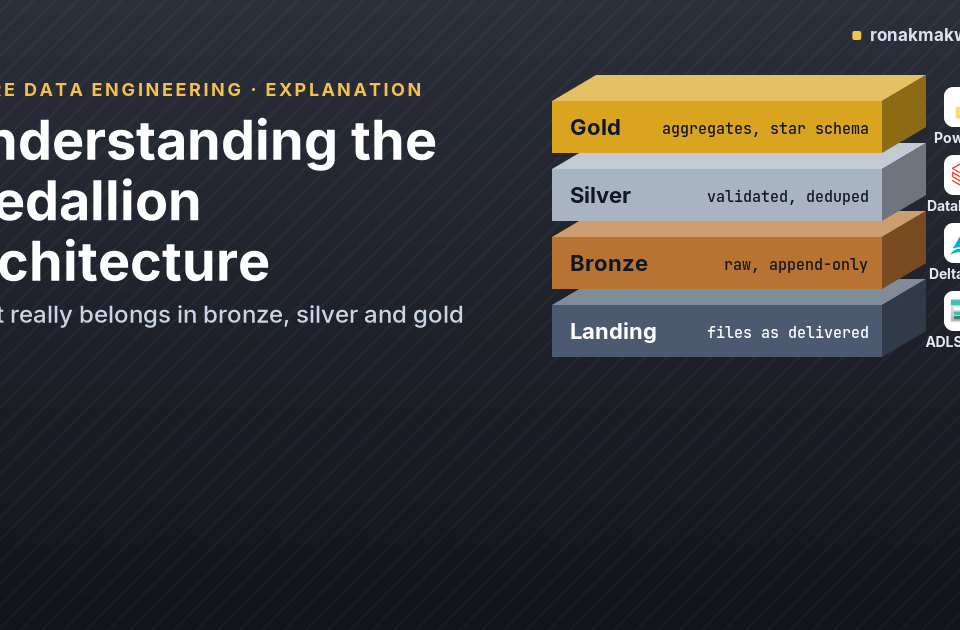
Inside an account, use a container per zone or layer (for example landing, bronze, silver, gold). Containers are the smallest scope for an Azure RBAC role assignment on data, so they’re your natural security boundary. The medallion layering itself is explained in Understanding the Medallion Architecture.
2. Choose redundancy deliberately
Azure Storage offers locally redundant (LRS), zone-redundant (ZRS), geo-redundant (GRS) and geo-zone-redundant (GZRS) storage, with read-access variants of the geo options. For production lakes, ZRS is a sensible minimum where the region supports it, because a single datacenter failure doesn’t make the data unavailable. Choose GZRS when you need a copy in a second region. Keep in mind that a geo copy protects against regional loss, not against someone deleting a folder: deletes replicate too.
3. Lay out directories for security, not just for browsing
Microsoft’s ADLS best-practices guidance shows patterns such as {Region}/{SubjectMatter(s)}/{yyyy}/{mm}/{dd}/{hh}/ and explains why the date goes at the end: you can then secure a region or subject area with a single ACL on its directory. Put the date first and you’d need an ACL on every date folder.
landing/
  erp/                        <- ACL: grp-ingest-erp (rwx), grp-de-platform (r-x)
    orders/2026/02/09/
    customers/2026/02/09/
  crm/                        <- ACL: grp-ingest-crm (rwx)
    accounts/2026/02/09/
bronze/                       <- Unity Catalog / Spark managed below this point
gold/                         <- RBAC: Storage Blob Data Reader for grp-bi-readers
4. Write fewer, bigger files
The same guidance recommends organising data into larger files, in the range of 256 MB to 100 GB, because analytics engines pay a per-file overhead for listing, access checks and metadata operations. It also notes that read and write operations are billed in 4 MB increments, so a 10 KB file costs as much per operation as a 4 MB one. Practical consequences:
- Land streaming or IoT data through something that batches (Event Hubs Capture, Structured Streaming with sensible triggers) instead of one file per event.
- Compact small files after ingestion. For Delta tables,
OPTIMIZEdoes this. - Use columnar formats such as Parquet or Delta for anything that’s queried, and keep CSV and JSON for landing only.
5. Use RBAC for coarse access and ACLs for fine access
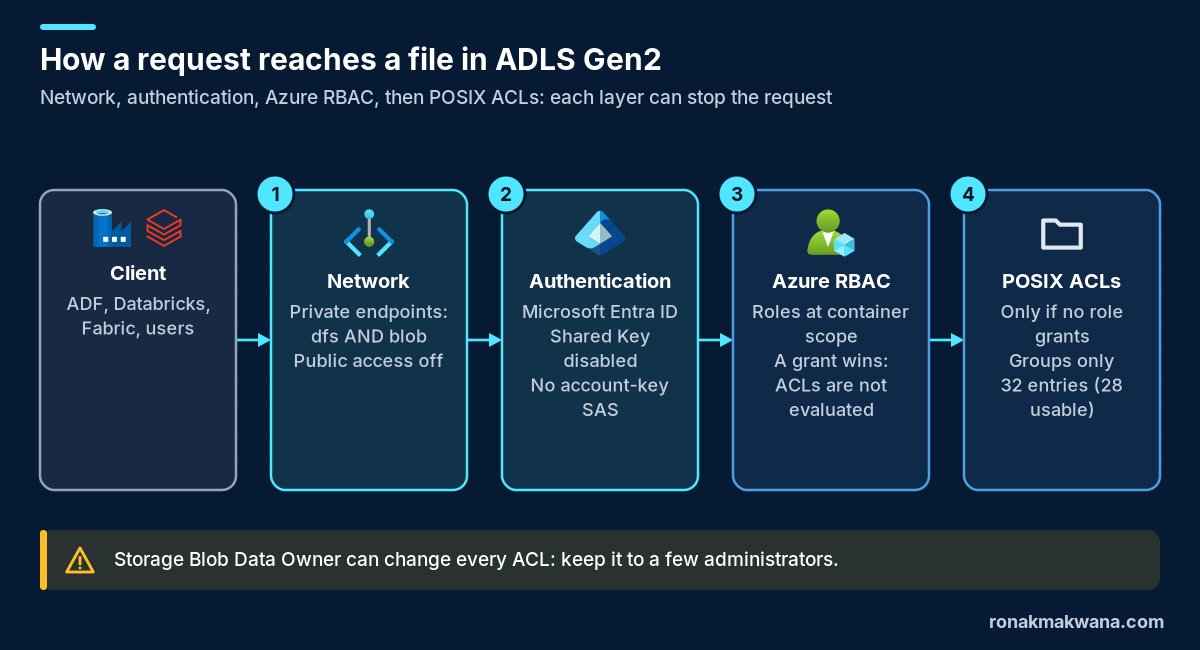
ADLS Gen2 evaluates three mechanisms. According to the access control model documentation, Azure role assignments are evaluated first (along with any ABAC conditions on them); if a role assignment grants the access, ACLs aren’t checked. If no role assignment grants it, the ACLs on the directory and file are evaluated. Two consequences matter in practice:
- A principal with Storage Blob Data Reader on the account can read every file, whatever the ACLs say. Grant data roles at container scope, or not at all for principals that should be restricted by ACLs.
- Storage Blob Data Owner can set the owner of items and modify the ACLs of all items. Treat it as a superuser role.
| Need | Mechanism | Scope |
|---|---|---|
| Pipeline identity writes a whole layer | Storage Blob Data Contributor | Container |
| BI readers see gold only | Storage Blob Data Reader | Container |
| A team reads one source system’s folder in landing | ACL (r-x on directory, plus x on parents) | Directory |
| Admins manage ACLs | Storage Blob Data Owner | Account, few people |
ACL rules that trip people up
- Limits: each file and directory can hold 32 ACL entries (effectively 28 usable, per the ACL documentation), and access ACLs and default ACLs each have their own limit. Assign ACLs to Microsoft Entra security groups, never to individual users.
- Inheritance only works forwards: a directory’s default ACL is copied to children when they’re created. Changing it later doesn’t touch existing children. Set default ACLs before data arrives, or apply changes recursively.
- Traversal: to read
landing/erp/orders/, a principal also needs execute (--x) onlanding/andlanding/erp/.
Setting access and default ACLs for a group with the Azure CLI (using Entra ID sign-in, not keys):
ACCOUNT=contosodpprodlake
GROUP_ID=00000000-0000-0000-0000-000000000000   # object ID of grp-ingest-erp

# Traverse permission on the parents
az storage fs access update-recursive --acl "group:$GROUP_ID:--x" \
  -p erp -f landing --account-name $ACCOUNT --auth-mode login --continue-on-failure false

# Access ACL and default ACL on the directory itself
az storage fs access set \
  --acl "user::rwx,group::r-x,other::---,group:$GROUP_ID:rwx,mask::rwx,default:user::rwx,default:group::r-x,default:other::---,default:group:$GROUP_ID:rwx,default:mask::rwx" \
  -p erp/orders -f landing --account-name $ACCOUNT --auth-mode login
The first command is written as a recursive update for brevity; on a large existing tree, apply traverse-only ACLs to the specific parent directories instead, because recursive updates touch every child item.
6. Require Entra ID and private networking
- Disable Shared Key authorization (
allowSharedKeyAccess: false). Requests signed with account keys, including SAS tokens signed with a key, are then rejected, and only Microsoft Entra ID-authorised requests succeed. Find and migrate any key-based clients first. - Private endpoints for both
dfsandblob. The private endpoint documentation notes that operations against the Data Lake (dfs) endpoint can be redirected to the Blob endpoint, and that some operations need the dfs endpoint, so create both. - Disable public network access once private endpoints and DNS (
privatelink.dfs.core.windows.net,privatelink.blob.core.windows.net) are in place.
Pipelines then reach the lake with managed identities; the companion post on building the platform shows the role assignments in Bicep.
7. Know which data protection features work with HNS
Not every Blob Storage feature is available once hierarchical namespace is on. From the feature support table for standard general-purpose v2 accounts with HNS:
| Feature | With HNS enabled |
|---|---|
| Soft delete for blobs | Supported |
| Soft delete for containers | Supported |
| Lifecycle management (tiering and delete) | Supported |
| Blob snapshots | Preview |
| Blob versioning | Not supported |
| Change feed | Not supported |
| Object replication | Not supported |
Turn on blob and container soft delete with a retention period your operations team can live with, and add a CanNotDelete resource lock on production accounts. For table data, Delta Lake’s transaction log and time travel give you the “previous version” capability that blob versioning would otherwise provide, within the table’s retention settings.
8. Automate tiering and expiry with lifecycle policies
The access tier documentation lists minimum storage durations of 30 days for cool, 90 days for cold and 180 days for archive; moving or deleting data earlier incurs an early deletion charge. Archive is offline, with rehydration measured in hours. Lifecycle policies apply these rules automatically; changes can take up to 24 hours to take effect.
param lakeName string

resource lake 'Microsoft.Storage/storageAccounts@2025-01-01' existing = {
  name: lakeName
}

resource lifecycle 'Microsoft.Storage/storageAccounts/managementPolicies@2025-01-01' = {
  parent: lake
  name: 'default'
  properties: {
    policy: {
      rules: [
        {
          name: 'landing-expire'
          enabled: true
          type: 'Lifecycle'
          definition: {
            filters: {
              blobTypes: [ 'blockBlob' ]
              prefixMatch: [ 'landing/' ]
            }
            actions: {
              baseBlob: {
                delete: { daysAfterModificationGreaterThan: 30 }
              }
            }
          }
        }
        {
          name: 'bronze-raw-files-tiering'
          enabled: true
          type: 'Lifecycle'
          definition: {
            filters: {
              blobTypes: [ 'blockBlob' ]
              prefixMatch: [ 'archive/' ]
            }
            actions: {
              baseBlob: {
                tierToCool: { daysAfterModificationGreaterThan: 30 }
                tierToCold: { daysAfterModificationGreaterThan: 90 }
                tierToArchive: { daysAfterModificationGreaterThan: 180 }
              }
            }
          }
        }
      ]
    }
  }
}
Don’t point tiering rules at folders that hold live Delta tables. A Delta table expects every file referenced by its log to be readable; an archived file makes queries fail until it’s rehydrated. Tier exported or archived raw files instead, and manage table history with VACUUM and retention settings.
9. Log data-plane access
Enable diagnostic settings on the blob service and send StorageRead, StorageWrite and StorageDelete to Log Analytics. Authorization failures are the most useful early signal of a broken pipeline identity or a missing ACL:
StorageBlobLogs
| where TimeGenerated > ago(1d)
| where StatusCode == "403"
| summarize failures = count() by AuthenticationType, RequesterObjectId, OperationName,
            folder = tostring(split(ObjectKey, "/")[2])
| order by failures desc
If a Databricks job reports a missing path when the files are clearly there, the cause is often an ACL or role problem rather than the path itself; the Databricks “Path does not exist” troubleshooting post walks through that diagnosis.
Enterprise checklist
- One account per environment; container per layer; HNS on at creation.
- ZRS or GZRS for production.
- Directory layout puts the security dimension before the date.
- Files sized for analytics; compaction in place.
- RBAC at container scope; ACLs for sub-folders; groups only; default ACLs set before data lands.
- Shared Key disabled; private endpoints for dfs and blob; public access off.
- Blob and container soft delete on; resource lock on production.
- Lifecycle rules for landing and archive folders, not live Delta tables.
- Diagnostic logs to Log Analytics with an alert on 403 spikes.
About this article
The lifecycle policy Bicep was compiled locally with Bicep CLI 0.48.1 (bicep build, no errors) but not deployed. The Azure CLI and KQL examples are illustrative and were not run against a live account; the all-zeros group object ID is an example value to replace with your own group’s object ID. Feature support and limits are quoted from the Microsoft Learn pages below. Last checked against official documentation: October 2026.
Sources
- Best practices for using Azure Data Lake Storage (Microsoft Learn)
- Access control model for Azure Data Lake Storage (Microsoft Learn)
- Access control lists in Azure Data Lake Storage (Microsoft Learn)
- Use Azure CLI to manage ACLs in Azure Data Lake Storage (Microsoft Learn)
- Blob Storage feature support in storage accounts (Microsoft Learn)
- Use private endpoints for Azure Storage (Microsoft Learn)
- Prevent authorization with Shared Key (Microsoft Learn)
- Access tiers for blob data (Microsoft Learn)
- Lifecycle management overview (Microsoft Learn)
- Azure Storage redundancy (Microsoft Learn)