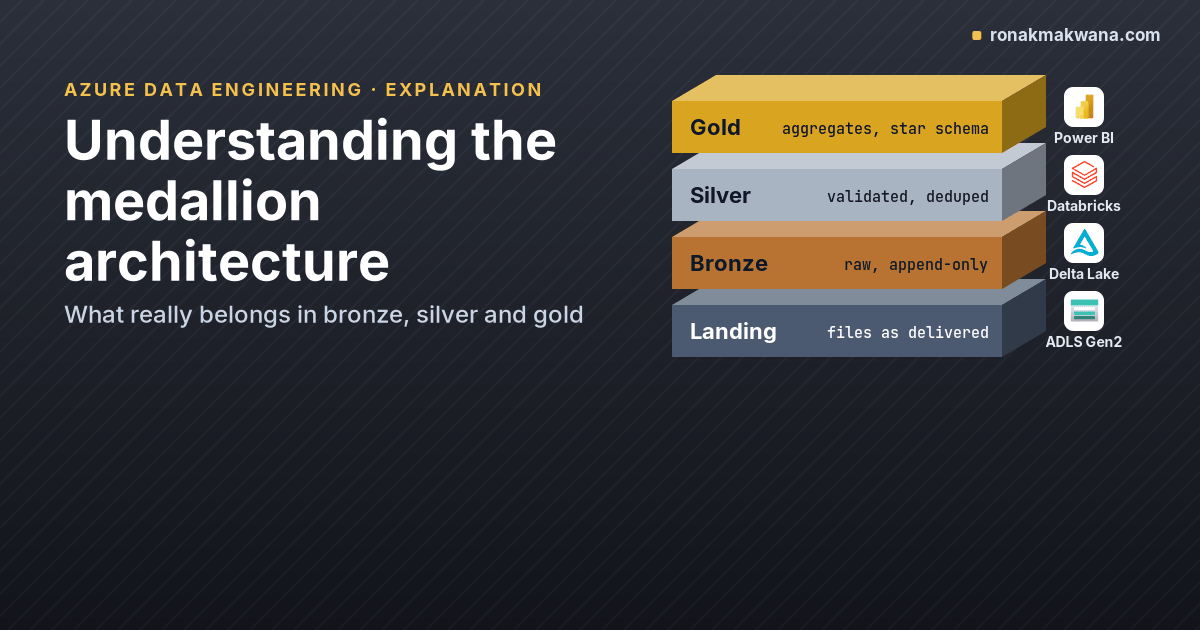
The medallion architecture is the most common way to organise a lakehouse: data moves through a bronze layer, a silver layer and a gold layer, getting cleaner and more business-shaped at each step. The names are easy to remember. What goes into each layer, and what doesn’t, is where teams disagree. This post explains each layer with a concrete example, shows the code that moves data between them, and covers the trade-offs that decide how strictly you follow the pattern.
Databricks describes the pattern as a recommended best practice rather than a requirement, and Microsoft Fabric documents the same layering for OneLake. The concepts here apply to both; the code uses PySpark and Delta Lake.
A running example
Contoso receives order extracts from an ERP system as CSV files, one per day. The files have the problems real extracts have: an order that appears in two files because its status changed, an amount that isn’t a number, and a row with no order ID. We’ll follow those six rows through the three layers.
orders_2026-02-05.csv
order_id,customer_id,order_ts,region,order_total,status
1001,C-01,2026-02-05T09:12:00,North,120.50,shipped
1002,C-02,2026-02-05T10:40:00,South,75.00,pending
1003,C-03,2026-02-05T11:05:00,North,not_a_number,shipped
,C-04,2026-02-05T11:30:00,West,40.00,pending

orders_2026-02-06.csv
order_id,customer_id,order_ts,region,order_total,status
1002,C-02,2026-02-06T08:00:00,South,75.00,shipped
1004,C-05,2026-02-06T09:20:00,West,210.00,shipped
Bronze: keep everything, exactly as it arrived
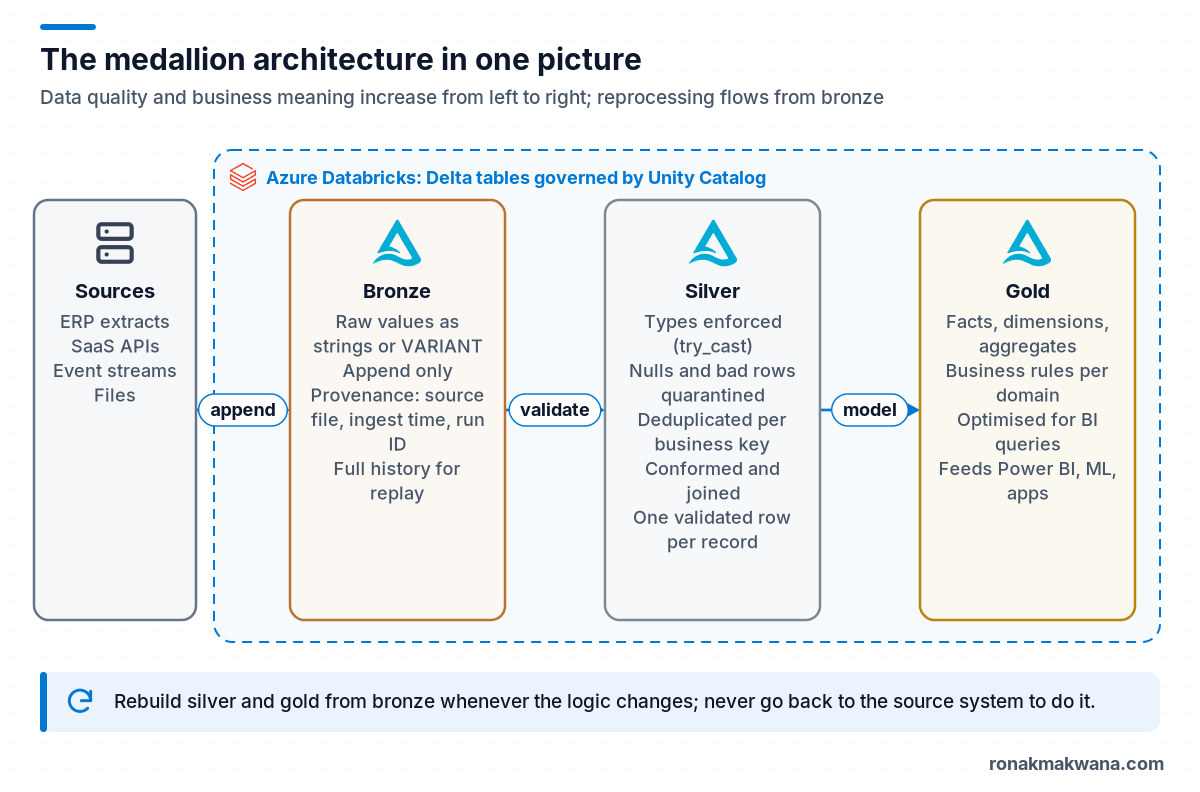
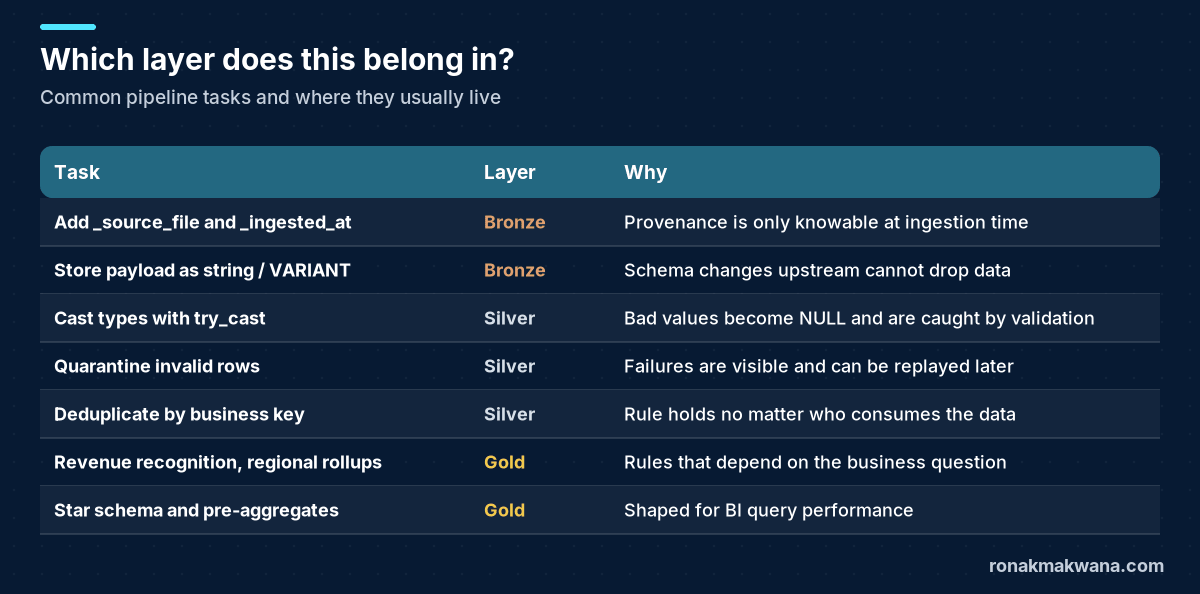
The bronze layer is the lake’s memory. The Databricks guidance describes bronze data as raw, appended incrementally, intended for the workloads that build silver rather than for analysts, and retained so you can reprocess and audit. It also recommends minimal validation here and storing most fields as string, VARIANT or binary so an unexpected schema change upstream doesn’t drop data.
In practice that means:
- Append only. Never update or delete bronze rows as part of normal processing.
- Read everything as strings (or
VARIANTfor semi-structured payloads). - Add provenance columns: source file, ingestion time, batch or pipeline run ID.
from pyspark.sql import functions as F
from pyspark.sql.window import Window

# Bronze: raw values as strings, plus provenance columns
bronze = (spark.read.option("header", True).csv(landing_path)      # every column is a string
          .withColumn("_source_file", F.col("_metadata.file_name"))
          .withColumn("_ingested_at", F.current_timestamp()))
bronze.write.format("delta").mode("append").saveAsTable("bronze.orders_raw")
All six rows land in bronze.orders_raw, including the broken ones. That’s the point: if the silver logic turns out to be wrong, you can rebuild silver from bronze without going back to the source system.
Silver: typed, validated, deduplicated
Silver is where data becomes trustworthy. According to the Databricks medallion guidance, the silver layer handles schema enforcement, nulls and missing values, deduplication, late and out-of-order data, quality checks, type casting and joins, and it should always keep at least one validated, non-aggregated representation of each record. It also advises against writing to silver directly from ingestion, because schema changes or corrupt records at the source then fail the silver write.
# Silver: type, validate, quarantine, deduplicate
typed = (spark.table("bronze.orders_raw")
         .withColumn("order_total_dec", F.expr("try_cast(order_total AS DECIMAL(18,2))"))
         .withColumn("order_ts_ts", F.expr("try_cast(order_ts AS TIMESTAMP)")))

is_valid = (F.col("order_id").isNotNull()
            & F.col("order_total_dec").isNotNull()
            & F.col("order_ts_ts").isNotNull())

(typed.filter(~is_valid)
      .withColumn("_reason", F.lit("missing id or unparseable amount/timestamp"))
      .write.format("delta").mode("append").saveAsTable("silver.orders_quarantine"))

latest = Window.partitionBy("order_id").orderBy(F.col("order_ts_ts").desc())
silver = (typed.filter(is_valid)
          .withColumn("_rn", F.row_number().over(latest))
          .filter("_rn = 1")
          .select(F.col("order_id").cast("int").alias("order_id"),
                  "customer_id", F.col("order_ts_ts").alias("order_ts"),
                  "region", F.col("order_total_dec").alias("order_total"), "status",
                  "_source_file"))
silver.write.format("delta").mode("overwrite").saveAsTable("silver.orders")
Three details are worth calling out:
try_cast, notcast. Apache Spark 4.x runs with ANSI mode enabled by default, so a plainCAST('not_a_number' AS DECIMAL)raises an error instead of returning NULL.try_castreturns NULL, which the validity rule then catches.- Quarantine instead of drop. Rows that fail validation go to
silver.orders_quarantinewith a reason. Silently filtering them out is how data goes missing without anyone noticing. - Deduplicate on a business rule. Order 1002 appears twice; we keep the latest version by order timestamp. The rule belongs to the business entity, not the file.
Running this example locally gives three silver rows, two quarantined rows, and order 1002 with status shipped:
+--------+-----------+-------------------+------+-----------+-------+---------------------+
|order_id|customer_id|order_ts           |region|order_total|status |_source_file         |
+--------+-----------+-------------------+------+-----------+-------+---------------------+
|1001    |C-01       |2026-02-05 09:12:00|North |120.50     |shipped|orders_2026-02-05.csv|
|1002    |C-02       |2026-02-06 08:00:00|South |75.00      |shipped|orders_2026-02-06.csv|
|1004    |C-05       |2026-02-06 09:20:00|West  |210.00     |shipped|orders_2026-02-06.csv|
+--------+-----------+-------------------+------+-----------+-------+---------------------+
The full overwrite keeps the example short. In production, silver is usually maintained incrementally with Delta MERGE or a streaming read from bronze, which the Databricks docs recommend for append-only sources.
Gold: shaped for a business question
Gold tables answer specific questions for specific consumers. The Databricks guidance describes gold as aggregated, aligned with business logic, optimised for query performance, and often modelled dimensionally. Some organisations keep separate gold areas per domain, such as finance or HR.
# Gold: business aggregate for reporting
gold = (spark.table("silver.orders")
        .groupBy(F.to_date("order_ts").alias("order_date"), "region")
        .agg(F.count("*").alias("orders"), F.sum("order_total").alias("revenue")))
gold.write.format("delta").mode("overwrite").saveAsTable("gold.daily_revenue_by_region")
On Databricks you could define the same aggregate as a materialized view in SQL, which is the example the medallion docs use for gold.
What belongs where
| Bronze | Silver | Gold | |
|---|---|---|---|
| Purpose | Preserve raw history | Clean, conformed records | Answer business questions |
| Typical consumers | Data engineers, audit | Engineers, analysts, data scientists | BI developers, business users, apps |
| Write pattern | Append | Merge / upsert, streaming from bronze | Overwrite or incremental refresh |
| Schema | Loose (strings, VARIANT) | Enforced, typed | Modelled (facts and dimensions, aggregates) |
| Grain | Source record | Business entity | Business metric or report |
Trade-offs and common disagreements
Do I always need three layers?
No. Small, already-clean sources (a reference table from a well-governed database) can go straight to a silver-quality table, with the raw extract kept in a landing folder for audit. Some teams add layers instead, such as a separate landing zone for files before bronze, or a “platinum” layer of highly curated exports. The names matter less than agreeing on the contract for each layer and documenting it.
Storage cost versus reprocessing ability
Bronze duplicates data that also exists in silver, and silver duplicates detail that’s summarised in gold. That’s the price of being able to rebuild downstream layers. Keep it under control with retention rules on bronze (for example, a defined number of months of history in hot storage), Delta VACUUM on tables that are rewritten often, and lifecycle management on landing folders.
Where does business logic start?
A useful rule: silver applies rules that are true regardless of who’s asking (an order ID is required, an amount is a decimal, the latest version wins). Gold applies rules that depend on the question (how revenue is recognised, which regions roll up together). If two teams would argue about a rule, it belongs in gold.
Layers as schemas, catalogs or storage accounts?
With Unity Catalog, a common layout is one catalog per environment or domain with bronze, silver and gold schemas, each backed by its own storage location. That’s the layout used in Building a Modern Data Engineering Platform on Microsoft Azure. Separate containers per layer make it easy to grant, for example, BI service principals access to gold only.
Anti-patterns to avoid
- Cleaning in bronze. Filtering or casting during ingestion means the original values are gone when a rule turns out to be wrong.
- Analysts querying bronze. If people report from bronze, every quirk of the source becomes a reporting bug. Grant access to silver and gold instead.
- Gold tables built from bronze. Skipping silver duplicates validation logic across every gold table, and each copy drifts.
- One giant silver table per source system. Silver should be organised around business entities (orders, customers), not around how the ERP happens to export them.
- No quarantine. Dropping invalid rows silently makes row counts disagree between layers with no explanation.
How the layers connect to orchestration
Typically Azure Data Factory (or Fabric Data Factory) lands source files, and Spark jobs move data from bronze to silver to gold. Run each layer as its own job step so a failure in gold doesn’t force you to re-ingest. The pipeline design principles in Designing Production-Ready ETL Pipelines (explicit windows, idempotent writes) apply to each hop. When upstream files add or rename columns, the bronze layer’s string-typed, append-only design is what keeps ingestion running; handling schema drift when landing Parquet covers the ingestion side of that problem.
About this article
The PySpark code in this post was run locally on synthetic data with Apache Spark 4.0.4 and delta-spark 4.0.1 (local mode, Delta tables in a local metastore), and the silver output shown is from that run. It was not run on Azure Databricks or Microsoft Fabric; on Databricks, the same code runs against Unity Catalog tables named catalog.schema.table. Last checked against official documentation: October 2026.
Sources
- What is the medallion lakehouse architecture? (Azure Databricks docs)
- Implement medallion lakehouse architecture in Fabric (Microsoft Learn)
- What is Delta Lake in Azure Databricks? (Azure Databricks docs)
- File metadata column (Azure Databricks docs)
- try_cast function (Azure Databricks docs)
- ANSI compliance (Apache Spark docs)
- Best practices for using Azure Data Lake Storage (Microsoft Learn)