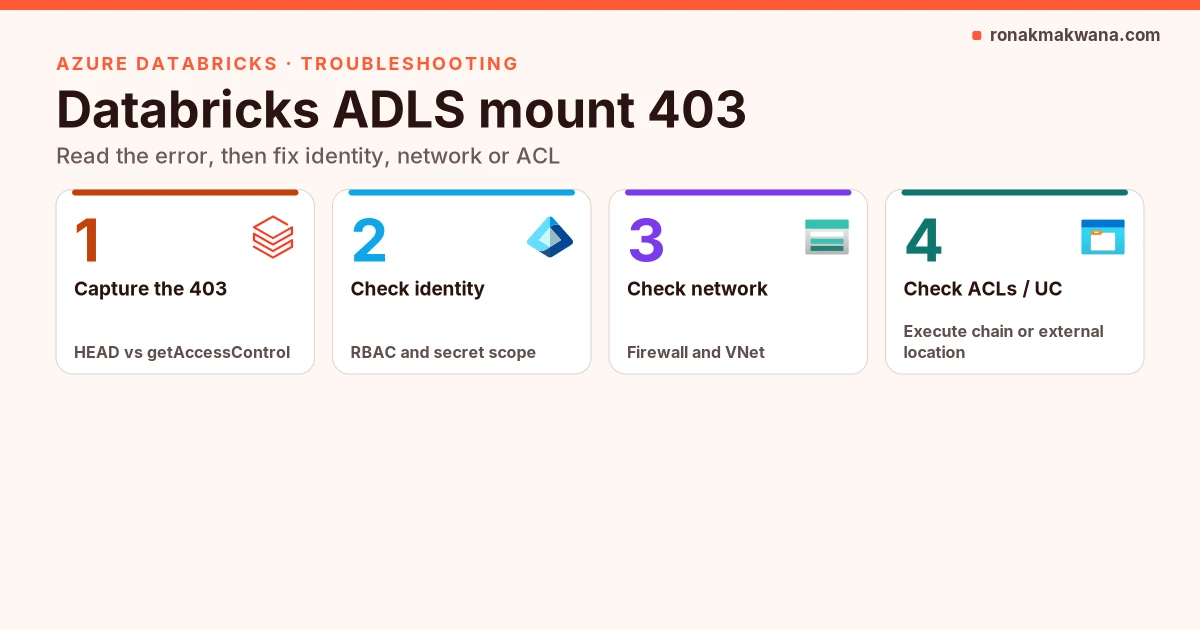
A Databricks ADLS mount 403 (403 Forbidden from dbutils.fs.mount, or from the first dbutils.fs.ls after a mount that returned True) is almost never "the path is wrong". Wrong paths after authentication already succeeded show up as Path does not exist / filesystem-not-found style errors (covered separately in Databricks ADLS Path does not exist). A 403 means Azure Storage rejected the identity, the network path, or the POSIX ACL for the request. Read the StatusCode=403 line in the stack: the URL and action= (for example a filesystem HEAD versus getAccessControl) tell you which bucket to open first.
This guide turns that into a layered workflow: capture the exact error, check identity and RBAC, check storage networking, check ACLs and the abfss URI / Hierarchical namespace, remount with refreshMounts, then prefer a Unity Catalog external location because DBFS mounts are deprecated and incompatible with serverless.
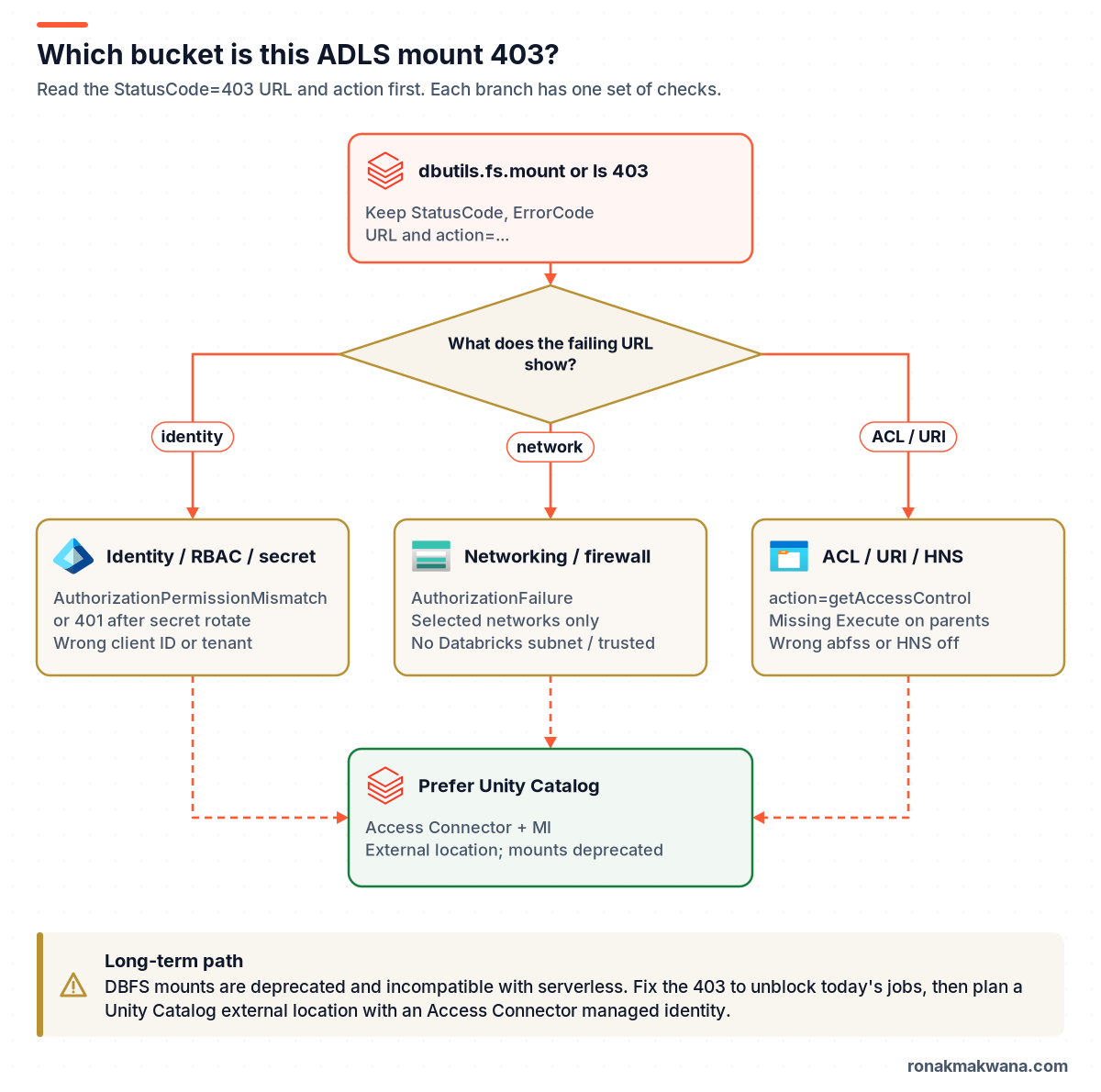
Quick answer: three buckets, one long-term path
- Identity / RBAC / secret. The service principal needs a data-plane role such as
Storage Blob Data ContributororStorage Blob Data Reader. ClassicOwner/Contributoron the account is not enough for the data plane. A rotated secret in the Databricks secret scope often surfaces as401 Unauthorizedper Microsoft Learn; still unmount and remount after you fix it. - Networking / firewall. Selected networks without the Databricks VNet-injected subnets (or without trusted access for an Access Connector) returns
AuthorizationFailure-style 403s. Community reports also show firewall blocks as a plain 403 on the ABFS HEAD. - ACL / URI / HNS. With Hierarchical namespace, a missing Execute on any parent directory fails
getAccessControl. The mount source must beabfss://<filesystem>@<account>.dfs.core.windows.net/and HNS must be on for ABFS mounts. - Long term. Microsoft documents DBFS mounts as deprecated and not compatible with serverless. Plan a Unity Catalog external location backed by an Access Connector managed identity.
Prerequisites
- A Databricks workspace notebook (or job cluster) where you can run
dbutils.fs.mount/lsand read the full exception text. Keep client secrets out of tickets. - Azure portal (or CLI) access to the storage account: Access control (IAM), Networking, and (for HNS accounts) Manage ACL on the filesystem.
- The Application (client) ID, Directory (tenant) ID and secret-scope names used in the mount
extra_configs. - Optional: Azure CLI signed in, for the
az role assignment/az storage account showchecks below. - For the Unity Catalog section: metastore privileges to create a storage credential and external location, plus rights to create an Access Connector for Azure Databricks.
Step 1: capture the exact error
Reproduce the failure once and keep the full stack. Two shapes show up often in ABFS mounts:
Example 403 shapes (placeholders; not live output)
# Not executed against Azure. Shapes quoted from community reports and Microsoft Learn 403 guidance.
# Shape A  -  network / auth failure style (HEAD on the filesystem)
Operation failed: "This request is not authorized to perform this operation.", 403, HEAD,
https://<account>.dfs.core.windows.net/<filesystem>/?upn=false&action=getAccessControl&timeout=90

# Shape B  -  permission mismatch on list after a mount that returned True
Operation failed: "This request is not authorized to perform this operation using this permission.", 403, GET,
https://<account>.dfs.core.windows.net/<filesystem>?resource=filesystem&...
ErrorCode=AuthorizationPermissionMismatch
Not executed against Azure. Microsoft Learn’s Blob Storage 403 troubleshooting article maps AuthorizationPermissionMismatch to missing data-plane RBAC (or SAS permissions) and AuthorizationFailure to public-network / firewall / VNet blocks. The mounts doc also states that a rotated, expired or deleted secret used by a mount can produce 401 Unauthorized, fixed only by unmounting and remounting. Write down: (1) status and error code, (2) HTTP verb and action= if present, (3) whether mount itself failed or only the first list/read failed.
Step 2: check identity, RBAC and the secret scope
Connect to Azure Data Lake Storage and Blob Storage (legacy pattern, still what mounts use) says to register a Microsoft Entra ID application, create a client secret, and assign Storage Blob Data Contributor on the storage account. The same page notes that Blob storage does not support Microsoft Entra ID service principals the way ADLS Gen2 / ABFS does, and that account keys grant full access – prefer a service principal or SAS over keys.
Data-plane role, not control-plane
The ADLS access control model is explicit: roles such as Owner, Contributor, Reader and Storage Account Contributor manage the account but do not provide access to the data. Data access needs Storage Blob Data Owner, Storage Blob Data Contributor or Storage Blob Data Reader. The 403 troubleshooting article also warns that in subscriptions with an Azure Databricks workspace, roles scoped only at the subscription may not grant blob data access – assign at resource group, storage account or container scope.
az: list data-plane role assignments for the mount SP
# Not executed against Azure. Confirm the SP used in the mount has a data-plane role.
# Use the service principal object ID (not only the app registration display name).
az role assignment list \
  --assignee <service-principal-object-id> \
  --scope /subscriptions/<sub>/resourceGroups/<rg>/providers/Microsoft.Storage/storageAccounts/<account> \
  --query "[].{role:roleDefinitionName, scope:scope}" -o table

# Resolve object ID from the application (client) ID in the mount config
az ad sp show --id <application-client-id> --query "{appId:appId, objectId:id, displayName:displayName}" -o json
Not executed against Azure. Community reports (not Microsoft docs) describe a frequent trap: two service principals with the same display name, RBAC granted to one, mount client.id pointing at the other. Always match the Application (client) ID in extra_configs to the assignee’s appId.
Secret scope and rotation
Mount configs typically pull the client secret with dbutils.secrets.get. Per the mounting documentation, mount points that use secrets are not automatically refreshed. If the secret is rotated, expires or is deleted, errors such as 401 Unauthorized can occur until you unmount and remount. Update the secret-scope value first, then remount (Step 5).
Python: ABFS OAuth mount (from Microsoft Learn, not executed)
# Not executed against Azure. OAuth mount pattern from Microsoft Learn (placeholders).
configs = {
  "fs.azure.account.auth.type": "OAuth",
  "fs.azure.account.oauth.provider.type": "org.apache.hadoop.fs.azurebfs.oauth2.ClientCredsTokenProvider",
  "fs.azure.account.oauth2.client.id": "<application-id>",
  "fs.azure.account.oauth2.client.secret": dbutils.secrets.get(scope="<scope-name>", key="<service-credential-key-name>"),
  "fs.azure.account.oauth2.client.endpoint": "https://login.microsoftonline.com/<directory-id>/oauth2/token",
}

dbutils.fs.mount(
  source="abfss://<container-name>@<storage-account-name>.dfs.core.windows.net/",
  mount_point="/mnt/<mount-name>",
  extra_configs=configs,
)
Step 3: check storage networking and firewall
If the error code is AuthorizationFailure, or the message is the shorter "This request is not authorized to perform this operation" without "using this permission", treat networking as the primary suspect. Azure Storage firewall rules deny traffic that is not on an allowed VNet, IP, resource instance or trusted-service exception. By default, traffic from a subnet is blocked until you add a virtual network rule for that subnet.
- Selected networks. Confirm whether the account allows public access from all networks or only selected networks / private endpoints.
- VNet injection. For classic workspace mounts from a VNet-injected Databricks workspace, allow the workspace’s public and private subnet (with the Microsoft.Storage service endpoint) on the storage firewall.
- Trusted services / Access Connector. Trusted Azure services lists
Microsoft.Databricks/accessConnectorsunder managed-identity based trusted access. The Unity Catalog ADLS external location guide requires enabling Azure trusted services when public network access is disabled on the storage account. - Private endpoints. If clients resolve the public FQDN while only a private endpoint is intended (or the reverse), you can still see authorization / network 403s. Confirm DNS resolves as you expect.
az: inspect firewall and set trusted-services bypass
# Not executed against Azure.
az storage account show -n <account> -g <rg> \
  --query "{publicNetworkAccess:publicNetworkAccess, defaultAction:networkRuleSet.defaultAction, bypass:networkRuleSet.bypass, vnets:networkRuleSet.virtualNetworkRules, ips:networkRuleSet.ipRules}" -o json

# When public access is disabled, UC external locations need AzureServices bypass (from Microsoft Learn).
az storage account update -n <account> -g <rg> --bypass AzureServices
Step 4: check ACLs, abfss URI and Hierarchical namespace
The mounts documentation states that Hierarchical namespace (HNS) must be enabled to mount an ADLS storage account with the ABFS endpoint. The source URI must use the DFS endpoint:
Required ABFS source form
abfss://<filesystem>@<storage-account-name>.dfs.core.windows.net/Using wasbs / blob.core.windows.net, a typo in the filesystem name, or an account without HNS will not behave like a healthy OAuth ABFS mount. After networking and RBAC are correct, a getAccessControl 403 often means POSIX ACLs.
Execute on every parent
ADLS ACLs require Execute (--X) on the container root and every directory leading to the target when you rely on ACLs without a broad data-plane role (or when ABAC conditions fall through to ACLs). Read a file needs R-- on the file; listing a directory needs R-X on that directory. Prefer Entra security groups in ACL entries rather than individual service principals, and use the service principal’s object ID (from az ad sp show), not the app registration’s object ID.
Important evaluation rule from the access control model: if Azure RBAC already grants sufficient data access, ACLs are not used to restrict it. So "tighten the ACL" will not undo Storage Blob Data Contributor on the whole account – narrow the role assignment scope or use ABAC conditions instead.
Step 5: remount and refreshMounts
After you change RBAC, secrets, firewall rules or ACLs, fix the mount registration itself:
- Never unmount while jobs are reading or writing the mount point. The mounts doc warns that unmounting under load causes errors.
- Update the secret-scope value if the client secret changed.
dbutils.fs.unmount("/mnt/<mount-name>")then run thedbutils.fs.mountcall again with the correctedextra_configs.- On every other running cluster that should see the change, run
dbutils.fs.refreshMounts(). - Confirm with
dbutils.fs.ls("/mnt/<mount-name>")and a small Spark read of a known file.
Python: unmount, remount, refresh, list
# Not executed against Azure.
dbutils.fs.unmount("/mnt/<mount-name>")
# ... run the mount block from Step 2 ...
dbutils.fs.refreshMounts()
dbutils.fs.ls("/mnt/<mount-name>")
Prefer Unity Catalog external locations
Microsoft Learn marks DBFS mounts as deprecated and incompatible with Databricks serverless compute. New accounts may be provisioned without mount access. Mounted data also does not work with Unity Catalog governance, and every workspace user can use a mount created in that workspace – so the service principal behind the mount must be limited to that storage account only.
The supported replacement is a Unity Catalog external location on ADLS Gen2:
- Create an Access Connector for Azure Databricks with a system-assigned or user-assigned managed identity.
- Grant that managed identity
Storage Blob Data Contributor(or a tighter combination such as Storage Blob Delegator on the account plus Contributor on one container). - If public network access is disabled, enable Azure trusted services (
--bypass AzureServices). - HNS is required; immutability (WORM) policies are not supported on external location containers because Unity Catalog needs DELETE.
- In Databricks, create a storage credential (Azure Managed Identity + Access Connector resource ID), then an external location URL such as
abfss://[email protected]/. - Grant
CREATE EXTERNAL TABLE/CREATE EXTERNAL VOLUME(orCREATE MANAGED LOCATION) to the principals that need it – access is no longer "all workspace users see the mount".
Patterns for managed identity and Key Vault elsewhere in a pipeline are covered in securing data pipelines with managed identity and Key Vault. Account layout and HNS defaults are covered in ADLS Gen2 best practices for enterprise and Terraform ADLS Gen2 with hierarchical namespace.
Cause, check and fix at a glance
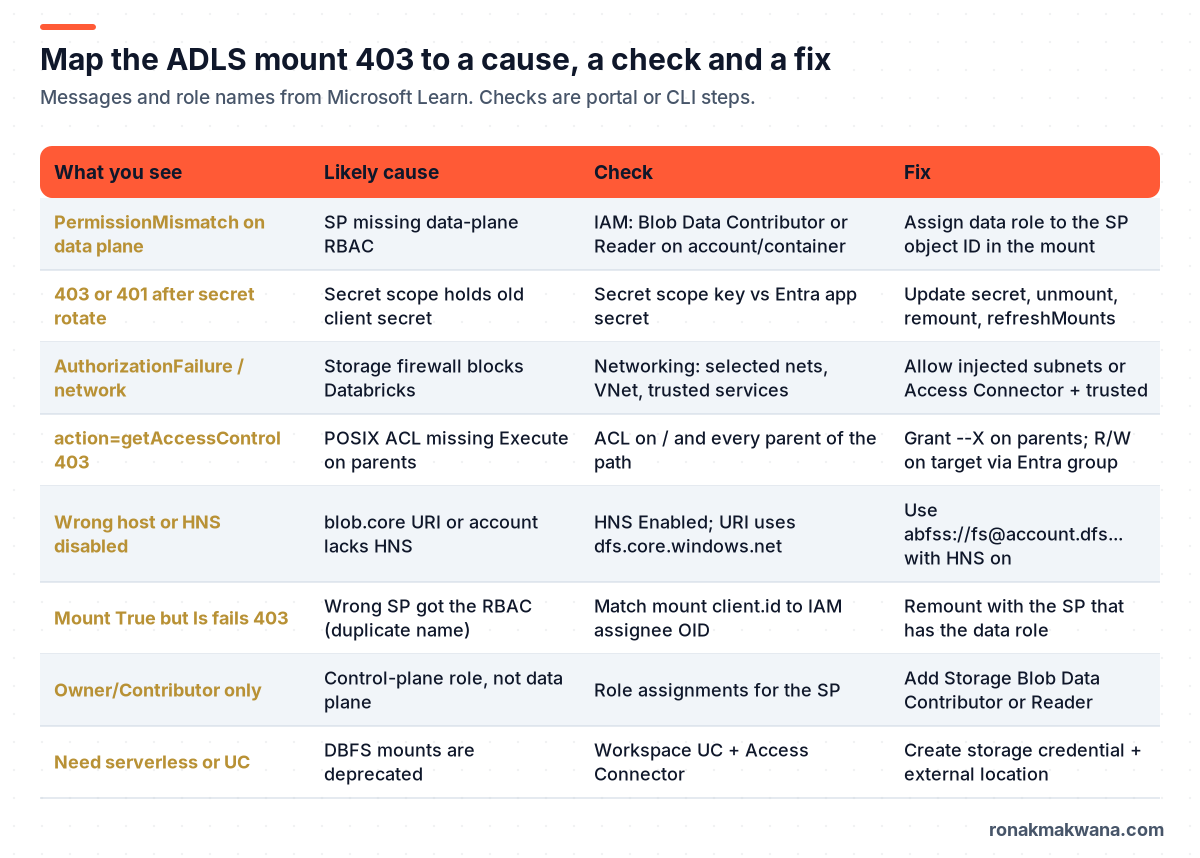
| What you see | Likely cause | Check | Fix |
|---|---|---|---|
AuthorizationPermissionMismatch | SP missing data-plane RBAC | IAM on account/container for the SP object ID | Assign Storage Blob Data Contributor or Reader |
| 403 / 401 after secret rotation | Secret scope still has old secret | Secret scope vs Entra app secret | Update secret; unmount; remount; refreshMounts |
AuthorizationFailure / network 403 | Firewall / selected networks | Networking blade; VNet rules; bypass | Allow Databricks subnets or Access Connector + trusted services |
action=getAccessControl | Missing Execute on parents | ACLs on / and parents | Grant –X on parents; R/W on target via Entra group |
| Wrong host or HNS off | Non-ABFS URI or no HNS | Account HNS flag; source URI | Use abfss://…dfs.core.windows.net/ with HNS enabled |
| Mount True, ls 403 | Wrong SP (duplicate name) | client.id vs IAM assignee appId | Remount with the SP that has the data role |
| Owner / Contributor only | Control-plane role only | Role assignments list | Add a Storage Blob Data * role |
Expected results after the fix
| Check | Expected after the fix |
|---|---|
dbutils.fs.mount(...) | True (or already mounted) without a 403 stack |
dbutils.fs.ls("/mnt/...") | FileInfo rows for the filesystem root or target folder |
| Spark read of a known path | Rows returned; no Authorization* 403 |
| Other running clusters | Same mount visible after refreshMounts() |
| UC external location (if migrated) | dbutils.fs.ls('abfss://...') succeeds with the Access Connector identity |
These are expected results based on documented behaviour, not output captured from a live workspace.
Security, reliability, monitoring and cost
- Security. Mounts are visible to all users in the workspace; grant the mount SP access only to that storage account. Prefer Unity Catalog external locations so privileges are per principal. Store client secrets in a Databricks secret scope (backed by Key Vault where possible) – see managed identity and Key Vault for data pipelines. Avoid account keys for routine mounts.
- Reliability. Secret rotation requires an unmount/remount; build that into the runbook. Do not unmount from production jobs. After any mount change, call
refreshMounts()on other live clusters. Prefer UC managed identities so there is no long-lived client secret to rotate. - Monitoring. Enable Azure Storage resource logs (StorageRead / StorageWrite / StorageDelete) to a Log Analytics workspace and alert on spikes of Authorization* failures for the storage account. Correlate timestamps with Databricks job runs.
- Cost. An Access Connector and managed identity avoid client-secret sprawl and repeated incident time from 401/403 after rotations. Storage diagnostic logs incur Log Analytics ingestion cost – keep retention tight and filter to the accounts you are hardening. UC external locations do not remove ADLS capacity charges; they change how identity is managed.
What I tested and what I didn’t
I didn’t have an Azure Databricks workspace or ADLS account for this post. None of the Python mount snippets, az commands or ACL changes were executed against Azure. Error shapes, role names, mount deprecation, OAuth mount syntax, refreshMounts behaviour, HNS requirements, trusted-services guidance and ACL Execute rules were checked against the Microsoft Learn pages listed below on 5 November 2026. Where a pattern comes from community reports (duplicate SP display names; firewall showing up as a bare HEAD 403), the text labels it as a community report, not Microsoft documentation.
Related guides
If authentication already works and Spark still cannot see the path, use Databricks ADLS Path does not exist. For lake layout and HNS, see ADLS Gen2 best practices for enterprise and Terraform ADLS Gen2 with hierarchical namespace. Identity patterns beyond Databricks are in securing data pipelines with managed identity and Key Vault. More Databricks posts are in the Azure Databricks category.
Sources
- Mounting cloud object storage on Azure Databricks (Microsoft Learn) – deprecation, OAuth mount, HNS, secrets, refreshMounts
- Connect to Azure Data Lake Storage and Blob Storage (Microsoft Learn) – Entra app, Storage Blob Data Contributor, abfss, secret scopes
- Connect to an ADLS Gen2 external location (Microsoft Learn) – Access Connector MI, trusted services, HNS
- Access control model for Azure Data Lake Storage (Microsoft Learn) – RBAC vs ACL evaluation
- Access control lists (ACLs) in Azure Data Lake Storage (Microsoft Learn) – Execute on parents
- Firewall rules and network access for Azure Storage (Microsoft Learn)
- Trusted Azure services for Azure Storage network security (Microsoft Learn) – Microsoft.Databricks/accessConnectors
- Troubleshoot 403 errors in Azure Blob Storage (Microsoft Learn) – AuthorizationPermissionMismatch, AuthorizationFailure, Databricks RBAC scope note