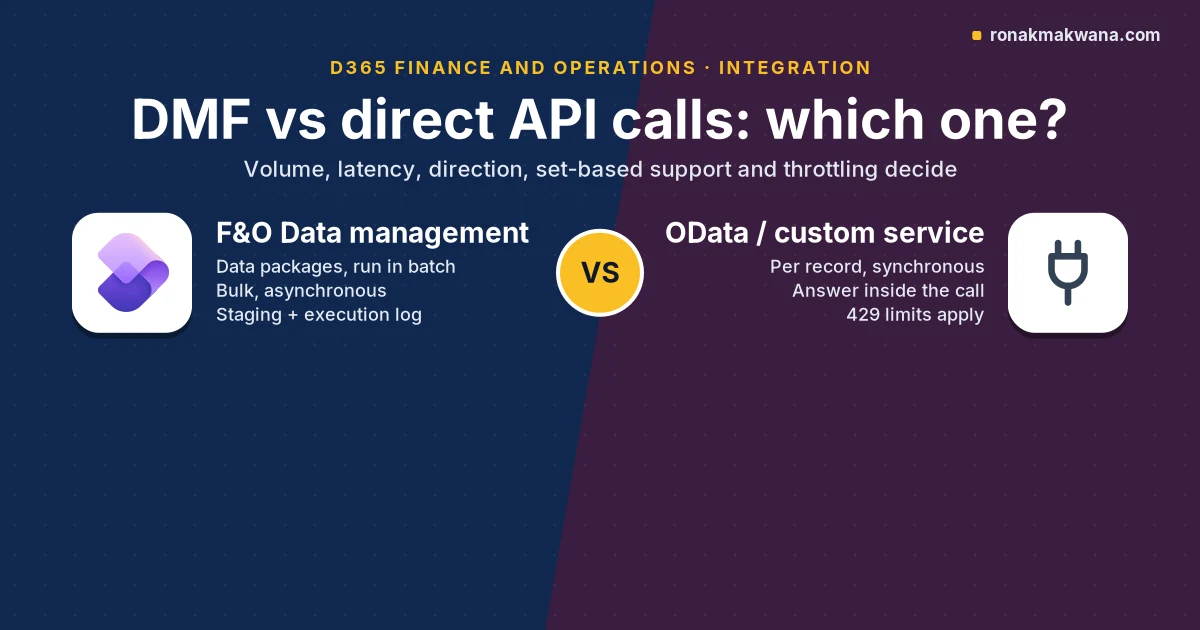
Use the Data management framework (DMF) in Dynamics 365 Finance and Operations (F&O) when a flow moves a lot of records at once, can wait minutes rather than milliseconds, or arrives as files. Use a direct API call, meaning OData on a data entity or a custom service, only when the caller needs the answer inside the same request and each request touches a few records. Microsoft’s own rule of thumb is that above a few hundred thousand records you should use the batch data API, which is DMF (integration overview). The other reason DMF wins is throttling: F&O’s service protection limits apply to OData and custom service calls, and the Data Import/Export Framework and recurring integrations are on the exempt list.
This post is for integration engineers working out which path a given flow should take. It gives a four-question decision flow, a five-point checklist you can run per flow, and an Azure pattern for importing a DMF package from Logic Apps or Azure Data Factory (ADF) with status polling. It also covers security, reliability, monitoring, cost and the errors you’re most likely to see. Every behaviour below was checked against Microsoft Learn on 2 November 2026; none of the code was run.
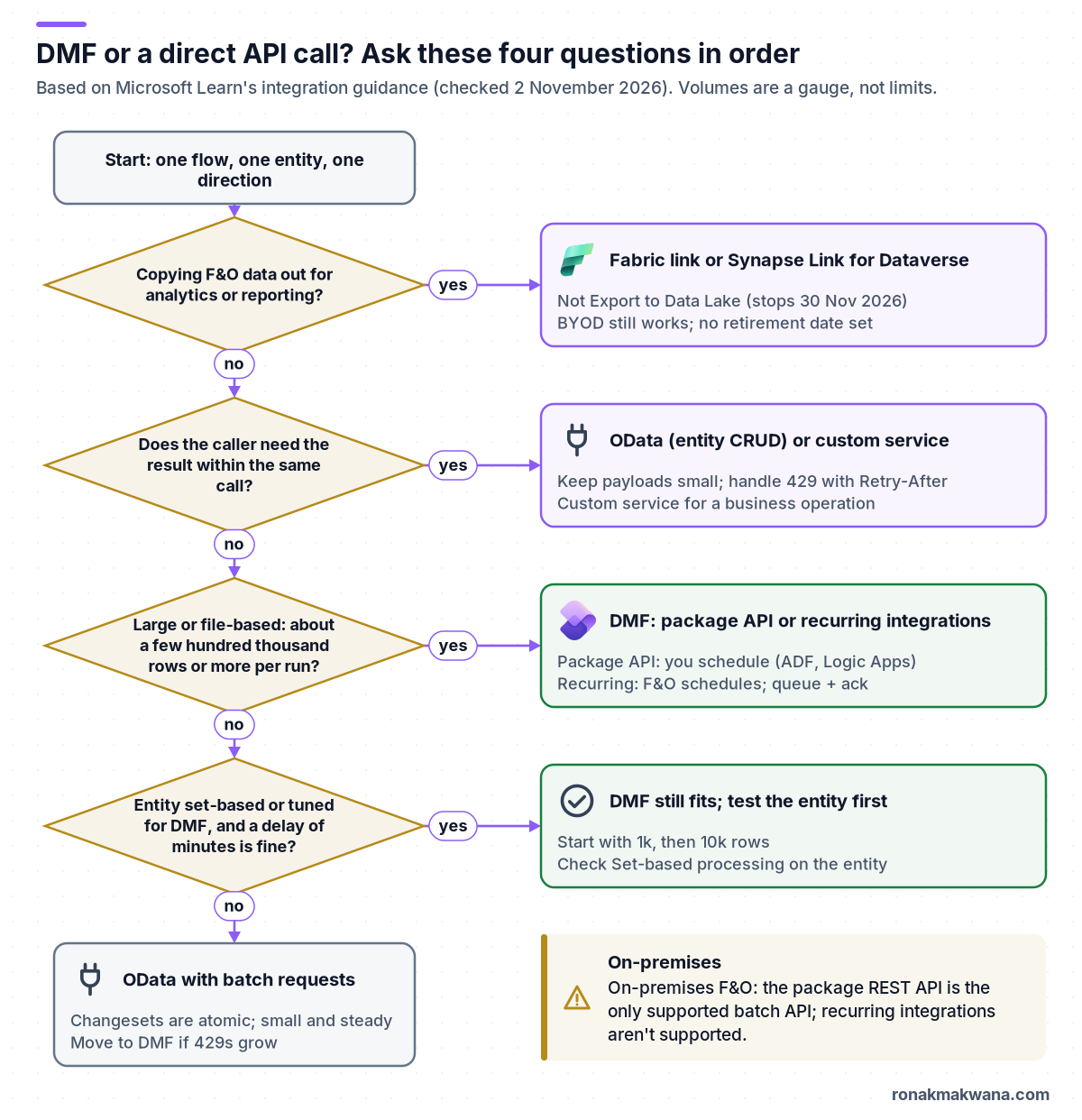
Short answer: when DMF beats a direct API call
- Volume. Hundreds of thousands of rows per run, or a steady stream that adds up to that each hour. Learn’s own examples put 200,000 sales orders an hour on the batch API and 1,000 product updates an hour on OData.
- Latency. The sender doesn’t need F&O’s answer before it carries on. DMF imports run as batch jobs, so results arrive minutes later.
- Files or packages. The source already produces CSV, XML or Excel files, or a package with several related entities that must load in sequence.
- Throttling. You’re getting HTTP 429 from F&O on OData, or you will at the volume you plan. DMF and recurring integrations are exempt from service protection limits.
- On-premises. For on-premises deployments, the package REST API is the only supported batch API.
A direct API call is the better choice when a user or system is waiting on the response: a price or stock check, creating one sales order and returning its number, or reading an order’s status. If you are exporting data for analytics, neither is the right tool. Use Fabric link or Azure Synapse Link for Dataverse, covered below.
What counts as DMF and what counts as a direct API
In F&O, both paths use the same data entities. An entity has two switches: Enable public API exposes it on OData, and Enable data management capabilities makes it available for asynchronous import and export through a staging table (data entities overview). So the choice is about how you call the entity, not which data you can reach.
Direct (synchronous) calls
- OData at
/data: create, read, update and delete on public entities. Server-driven paging returns at most 10,000 rows per page, queries see the default company unless you addcross-company=true, and batch requests group operations into atomic changesets (OData in finance and operations). - Custom services: X++ classes exposed as SOAP and as JSON at
/api/services/<group>/<service>/<operation>(custom service development). Use one when the operation is a business action, not a row change.
DMF (asynchronous) options
- Data management workspace jobs: import and export projects that run through staging tables, with mapping, sequencing, job history and an execution log (data import and export jobs).
- Package REST API: OData actions such as
GetAzureWriteUrl,ImportFromPackage,ExportToPackageandGetExecutionSummaryStatus. You schedule it from outside F&O (data management package REST API). - Recurring integrations: a recurring data job inside F&O that picks up enqueued files or packages, or exposes exports to dequeue, on a schedule F&O runs (recurring integrations). Not supported on-premises.
- BYOD: scheduled full or incremental export of entities to your own Azure SQL database (bring your own database).
Decision table: DMF vs OData and custom services
| Factor | OData or custom service | DMF (package API or recurring) |
|---|---|---|
| Caller waits for result | Yes, in the response | No; poll or check later |
| Typical volume | Small, per record | Large batches and files |
| Learn’s gauge | Below a few hundred thousand | Above a few hundred thousand |
| Business logic | Runs at once, per record | Runs in batch; set-based skips some |
| Throttling (429) | Service protection limits apply | DIXF and recurring are exempt |
| Errors | Per request; batch changesets roll back | Execution log, staging errors |
| Scheduling | The caller | Package API: you. Recurring: F&O |
| Multi-entity order | You order the calls | Package manifest and sequence |
| On-premises | OData, custom services | Package API only |
| Analytics export | Not recommended | Use Fabric link or Synapse Link |
Two rows need care. Learn says not to use OData for Power BI reports, and to use the entity store instead (integration overview). And the volume line is a gauge, not a limit: Learn says to use the numbers only to gauge the pattern, not as hard system limits, and that what counts as large depends on the entity and how much business logic runs on import or export.
The five-point checklist (run it per flow, not per project)
Most projects have both kinds of flow, so ask these questions for each entity and direction. Write the answers down; they become your integration design record.
1. Volume: how many records per run, and per hour at peak?
Count the peak, not the average. Learn’s examples give the scale: OData for 1,000 product creates or updates an hour and 5,000 order-status reads an hour; the batch API for 200,000 sales orders an hour arriving every five minutes, and for 300,000 purchase orders an hour exported with change tracking (integration overview). If the peak is in the hundreds of thousands, DMF is the default.
2. Latency: does anyone wait on the answer?
If the sender needs a generated number, a validation result or a price before it continues, that’s synchronous by definition, so use OData or a custom service. If the sender only needs to know later whether the load worked, DMF fits. Remember that the batch job behind a DMF import can queue: the import is scheduled as a batch job, which may not start at once because batch processing is throttled (data import and export jobs).
3. Direction: into F&O, out of it, or both?
- Inbound bulk: DMF import through the package API or recurring integrations.
- Outbound to another system: DMF export (with change tracking for deltas) or recurring dequeue.
ExportToPackageneeds an existing export project, and with change tracking on it returns only the delta (package REST API). - Outbound for analytics: Fabric link or Synapse Link for Dataverse, not DMF or OData. See the deprecation section below.
- Lookups and single writes: OData or a custom service.
4. Set-based eligibility: will the entity actually go fast in DMF?
DMF is only as fast as the entity. Learn notes that not every entity is optimized for migration; some are built for OData. On the Target entities page, check the Set-based processing column. Not every entity supports it: turning it on for Customer definitions gives the warning “Set operations not supported for ‘Customer definitions’ entity”. An entity built for set-based processing needs, among other things, data sources that aren’t read-only, ValidTimeStateEnabled set to No, regular table types and no union query (optimize data migration). If the entity can’t run set-based, DMF still gives you batch, staging and error files, but test throughput with a subset first. Learn suggests 1,000, then 10,000, then 100,000 records.
5. Throttling exposure: will you hit HTTP 429?
Since version 10.0.19, F&O applies resource-based service protection limits to OData and custom service requests. They are based on web server CPU and memory, they aren’t configurable, and they apply to the online service (production and sandbox). Exceeding them returns HTTP 429 Too Many Requests with a Retry-After header. The older user-based limits (6,000 requests, 1,200 seconds of execution time or 52 concurrent requests per user, per app ID, per web server in five minutes) are no longer enforced and were removed in 10.0.36. The exempt list includes the Data Import/Export Framework (DIXF) and recurring integrations (service protection API limits). If a flow will push many requests at peak, it is exposed; DMF moves that load off the throttled endpoints.
One gap in the docs. The package REST API’s control calls (ImportFromPackage, GetExecutionSummaryStatus and so on) are OData actions under /data. The limits page lists DIXF as exempt but doesn’t say whether these control calls count as DIXF or as OData. They are few per import, so this rarely matters, but handle 429 on them anyway. Learn also says exemptions can be removed with notice.
Export to Data Lake stops on 30 November 2026: what to use instead
If a flow exists to feed a data lake or warehouse, check what it runs on. Learn’s removed and deprecated platform features page (updated 25 August 2026) says Export to Azure Data Lake was retired on 1 November 2024 and will permanently stop on 30 November 2026; files already exported remain, and there are no extensions (removed or deprecated platform features). The replacement is Azure Synapse Link for Dataverse, and Microsoft recommends Link to Microsoft Fabric with low-latency sync for most customers (transition from legacy data integration services).
- BYOD has no retirement date yet, but Microsoft recommends moving to Synapse Link or Fabric link (transition FAQ, updated 14 October 2026).
- Synapse Link with Delta Lake (Parquet) output is itself deprecated: from 15 October 2026 it isn’t available to new customers, and existing customers must move to CSV output or Fabric link by December 2027 (Synapse Link Delta Lake export).
- DMF export and OData stay valid for system-to-system integration. They aren’t the recommended route for bulk analytics replication.
Pattern: import a DMF package from Logic Apps or ADF with status polling
This is the pattern to reach for when an Azure service owns the schedule and the file. It uses only documented package API actions, and it keeps every long wait in your orchestrator rather than in an HTTP call.
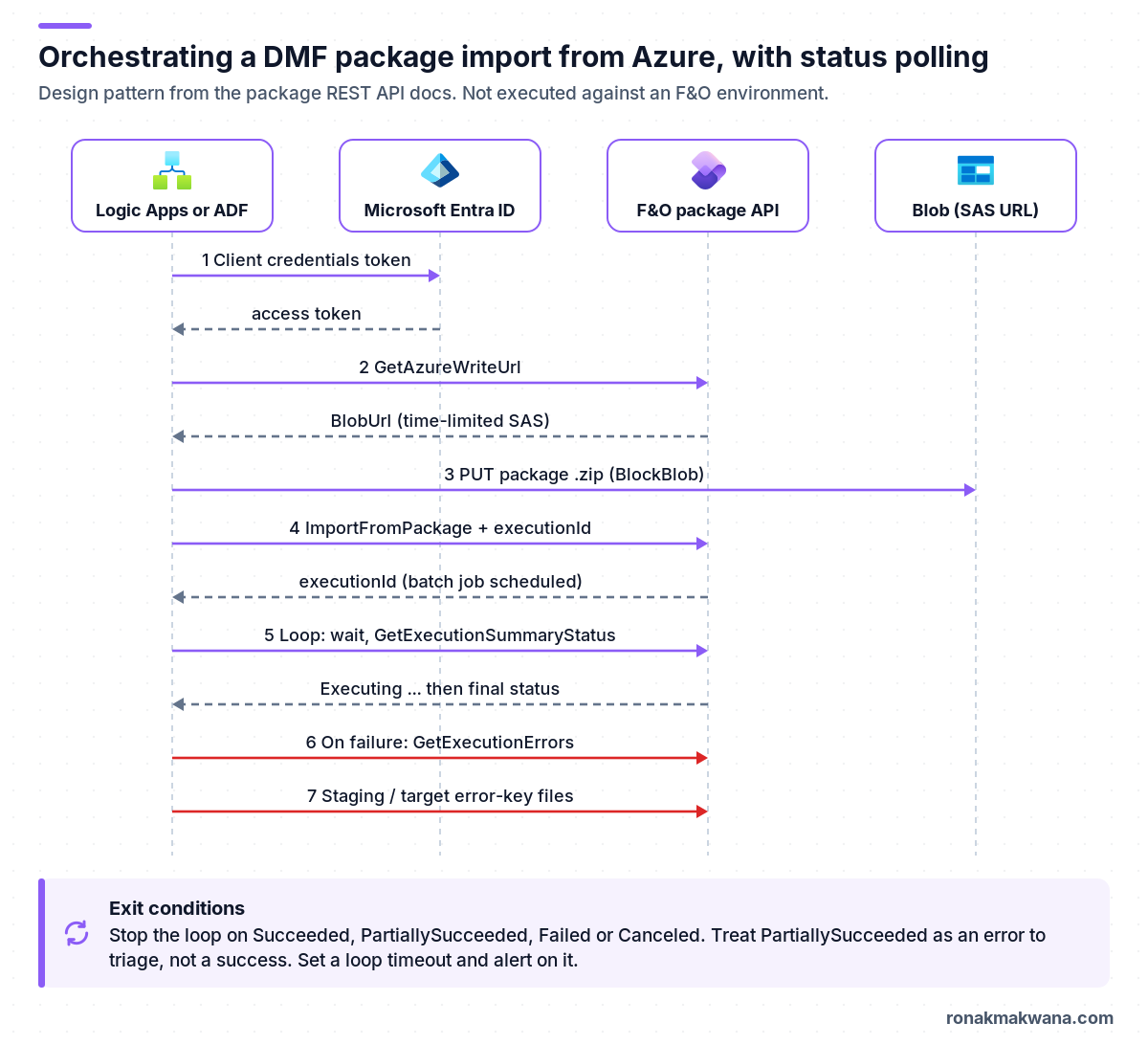
- Get a token. Client credentials flow against Microsoft Entra ID, with the F&O base URL as the resource or audience; the package API sample code warns not to add a trailing slash (service endpoints and authentication, package REST API).
- Ask for a write URL.
GetAzureWriteUrlwith a unique file name. The responsevalueis a JSON string containingBlobIdandBlobUrl, so parse it before use. The SAS in the URL expires, so request it just before the upload (package REST API). - Upload the package. PUT the .zip to
BlobUrlwith thex-ms-blob-type: BlockBlobheader, which Put Blob requires (Put Blob). The package must contain the data files plus the manifest and package header that DMF generates when you export a project as a package (data management overview). - Start the import.
ImportFromPackagewithpackageUrl, the data project name asdefinitionGroupId, your ownexecutionId,executetrue,overwritetrue (false for a composite entity) andlegalEntityId. It returns the execution ID, which appears as the Job ID in F&O. - Poll. Wait, then call
GetExecutionSummaryStatusuntil it returns Succeeded, PartiallySucceeded, Failed or Canceled. The other values are Unknown, NotRun and Executing. - Collect errors. On anything but Succeeded, call
GetExecutionErrors; for each entity,GetImportStagingErrorFileUrlfor rows that failed source-to-staging, andGenerateImportTargetErrorKeysFilethenGetImportTargetErrorKeysFileUrl(in a loop until the URL isn’t empty) for rows that failed staging-to-target.
Learn also says not to call ImportFromPackage from parallel threads, because it fails; use the parallel processing settings in Data management instead. The recurring integrations page adds that parallel package imports through the package API are only supported when Enhanced parallel package import is turned on (Data management > Framework parameters > Compatibility options). So run one import call at a time from the orchestrator unless that option is on and you have tested it.
The HTTP calls
Not executed: written from the Microsoft Learn API reference, not run against Azure or a Dynamics 365 environment. Request shapes are copied from the package API reference. Replace the placeholders; <fo> is your environment URL.
Package API calls (not executed)
POST https://<fo>/data/DataManagementDefinitionGroups/Microsoft.Dynamics.DataEntities.GetAzureWriteUrl
Authorization: Bearer <token>
Content-Type: application/json

{ "uniqueFileName": "customers-20261102-0915-<guid>.zip" }

# Response: "value" is a JSON string, so parse it a second time
# { "value": "{\"BlobId\":\"{<GUID>}\",\"BlobUrl\":\"https://<account>.blob.core.windows.net/dmf/<file>?<SAS>\"}" }

PUT <BlobUrl>
x-ms-blob-type: BlockBlob

<package .zip bytes>

POST https://<fo>/data/DataManagementDefinitionGroups/Microsoft.Dynamics.DataEntities.ImportFromPackage
Authorization: Bearer <token>
Content-Type: application/json

{
  "packageUrl": "<BlobUrl>",
  "definitionGroupId": "CustomersInbound",
  "executionId": "CustomersInbound-20261102-0915",
  "execute": true,
  "overwrite": true,
  "legalEntityId": "USMF"
}

POST https://<fo>/data/DataManagementDefinitionGroups/Microsoft.Dynamics.DataEntities.GetExecutionSummaryStatus
Authorization: Bearer <token>
Content-Type: application/json

{ "executionId": "CustomersInbound-20261102-0915" }

# Response: { "value": "Executing" } ... later "Succeeded", "PartiallySucceeded", "Failed" or "Canceled"
CustomersInbound and USMF are placeholders for your import project and legal entity. The project must already exist in the Data management workspace with the entity and mapping you want.
Logic Apps: the polling loop
Not executed: written from the Microsoft Learn API reference, not run against Azure or a Dynamics 365 environment. This is a workflow definition fragment for the import and polling steps. It uses the built-in HTTP action with Active Directory OAuth authentication (HTTP action) and an Until loop. Until loops default to 60 iterations or one hour; this one sets 120 iterations at one minute each, and FailWhenLimitsReached makes a timeout fail the run instead of carrying on silently (loops in Logic Apps).
Logic Apps workflow fragment (not executed)
"Import_package": {
  "type": "Http",
  "inputs": {
    "method": "POST",
    "uri": "@{parameters('foUrl')}/data/DataManagementDefinitionGroups/Microsoft.Dynamics.DataEntities.ImportFromPackage",
    "headers": { "Content-Type": "application/json" },
    "body": {
      "packageUrl": "@{variables('blobUrl')}",
      "definitionGroupId": "CustomersInbound",
      "executionId": "@{variables('executionId')}",
      "execute": true,
      "overwrite": true,
      "legalEntityId": "USMF"
    },
    "authentication": {
      "type": "ActiveDirectoryOAuth",
      "tenant": "@{parameters('tenantId')}",
      "audience": "@{parameters('foUrl')}",
      "clientId": "@{parameters('clientId')}",
      "secret": "@{parameters('clientSecret')}"
    }
  },
  "runAfter": { "Upload_package": [ "Succeeded" ] }
},
"Until_import_finished": {
  "type": "Until",
  "expression": "@contains(createArray('Succeeded','PartiallySucceeded','Failed','Canceled'), variables('status'))",
  "limit": { "count": 120, "timeout": "PT2H" },
  "operationOptions": "FailWhenLimitsReached",
  "actions": {
    "Wait_1_minute": { "type": "Wait", "inputs": { "interval": { "count": 1, "unit": "Minute" } } },
    "Get_status": {
      "type": "Http",
      "runAfter": { "Wait_1_minute": [ "Succeeded" ] },
      "inputs": {
        "method": "POST",
        "uri": "@{parameters('foUrl')}/data/DataManagementDefinitionGroups/Microsoft.Dynamics.DataEntities.GetExecutionSummaryStatus",
        "body": { "executionId": "@{variables('executionId')}" },
        "authentication": { "type": "ActiveDirectoryOAuth", "tenant": "@{parameters('tenantId')}", "audience": "@{parameters('foUrl')}", "clientId": "@{parameters('clientId')}", "secret": "@{parameters('clientSecret')}" }
      }
    },
    "Set_status": {
      "type": "SetVariable",
      "runAfter": { "Get_status": [ "Succeeded" ] },
      "inputs": { "name": "status", "value": "@{body('Get_status')?['value']}" }
    }
  },
  "runAfter": { "Import_package": [ "Succeeded" ] }
}
Earlier steps, not shown: initialize executionId and status, call GetAzureWriteUrl and set blobUrl to json(body('Get_write_url')?['value'])?['BlobUrl'], then upload with an HTTP PUT whose body is the package content from your storage connector. After the loop, branch on the status: Succeeded ends the run; anything else calls the error APIs and raises an alert. Read the client secret from Key Vault rather than keeping it in a parameter in source control.
ADF variant
- Use Web activities for the package API calls, with Service principal authentication and the F&O URL as the resource. Web activity supports service principal and managed identity authentication, and its response timeout defaults to one minute (up to ten) (Web activity).
- Use an Until activity containing a Wait and a Web activity for the polling. Its timeout defaults to seven days, maximum 90; set it to something like two hours so a stuck job fails the pipeline (Until activity).
- Parse the write URL with
@json(activity('Get write URL').output.value).BlobUrl. - For the upload, sending a binary .zip from a Web activity isn’t a documented scenario. A Copy activity with Binary datasets can write to an Azure Blob Storage linked service that uses SAS URI authentication and takes the URL as a linked service parameter (Blob Storage connector, parameterize linked services). Test this step; it is the part of the ADF variant I’m least sure behaves well with a per-run SAS URL.
- The ADF Dynamics AX connector reads F&O entities over OData with service principal authentication and works for exports, but it’s a copy source only (Dynamics AX connector). It isn’t a substitute for DMF imports.
For retries and failure paths in the pipeline itself, see error handling and retry logic in ADF.
Package API or recurring integrations?
| Need | Package API | Recurring integrations |
|---|---|---|
| Who schedules | Your orchestrator | F&O recurring data job |
| Input | Data packages only | Files or packages |
| Transformation | Outside F&O | XSLT for XML files |
| Protocol | REST (OData actions) | REST and SOAP |
| Ordering | You control call order | Optional in-order processing |
| On-premises | Supported | Not supported |
Recurring integrations uses enqueue (/api/connector/enqueue/<activityID>?entity=<name>), dequeue (/api/connector/dequeue/<activityID>) and an acknowledgement call. A dequeued message that isn’t acknowledged is offered again every 30 minutes, and GetMessageStatus reports states from Enqueued to Processed or ProcessedWithErrors (recurring integrations). XSLT scripting in data management was deprecated in March 2022, so prefer transforming outside F&O even with recurring integrations.
Security: app registration and least privilege
- One app registration per integration. Register a confidential client in Microsoft Entra ID, then add its client ID in F&O under System administration > Setup > Microsoft Entra applications and map it to a user (service endpoints overview). Learn’s example maps it to Admin but recommends a dedicated service account with only the permissions the operations need. Do that.
- Scope the service account. Give the mapped user security roles that cover only the data projects and entities the integration uses. Data jobs can also be restricted by role, user and legal entity, and anyone with access to a job sees its execution history and staging data.
- Recurring jobs are tied to the Entra application ID you enter when you create and enable the job, so give each integration its own app (recurring integrations).
- Secrets. Client credentials support a shared secret or a certificate. Keep either in Key Vault. If your Logic App can’t read it, the Logic Apps Key Vault Unauthorized fix walks through access policies and RBAC. The wider pattern is in securing data pipelines with managed identity and Key Vault.
- Treat the SAS URL as a secret. The
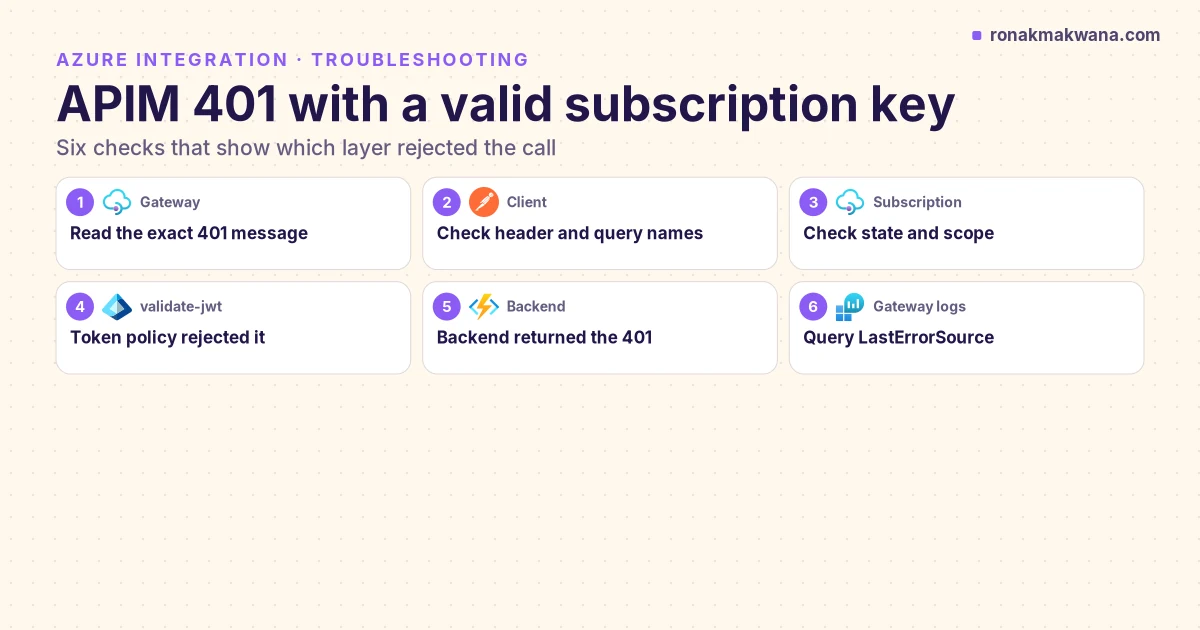
BlobUrlgrants write access until it expires. In Logic Apps, turn on secure inputs and outputs for the actions that handle it and the token so they don’t show in run history (secure access and data in Logic Apps). - Fronting F&O with API Management? That’s for your own APIs. If you put one in front of a custom service, the APIM 401 guide helps separate gateway errors from backend ones.
Reliability: idempotency, error handling and execution logs
- Own the execution ID. Build it from the file name and run ID and store it before you call
ImportFromPackage. If the orchestrator crashes after the call, queryGetExecutionSummaryStatusfor that ID before resubmitting. Learn doesn’t document what happens if you reuse an existing ID, so don’t rely on that as a duplicate guard. - Make the data idempotent too. An import that inserts or updates by entity key gives the same result when repeated; one that only creates (journals, for example) does not. Track processed files so the same package isn’t imported twice.
- PartiallySucceeded is not success. Some records failed. Pull
GetExecutionErrorsand the staging and target error files, and route them to whoever owns the source data. - Keep error files. Files in the F&O-managed Blob storage are deleted after seven days, and job history and staging data older than 90 days are cleaned up automatically, so copy anything you need for audit (data import and export jobs).
- Batch restarts. Learn documents automatic retry after a batch restart for import and export batch jobs from version 10.0.42, and for recurring data jobs from PU64. Check your version before you build your own restart handling.
- Direct calls retry differently. On 429, wait for the Retry-After interval; retries don’t get priority, and continuing to send demanding requests extends the interval (retry operations). For other transient errors, retry with backoff and make writes safe to repeat.
Monitoring
- In F&O: the Data management workspace’s job history shows each execution with processed and failed counts per entity and the execution log. For recurring integrations, the Data Management IT workspace lists messages per recurring job with their status.
- In Azure: Logic Apps run history or ADF pipeline runs show each poll. Alert when the polling loop times out, when the final status isn’t Succeeded, and when no file arrives for a scheduled run.
- For OData and custom services: Lifecycle Services environment monitoring has a Requests throttled query and a Summarized API requests by application and user query, summarized in five-minute intervals (monitor API throttling).
Cost and throttling
- Throttling is the hidden cost of OData at volume. Every 429 adds wait time, and Learn’s throughput advice (start with small batches and raise concurrency until you see limit errors, spread load across applications, remove the affinity cookie; batches are capped at 5,000 operations) adds client complexity (maximize API throughput).
- Throttling prioritization lets an admin give an Entra application or user Low, Medium or High priority for resource-based limits, under System administration > Setup > Throttling priority mapping (throttling prioritization). It shifts who gets throttled first; it doesn’t raise capacity.
- DMF uses your batch capacity. Imports run as batch jobs alongside everything else. Parallel imports are set per entity with an import threshold record count and an import task count, which can’t exceed the maximum batch threads; Learn warns that too many parallel tasks can drive resource use to 100% and affect other operations (data import and export jobs). Schedule heavy imports away from business-critical batch windows.
- Polling costs actions. In the Logic Apps Consumption plan, built-in actions beyond a free allowance are billed per execution, so each loop iteration counts; Standard includes built-in operations in the plan (Logic Apps pricing). In ADF, each Wait and Web activity inside the loop is an activity run. Poll every minute or two, not every few seconds.
Troubleshooting
| Symptom | Likely cause | Fix |
|---|---|---|
| HTTP 429 on OData | Resource-based limits | Honour Retry-After; move bulk to DMF |
| 401 from /data | App not added in F&O, or wrong audience | Add in Microsoft Entra applications; base URL, no slash |
| Parallel imports fail | ImportFromPackage called in parallel | Serialize, or enable parallel import |
| Status stays NotRun | Batch job queued | Check batch jobs and capacity |
| PartiallySucceeded | Some records failed | Read execution errors and error files |
| Upload to BlobUrl rejected | SAS expired, or no blob type header | Get a new URL; send BlockBlob |
| Composite entity import fails | Other entities in package | One composite per package; overwrite false |
| Import is slow | Entity not set-based | Check Target entities; tune threads |
| OData misses other companies | Default company only | Add cross-company=true |
| Dequeue URL uses http | Load balancer rewrite | Switch to https in middleware |
| Package link stopped working | Files deleted after 7 days | Export again; archive your copy |
The 401 row assumes the token itself is valid. If it isn’t, check that the token’s audience matches the F&O URL exactly. The sample code on the package API page says not to add a trailing slash to the resource URI (package REST API).
What I checked and what I didn’t
I didn’t have a Dynamics 365 Finance and Operations environment or an Azure subscription for this post, so none of the HTTP calls, the Logic Apps fragment or the ADF steps were run. API names, request bodies, status values, limits, menu paths and dates were checked against the Microsoft Learn pages below on 2 November 2026. Three things Learn doesn’t settle are called out where they come up: whether the package API’s control calls are exempt from service protection limits, what happens when an execution ID is reused, and how the per-run SAS URL behaves in an ADF Copy activity sink.
Related guides
If your Logic App can’t read the client secret, start with the Logic Apps Key Vault Unauthorized fix. For the identity and secret pattern, read securing data pipelines with managed identity and Key Vault. For retries in an ADF version of this pattern, see error handling and retry logic in ADF. More integration guides are in the Azure Integration category.
Sources
- Integration between finance and operations apps and third-party services (Microsoft Learn, updated 9 March 2026)
- Data management package REST API (Microsoft Learn)
- Recurring integrations (Microsoft Learn)
- Open Data Protocol (OData) in finance and operations (Microsoft Learn)
- Custom service development (Microsoft Learn)
- Service endpoints overview: authentication and app registration (Microsoft Learn)
- Data entities overview (Microsoft Learn)
- Data management overview: data packages (Microsoft Learn)
- Data import and export jobs overview (Microsoft Learn, updated 8 September 2026)
- Optimize data migration for finance and operations apps (Microsoft Learn)
- Service protection API limits (Microsoft Learn)
- Retry operations (Microsoft Learn)
- Maximize API throughput (Microsoft Learn)
- Monitor API throttling (Microsoft Learn)
- Throttling prioritization (Microsoft Learn)
- Removed or deprecated platform features (Microsoft Learn, updated 25 August 2026)
- Transition from legacy data integration services to Fabric link and Azure Synapse Link for Dataverse (Microsoft Learn)
- Transition FAQ: Fabric link and Azure Synapse Link for Dataverse (Microsoft Learn, updated 14 October 2026)
- Export Dataverse data in Delta Lake format: deprecation notice (Microsoft Learn)
- Bring your own database (BYOD) (Microsoft Learn)
- Web activity in Azure Data Factory (Microsoft Learn)
- Until activity in Azure Data Factory (Microsoft Learn)
- Azure Blob Storage connector: SAS URI authentication (Microsoft Learn)
- Parameterize linked services in Azure Data Factory (Microsoft Learn)
- Copy data from Dynamics AX (and finance and operations) with Azure Data Factory (Microsoft Learn)
- Loops in Azure Logic Apps workflows: Until limits (Microsoft Learn)
- Call HTTPS endpoints from Logic Apps workflows (Microsoft Learn)
- Secure access and data in Logic Apps workflows (Microsoft Learn)
- Usage metering, billing and pricing for Azure Logic Apps (Microsoft Learn)
- Put Blob REST API (Microsoft Learn)
- Microsoft Dynamics AX integration samples: package API console app (GitHub)