A Logic App that calls Azure Key Vault and fails with Unauthorized (401) or Forbidden (403) is almost never a Logic Apps bug. One of three layers turned the call down: authentication (no token, or a token for the wrong audience), authorization (the identity has no RBAC role or access policy on the vault), or the network (the vault firewall doesn’t allow the address the call comes from). The status code and the inner error code in the action’s raw output tell you which layer it was. Fix that layer and nothing else.
This guide is a troubleshooting workflow you can follow in order. It covers the Azure Key Vault managed connector, the built-in connector in Standard, and the HTTP action with a managed identity. It explains why the identity Key Vault sees is often not the one you granted, and why the vault firewall blocks Logic Apps even when “Allow trusted Microsoft services” is on.
Applies to: Azure Logic Apps Consumption and Standard calling Azure Key Vault secrets. Behaviour was checked against Microsoft Learn on 12 October 2026. All names are synthetic (la-orders-demo, kv-contoso-demo, secret erp-api-key). The CLI commands and workflow JSON are illustrative and were not executed against a live Azure subscription. They follow the documented syntax.
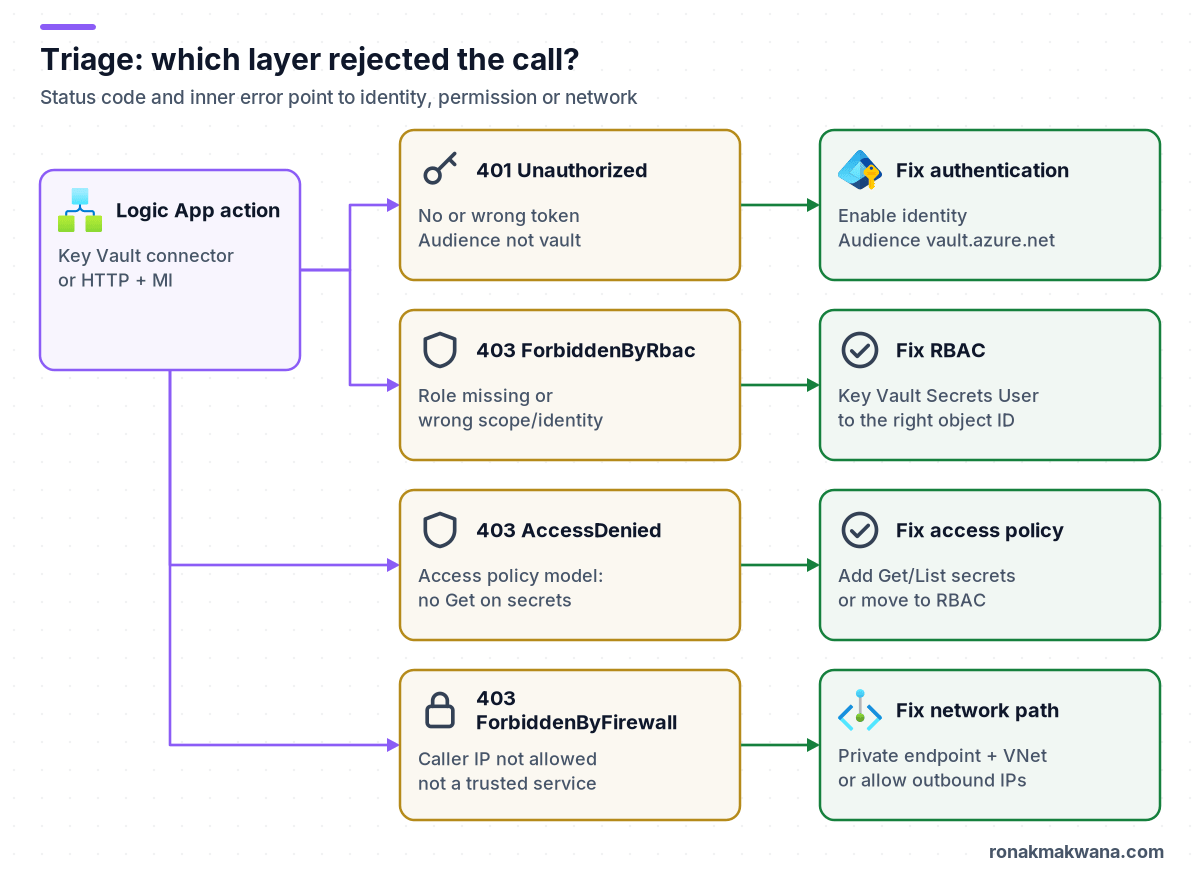
The short answer
- 401 Unauthorized: Key Vault got no usable token. Check that the managed identity is turned on and selected in the action, and that the HTTP action’s Audience is exactly
https://vault.azure.net. The default audience is Azure Resource Manager, which Key Vault rejects. - 403 with an RBAC message (“Caller is not authorized to perform action on resource”): the vault uses the Azure RBAC permission model and the calling identity has no role that includes the secret read. Assign Key Vault Secrets User to the identity that actually calls the vault. Key Vault Reader can’t read secret values.
- 403 with “does not have secrets get permission”: the vault uses the legacy access policy model. Add an access policy with Get (and List if you list secrets) for that identity, or move the vault to RBAC. Only the vault’s active permission model counts, so a grant made in the other model has no effect.
- 403 “Client address is not authorized and caller is not a trusted service”: the vault firewall blocked the source IP. Logic Apps isn’t on Key Vault’s trusted services list. Allow the right outbound IPs, or (Standard only) reach the vault through a private endpoint using VNet integration with the built-in connector or HTTP action.
Prerequisites
- Read access to the Logic App’s run history, and permission to change role assignments (or access policies) and networking on the vault. On RBAC vaults, that usually means Owner, User Access Administrator or Role Based Access Control Administrator at the vault scope.
- Ideally, Key Vault diagnostic logs (
AuditEvent) sent to a Log Analytics workspace. They show the caller’s object ID, the client IP and the result for every request. - Azure CLI if you want to check from a shell. All commands below are not executed examples.
Step 1: Read the raw output of the failed action
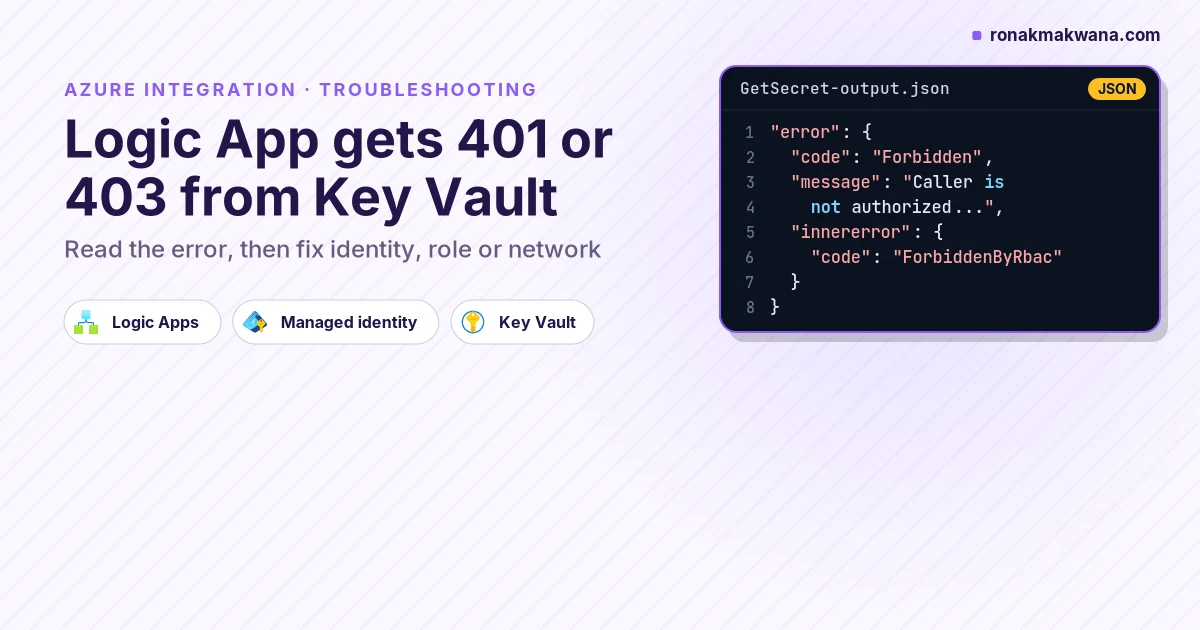
Open the failed run, select the Key Vault or HTTP action, and choose Show raw outputs. Don’t stop at the designer’s summary. The body returned by Key Vault normally contains an error.code, a message, and sometimes an innererror.code. The shape looks like this (illustrative, trimmed):
{
  "statusCode": 403,
  "body": {
    "error": {
      "code": "Forbidden",
      "message": "Caller is not authorized to perform action on resource. ... Action: 'Microsoft.KeyVault/vaults/secrets/getSecret/action' ...",
      "innererror": { "code": "ForbiddenByRbac" }
    }
  }
}
Microsoft’s Key Vault error-code reference describes the split. A 401 means the request had no valid token for Key Vault. A 403 means Key Vault knew who the caller was but turned it down, either because that identity has no permission or because its IP isn’t allowed through the firewall. The message text tells the two 403 causes apart: the firewall message mentions the client address and trusted services, and the permission message names the action or the missing permission. The exact inner-code strings can vary, so match on the message as well as the code.
Step 2: Fix a 401 (authentication)
HTTP action with a managed identity
Calling the Key Vault REST API directly is a common pattern, for example GET https://kv-contoso-demo.vault.azure.net/secrets/erp-api-key?api-version=7.4. If you do, check these in order:
- The identity is enabled on the Logic App (Settings → Identity), either system-assigned or a user-assigned identity attached to the app.
- The action’s Authentication type is Managed identity, and the identity you granted is the one selected. With a user-assigned identity, picking the system-assigned one by mistake gives you a valid token for a principal with no access. You’ll see a 403, not a 401.
- Audience is set to exactly
https://vault.azure.net(global Azure). Microsoft Learn notes that the audience defaults tohttps://management.azure.com/. A token for that audience is a perfectly good ARM token, but Key Vault rejects it.
In code view, a correct HTTP action looks like this (illustrative, not executed):
"Get_ERP_key": {
  "type": "Http",
  "inputs": {
    "method": "GET",
    "uri": "https://kv-contoso-demo.vault.azure.net/secrets/erp-api-key?api-version=7.4",
    "authentication": {
      "type": "ManagedServiceIdentity",
      "audience": "https://vault.azure.net"
    }
  },
  "runtimeConfiguration": {
    "secureData": { "properties": [ "outputs" ] }
  }
}
For a user-assigned identity, add "identity": "<resource ID of the user-assigned identity>" inside authentication. The secureData setting matches Secure outputs in the designer. Without it, the secret value is visible in run history to anyone who can read runs.
Key Vault managed connector
The Azure Key Vault managed connector authenticates through its API connection, not through the action. According to the connector reference, the connection can use a managed identity, the default Microsoft Entra ID OAuth app (a signed-in user), a service principal, or client certificate auth. Two traps lead to 401 or 403:
- An OAuth connection calls Key Vault as the user who signed in when the connection was created, not as the Logic App. Granting the Logic App’s managed identity changes nothing. If that user leaves, loses access or their token expires, the connection breaks. The connector reference also says Microsoft Entra ID guest users aren’t supported for these connections. For unattended workflows, recreate the connection with Managed identity.
- An existing connection keeps its auth type. Turning on the identity afterwards doesn’t switch it. Create a new connection and point the action at it.
Step 3: Fix a 403 from permissions (RBAC or access policy)
Find which permission model the vault uses
Go to Key Vault → Settings → Access configuration. If the model is Azure role-based access control, only role assignments count. If it’s Vault access policy, only access policies count for data-plane operations. Granting in the wrong place is the most common reason a fix “didn’t work”. Microsoft recommends the RBAC model for new vaults.
# Illustrative, not executed: true = RBAC model, false/null = access policies
az keyvault show --name kv-contoso-demo --query properties.enableRbacAuthorization
Grant the identity that actually calls
Microsoft’s 403 guidance says the most common cause is that the app isn’t using the identity you think it is. Get the principal (object) ID from the Logic App’s Identity blade, or from the caller’s object ID in the Key Vault AuditEvent log. Grant that exact object. Several Entra objects can share a display name, so don’t pick by name.
# Illustrative, not executed: RBAC model, least privilege for reading secret values
PRINCIPAL_ID=$(az logic workflow show -g rg-int-demo -n la-orders-demo --query identity.principalId -o tsv)
KV_ID=$(az keyvault show -n kv-contoso-demo --query id -o tsv)
az role assignment create --assignee-object-id "$PRINCIPAL_ID" \
  --assignee-principal-type ServicePrincipal \
  --role "Key Vault Secrets User" --scope "$KV_ID"

# Illustrative, not executed: access policy model instead
az keyvault set-policy -n kv-contoso-demo --object-id "$PRINCIPAL_ID" --secret-permissions get list
For a Standard logic app, the identity sits on the App Service-based resource, so read it with az logicapp identity show or from the portal. Keep these points in mind:
- Key Vault Secrets User reads secret values. Key Vault Reader reads metadata only, so a List secrets action can work while Get secret fails with 403. Contributor and Owner are management-plane roles and don’t grant data access on an RBAC vault.
- Assign at the vault scope unless you really need per-secret scope. Microsoft advises against per-object role assignments except where you must share one secret between apps.
- New role assignments and access policies can take several minutes to take effect. A 403 straight after the grant isn’t proof the grant is wrong. Resubmit the run after a few minutes, and keep the action’s retry policy for transient failures.
Step 4: Fix a 403 from the firewall or private endpoint
When the vault’s public network access is set to selected networks or disabled, the message says the client address isn’t authorized and the caller isn’t a trusted service. Turning on Allow trusted Microsoft services to bypass this firewall doesn’t help, because Azure Logic Apps isn’t in the Key Vault trusted services table. You need a real network path, and which one depends on where the call comes from:
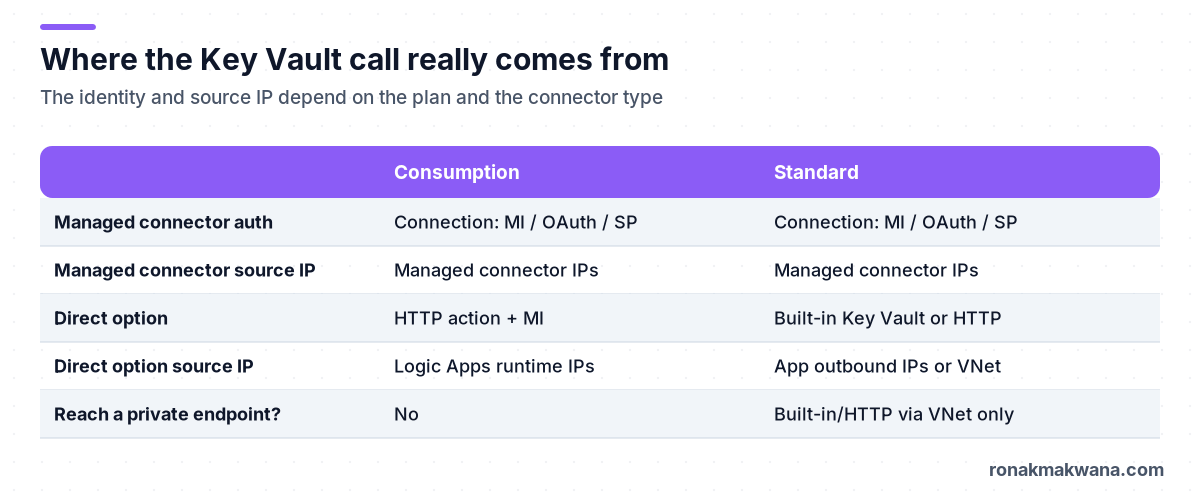
- Managed connector (both plans): it runs in shared, multitenant connector infrastructure and calls from the region’s managed connector outbound IPs, which are listed in the Logic Apps limits and configuration reference and published as the
AzureConnectorsservice tag. You can allow those ranges, but other tenants’ connectors share them. A managed connector can’t reach a private endpoint. - Consumption HTTP action: it calls from the Logic Apps runtime outbound IPs for the region. Same trade-off: shared ranges, and no private endpoint access.
- Standard with built-in Key Vault or HTTP: the best option for a locked-down vault. Turn on outbound VNet integration on the logic app, create a private endpoint for the vault with the
privatelink.vaultcore.azure.netprivate DNS zone linked to that VNet, and disable public access. Check that the vault name resolves to the private IP from inside the app. If DNS still returns the public address, the call leaves the VNet and the firewall turns it down.
Expected results after the fix
- The action returns 200 with the secret in the body (masked in run history if Secure outputs is on).
- The Key Vault
AuditEventlog showsSecretGetwith result 200 for the Logic App’s object ID and the expected client IP (a private IP if you use a private endpoint).
A KQL starting point for the log check (illustrative, not executed; resource-specific diagnostic tables use different column names):
AzureDiagnostics
| where ResourceProvider == "MICROSOFT.KEYVAULT" and OperationName == "SecretGet"
| where TimeGenerated > ago(1h)
| project TimeGenerated, ResultSignature, httpStatusCode_d, CallerIPAddress,
          identity_claim_oid_g, ResultDescription
| order by TimeGenerated desc
Security, reliability, monitoring and cost
- Security: prefer managed identity over OAuth or client-secret connections, grant Key Vault Secrets User rather than broader roles, and turn on Secure inputs and outputs on every action that touches the secret. The same identity-first approach is covered for data pipelines in securing Azure data pipelines with managed identity and Key Vault.
- Reliability: Key Vault throttles high request rates (HTTP 429). Read a secret once per run, not inside a loop, and keep retry policies on.
- Monitoring: alert on Key Vault 401/403 counts from the
AuditEventlogs, and on failed Logic App runs. A spike right after a deployment usually means an identity was recreated and its new object ID has no grant. - Cost: Key Vault bills per operation, and managed connector calls count as billable actions in Consumption. Private endpoints and private DNS add a small hourly and data charge. Check current figures on the Azure pricing pages.
If the secret ends up as a key for an API behind API Management, see publishing an Azure Function behind API Management with a subscription key. More posts like this are in the Azure Integration category.
References
- Azure Key Vault REST API error codes
- Authenticate access to Azure resources with managed identities in Azure Logic Apps
- Azure Key Vault connector reference
- Provide access to Key Vault keys, certificates and secrets with Azure RBAC
- Azure RBAC vs. access policies in Key Vault
- Virtual network service endpoints and trusted services for Key Vault
- Configure Azure Key Vault networking settings
- Troubleshooting Azure Key Vault access issues
- Logic Apps limits and configuration (outbound IP addresses)
- Secure traffic between Standard logic apps and virtual networks using private endpoints
- Secure access and data in Azure Logic Apps (secure inputs and outputs)