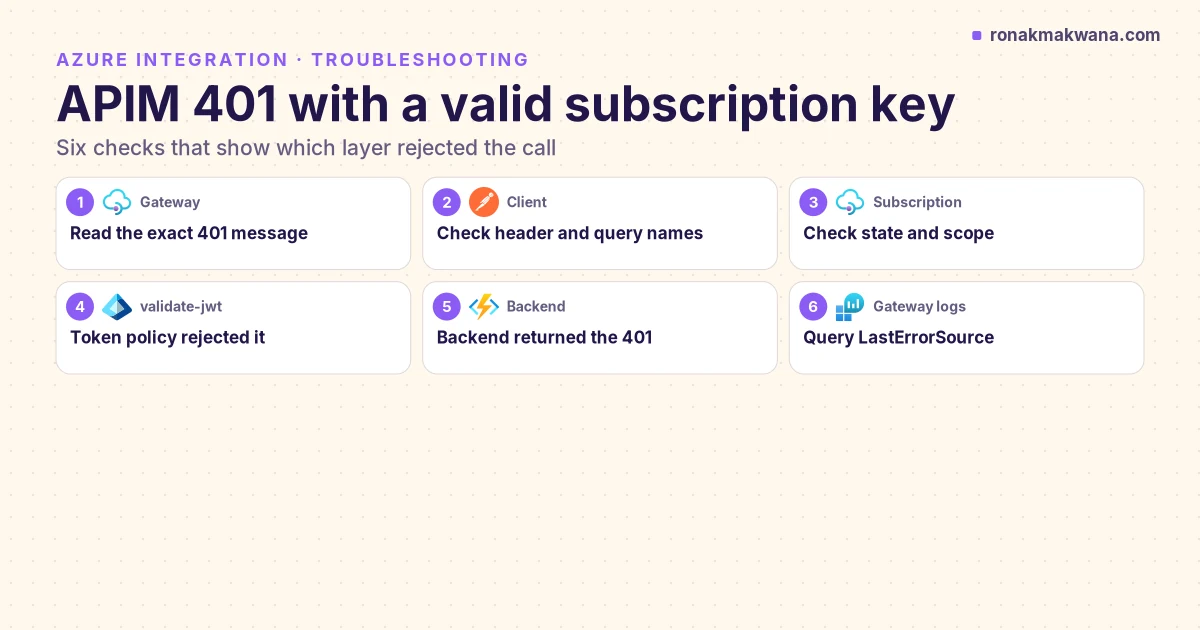
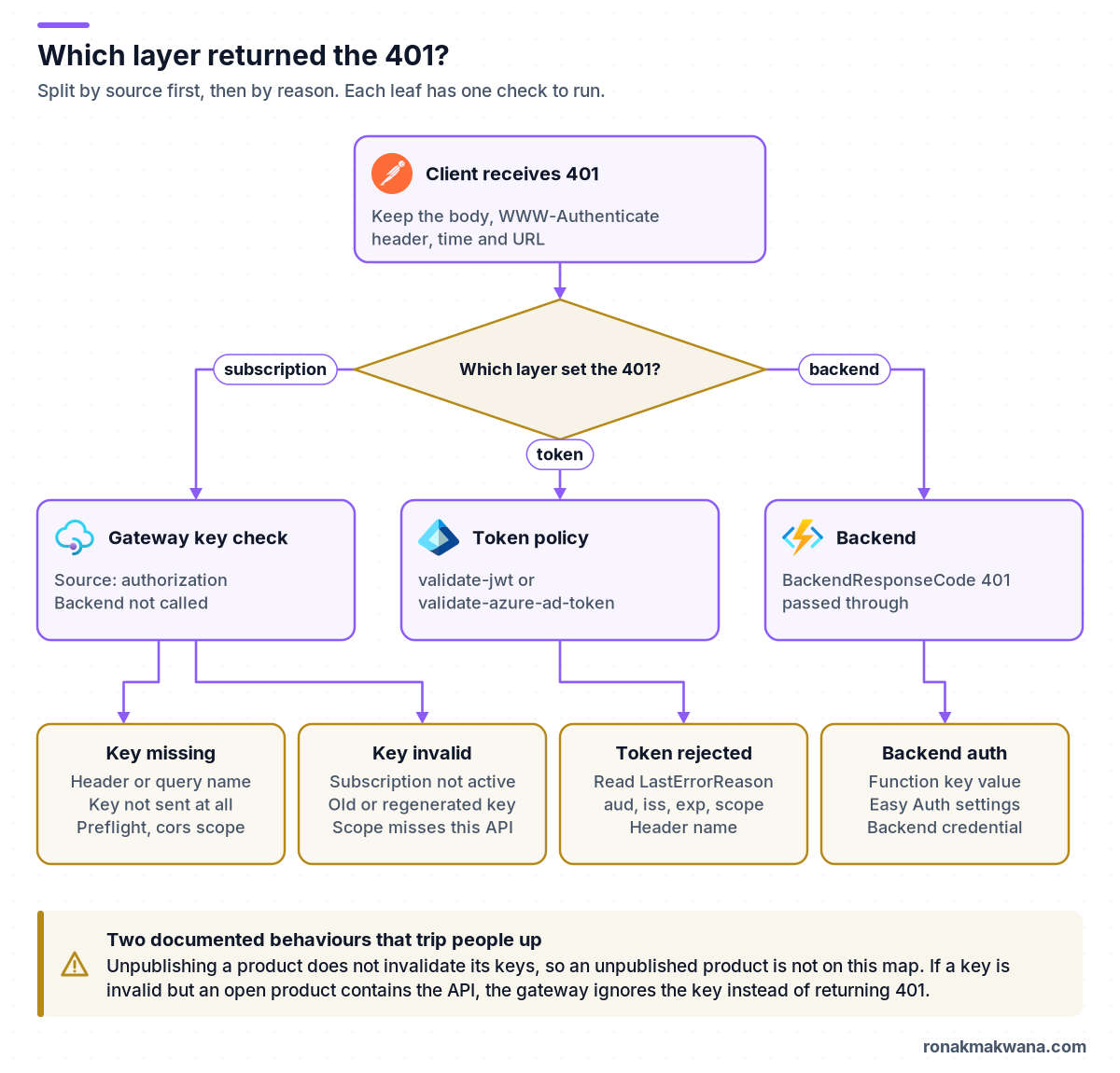
A 401 from Azure API Management (APIM) doesn’t always mean the subscription key is wrong. Three layers can return it: the gateway’s subscription check, a token policy such as validate-jwt, or the backend, whose 401 APIM passes back to the caller. Find the layer first, then the reason. When a key that looks valid is rejected, the cause is usually one of these: the subscription isn’t in the active state, its scope doesn’t include the API you’re calling, the key was regenerated, or the key is sent under a header or query name the API doesn’t expect.
This guide turns that into a repeatable diagnosis. It maps the exact 401 (status, message and the layer it came from) to a cause and a check, and gives a Log Analytics query that shows which layer returned each 401.
Quick answer: read the message, then the logs
Access denied due to missing subscription key: the gateway found no key where this API looks for one. Check the header and query parameter names in the API’s settings.Access denied due to invalid subscription key: the gateway found a key but it doesn’t belong to an active subscription whose scope covers this API. Check the subscription’s state and scope, and whether the key was regenerated.- Any other 401 body: look at
LastErrorSourceandBackendResponseCodeinApiManagementGatewayLogs. A token policy name points to the token. A 401 inBackendResponseCodemeans the backend rejected the call.
Prerequisites
- Read access to the APIM instance in the Azure portal (APIs, Products, Subscriptions). Request tracing for an external caller also needs Contributor or higher on the instance.
- A diagnostic setting that sends Logs related to ApiManagement Gateway to a Log Analytics workspace using the Resource specific table option. That option gives you the
ApiManagementGatewayLogstable. Without it, gateway logs go toAzureDiagnostics, and a new workspace can take up to 2 hours to start receiving data. See Monitor API Management. - One failing request you can repeat, with the time it was sent, the full URL and the response body. Keep the subscription key itself out of tickets and chat.
- Optional: the Azure CLI, signed in, for the
az restexamples below.
Step 1: capture the exact response
Send the request yourself with the response headers shown, so you’re looking at what APIM returned rather than what the client app logged.
curl: the request with headers shown
# Not executed against Azure. Replace the placeholders.
curl -i "https://<apim-name>.azure-api.net/<api-url-suffix>/<operation>" \
  -H "Ocp-Apim-Subscription-Key: <subscription-key>"

# Same call with the key in the query string instead of a header
curl -i "https://<apim-name>.azure-api.net/<api-url-suffix>/<operation>?subscription-key=<subscription-key>"
Not executed against Azure. According to Microsoft Learn’s troubleshooting article for 401 errors, a key rejected by the gateway returns one of these bodies:
The two gateway messages (text quoted from Microsoft Learn)
{ "statusCode": 401, "message": "Access denied due to missing subscription key. Make sure to include subscription key when making requests to an API." }

{ "statusCode": 401, "message": "Access denied due to invalid subscription key. Make sure to provide a valid key for an active subscription." }
The same article’s sample response also carries a WWW-Authenticate header like AzureApiManagementKey realm="...",name="Ocp-Apim-Subscription-Key",type="header". If your body matches one of the two messages above, the 401 came from the gateway’s subscription check and your backend was never called. If the body is something else, such as your own JSON error or a token message, go to Step 2.
Step 2: find the layer in the gateway logs
Each request in ApiManagementGatewayLogs records the response code sent to the client (ResponseCode), the backend’s response code (BackendResponseCode), and details of the last error (LastErrorSource, LastErrorReason, LastErrorMessage). The error handling reference lists the values for built-in steps. The subscription check uses source authorization with reason SubscriptionKeyNotFound or SubscriptionKeyInvalid. A policy reports its own element name as the source, so a validate-jwt failure shows source validate-jwt with reasons such as TokenNotPresent, TokenExpired or TokenAudienceNotAllowed. The reference doesn’t list reason codes for validate-azure-ad-token, so check LastErrorMessage for that policy. All column names below are taken from the ApiManagementGatewayLogs table reference.
KQL: classify 401s by layer
// Not executed against Azure. Which layer returned each 401 in the last 24 hours?
ApiManagementGatewayLogs
| where TimeGenerated > ago(24h)
| where ResponseCode == 401
| extend Layer = case(
    LastErrorSource == "authorization", "Gateway: subscription key",
    LastErrorSource in ("validate-jwt", "validate-azure-ad-token"), "Gateway: token policy",
    BackendResponseCode == 401, "Backend",
    "Other: read LastErrorSource and LastErrorMessage")
| summarize Requests = count(), LastSeen = max(TimeGenerated)
    by Layer, LastErrorSource, LastErrorReason, ApiId, ProductId, ApimSubscriptionId
| order by Requests desc
Not executed against Azure. Read the result like this:
Gateway: subscription keywithSubscriptionKeyNotFound: go to Step 3. WithSubscriptionKeyInvalid: go to Step 4.Gateway: token policy: go to Step 5.LastErrorReasonnames the exact check that failed.Backend: APIM accepted the key, forwarded the request, and the backend said no. Go to Step 6.Other: a different policy returned 401, for example areturn-responseorcheck-headerin your own policy.LastErrorSourceandLastErrorMessagetell you which.
To narrow down to one caller, add | where CallerIpAddress == "<caller-ip>" and a tight time window around the failing request. Comparing ApiId and ProductId on failing rows with successful rows from the same caller often shows the problem straight away, for example a different API than the one the key was issued for.
Step 3: if the key is missing
The gateway looks for the key in the Ocp-Apim-Subscription-Key header, then in the subscription-key query parameter. According to the subscriptions documentation, the query parameter is checked only if the header isn’t present. Check these in order:
- Renamed header or query parameter. Both names can be changed per API, on the API’s Settings tab. If someone renamed them, clients sending the default name get the missing-key message even though the key is correct.
- Key not sent at all, or sent twice. Confirm what the client really sends. Because the query parameter is only read when the header is absent, a header with the wrong value wins over a correct query parameter. The curl call from Step 1 shows whether the gateway accepts the key when you send it directly.
- Browser preflight. Only the
corspolicy runs on anOPTIONSpreflight request. The cors policy reference lists a known issue: acorspolicy at product scope doesn’t work when the subscription key is passed in a header. Putcorsat API or global scope, or pass the key in the query string. Microsoft Learn doesn’t say what status the browser sees in that case, so confirm it in the browser’s network tab.
Step 4: if the key is invalid
An invalid-key 401 means the gateway found a value but couldn’t match it to an active subscription at a scope that covers this API. Open APIs > Subscriptions in the portal, find the subscription the caller says they use, and check four things.
1. State
A subscription can be active, suspended, submitted (waiting for approval), rejected, cancelled or expired, according to the Subscription REST reference. Only active passes the gateway check. A product with Requires approval set leaves new subscriptions in submitted until an administrator approves them. The expirationDate property is for auditing only and doesn’t change the state by itself.
2. Scope
A subscription is scoped to a product, a single API, all APIs, or the built-in all-access subscription for the instance. A product-scoped key only works for APIs inside that product. So the most common "but the key is valid" case is a key for product A used to call an API that was only added to product B. Check the subscription’s scope, then open the product and confirm the API is listed under its APIs. Microsoft Learn’s 401 troubleshooting article also calls out an API that isn’t associated with any product.
3. Current key value
Each subscription has a primary and a secondary key. There’s no automatic expiry or rotation, but regenerating a key invalidates its old value. If someone regenerated the key the client stores, the client now sends a value that no longer exists. Compare the client’s value with the current keys. The keys aren’t returned on a normal GET; they come from the listSecrets operation.
az rest: check state, scope and current keys
# Not executed against Azure. Placeholders in angle brackets.
BASE="https://management.azure.com/subscriptions/<azure-subscription-id>/resourceGroups/<rg>/providers/Microsoft.ApiManagement/service/<apim-name>"

# State and scope of one APIM subscription (no keys in the output)
az rest --method get \
  --url "$BASE/subscriptions/<apim-subscription-id>?api-version=2024-05-01" \
  --query "{state:properties.state, scope:properties.scope, displayName:properties.displayName}"

# APIs in the product the subscription is scoped to
az rest --method get \
  --url "$BASE/products/<product-id>/apis?api-version=2024-05-01" \
  --query "value[].name"

# Current keys. The output is a secret: compare it, don't paste it anywhere.
az rest --method post \
  --url "$BASE/subscriptions/<apim-subscription-id>/listSecrets?api-version=2024-05-01"
Not executed against Azure. The scope comes back in a form such as /products/<product-id>, /apis or /apis/<api-id>.
4. Same instance, same gateway, same workspace
- Different instance or environment. A key from the test instance doesn’t work on production. Check the hostname in the failing URL.
- Workspaces. In a workspace, APIs, products and subscriptions belong to that workspace, and its APIs are called through the workspace gateway hostname, in the form
<gateway>-<hash>.gateway.<region>.azure-api.net. Make sure the subscription was created in the same workspace as the API. - Self-hosted gateway. A self-hosted gateway checks for configuration updates every 10 seconds over outbound port 443. If it loses that connection, it keeps serving the configuration it already has in memory. Microsoft Learn doesn’t say this explicitly, but it follows that a gateway that’s offline won’t know about keys created or regenerated after it disconnected. Check the gateway’s connection status in the portal.
Why the portal Test console works when the client doesn’t
By default, the Test tab in the portal sends the built-in all-access subscription key, which is valid for every API. So a successful test proves the API works, not that the caller’s key does. To test the caller’s key, add an Ocp-Apim-Subscription-Key header with that value in the Test tab. The opposite also happens: the troubleshooting article describes a case where an Ocp-Apim-Subscription-Key header with a wrong value was hard-coded in an operation’s frontend definition (Design tab, Frontend, Headers), which made test calls fail. Remove such headers.
Step 5: if a token policy returned it
If the API also requires an OAuth token, validate-jwt and validate-azure-ad-token return 401 by default when validation fails. That’s the same status code as a bad key, so a valid key plus a bad token still looks like "401 with a valid key". For validate-jwt, LastErrorReason tells you which check failed:
| LastErrorReason | What it means | What to check |
|---|---|---|
TokenNotPresent | No token in the expected place | The policy’s header-name; validate-azure-ad-token reads Authorization by default |
TokenExpired | The token’s expiry time has passed | Client token caching and refresh |
TokenAudienceNotAllowed | The aud claim isn’t in the allowed audiences | Token requested for the right resource or scope |
TokenIssuerNotAllowed | The iss claim isn’t allowed | Tenant and issuer values in the policy |
TokenSignatureInvalid, TokenSignatureKeyNotFound | The signature couldn’t be validated | OpenID configuration URL or signing keys in the policy |
TokenClaimNotFound, TokenClaimValueNotAllowed | A required claim is missing or has another value | Roles or scopes granted to the client app |
Reason names are taken from the predefined errors table. Don’t put tokens into logs or tickets. Decode them locally when you need to read the claims.
Step 6: if the backend returned it
If BackendResponseCode is 401, APIM accepted the key and the backend rejected the forwarded call. Typical backend layers:
- Azure Functions access keys. Unless the HTTP trigger’s authorization level is
anonymous, the call needs a function key or host key in thecodequery parameter or thex-functions-keyheader (see HTTP trigger authorization levels and Functions access keys). If APIM sends the key from a named value, check that the named value still matches the key in the Function App. The two-key setup is walked through in calling an Azure Function through APIM with a subscription key. - App Service authentication (Easy Auth). When unauthenticated requests are set to return HTTP 401, the backend rejects calls that don’t carry a valid identity, before your code runs. See App Service authentication.
- Your own backend code that checks its own token or API key.
One more thing to check: APIM forwards the subscription key header to the backend by default. That doesn’t cause a 401 by itself, but a backend that reads the same header name for its own key would see the APIM key. The Function App walkthrough shows how to strip the key before forwarding.
Optional: trace one request from a real client
For calls made outside the portal, request tracing uses a short-lived debug token instead of the old Ocp-Apim-Trace header, which is no longer supported. It needs Contributor on the instance and isn’t available in workspaces.
- Get a token from
POST .../gateways/managed/listDebugCredentials?api-version=2023-05-01-previewwith the API’s full resource ID asapiId,purposesset totracingand an expiry of at most one hour (PT1H). - Send the failing request with the token in an
Apim-Debug-Authorizationheader, and readApim-Trace-Idfrom the response.Apim-Debug-Authorization-ExpiredorApim-Debug-Authorization-WrongAPIin the response means the token is the problem. - Pass the trace ID to
POST .../gateways/managed/listTraceand read the inbound, backend and on-error sections.
Not executed against Azure. If you can’t use tracing, an on-error section that copies context.LastError.Source and context.LastError.Reason into response headers shows the layer to the caller. The pattern is taken from the error handling reference.
Policy XML: expose the error source while you diagnose
<!-- Not executed against Azure. Temporary diagnostic only: remove it afterwards. -->
<on-error>
    <base />
    <set-header name="ErrorSource" exists-action="override">
        <value>@(context.LastError.Source)</value>
    </set-header>
    <set-header name="ErrorReason" exists-action="override">
        <value>@(context.LastError.Reason)</value>
    </set-header>
</on-error>
These headers tell anyone who gets a response how your gateway is configured. Add them at the narrowest scope you can, in a non-production instance if possible, and remove them as soon as you have the answer.
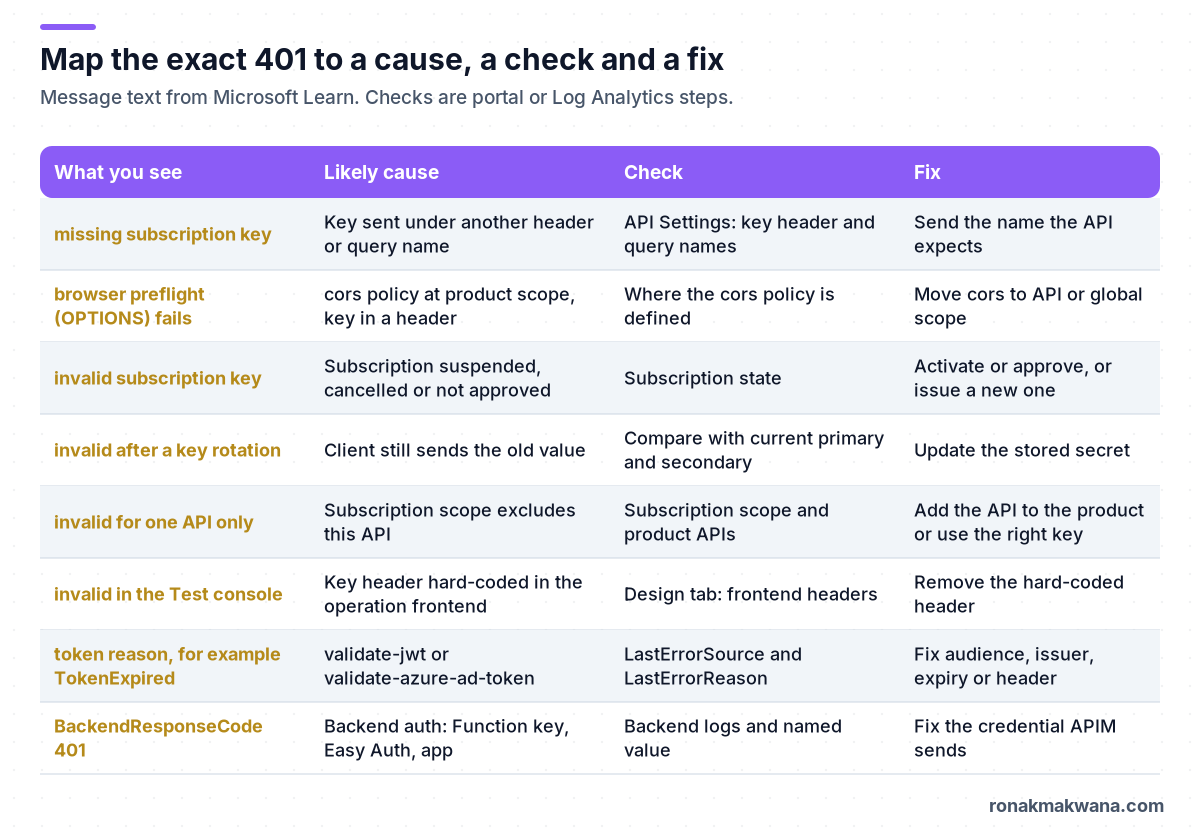
Cause, check and fix at a glance
Things that look like causes but aren’t
- An unpublished product. Publishing only controls whether developers can find the product in the developer portal. The products documentation says a product’s APIs can be called through the gateway whether or not it’s published, and the subscriptions documentation says unpublishing doesn’t invalidate existing keys.
- A bad key on an open product. If the key is invalid but the API is in an open product (one that doesn’t require a subscription), the gateway ignores the key and lets the request through as an open-product call. You won’t get a 401, but the call won’t count against the subscription you expected either. An API can be in only one open product.
- A key on an API that doesn’t require a subscription. The key is ignored.
- Key expiry. Keys don’t expire on a schedule. If a key stopped working, look for a state change, a regenerated key or a scope change.
- Product policies on other scopes. Policies at product scope don’t apply to requests made with an API-scoped, all-APIs or all-access subscription. This won’t cause a 401, but it can explain why a check in your product policy "didn’t run" for some callers.
Expected results after the fix
| Check | Expected after the fix |
|---|---|
| curl from Step 1 | The backend’s normal status, for example 200, and no Access denied body |
| KQL from Step 2 | New rows for the caller show ResponseCode other than 401 and an empty LastErrorSource |
| Subscription | State active, and a scope that covers the API being called |
| Portal Test tab with the caller’s key | Same result as the curl call |
These are expected results based on the documented behaviour, not output captured from a live instance.
Security, reliability, monitoring and cost
- Security. A subscription key identifies a caller; it isn’t strong authentication on its own. For APIs that need it, combine the key with
validate-jwtorvalidate-azure-ad-token. Store client keys in a secret store such as Key Vault rather than in config files, and never log them. The same Key Vault reference pattern is covered in fixing Logic Apps Unauthorized errors from Key Vault and securing data pipelines with managed identity and Key Vault. - Reliability. Keys come in pairs so you can rotate with minimal disruption: move clients to the secondary key, regenerate the primary, then move them back. Regenerating the key that clients are still using causes an outage that looks exactly like this 401.
- Monitoring. Alert on a jump in 401s grouped by
LastErrorReasonrather than on all 401s. A spike inSubscriptionKeyInvalidright after a change usually means a regenerated key or a changed scope. If you also send APIM telemetry to Application Insights, requests with a 4xx or 5xx status are logged as exceptions there too. - Cost. Log Analytics charges by data ingested. The default diagnostic settings don’t log request headers or bodies. Add them only for the API you’re diagnosing and only for as long as you need them; entries are limited to 32 KB. For Application Insights, Microsoft Learn warns that logging every request can significantly reduce throughput at high request rates, so use sampling with Always log errors on.
What I tested and what I didn’t
I didn’t have an Azure subscription for this post. None of the curl, KQL, policy XML or az rest examples were run against Azure. The error messages, KQL column names, policy reason codes, subscription states and REST operations were checked against the Microsoft Learn pages listed below on 26 October 2026. Where Microsoft Learn doesn’t state a behaviour (the self-hosted gateway and new keys, and the status a browser sees when a product-scoped cors policy is skipped), the text says so.
Related guides
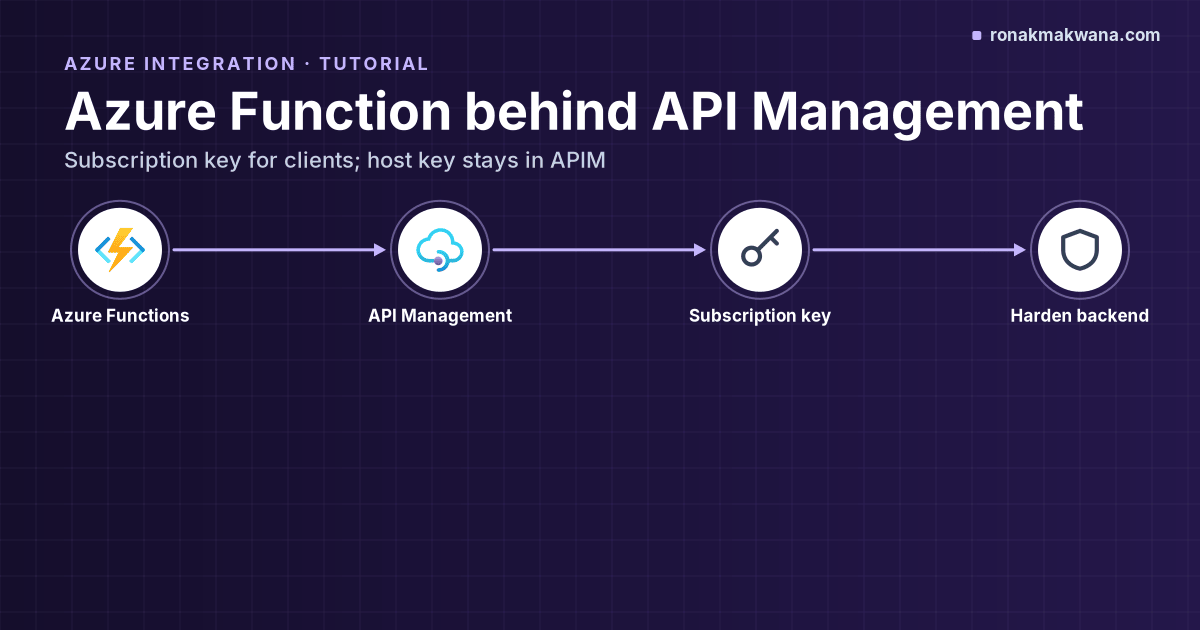
If you’re putting an Azure Function behind APIM, start with calling an Azure Function through APIM with a subscription key. For 401s from Key Vault in integration workflows, see Logic Apps Unauthorized errors from Key Vault. More guides are in the Azure Integration category.
Sources
- Subscriptions in Azure API Management (Microsoft Learn)
- Troubleshoot 401 Unauthorized errors when invoking APIs in API Management (Microsoft Learn)
- Error handling in API Management policies: predefined errors and LastError (Microsoft Learn)
- ApiManagementGatewayLogs table reference (Microsoft Learn)
- Monitor Azure API Management (Microsoft Learn)
- Integrate Azure API Management with Application Insights (Microsoft Learn)
- validate-jwt policy (Microsoft Learn)
- validate-azure-ad-token policy (Microsoft Learn)
- cors policy, including the product-scope known issue (Microsoft Learn)
- Enable tracing of requests in Azure API Management (Microsoft Learn)
- Create and publish a product (Microsoft Learn)
- Subscription – Get: SubscriptionState values (Microsoft Learn REST reference)
- Subscription – List Secrets (Microsoft Learn REST reference)
- Workspaces in Azure API Management (Microsoft Learn)
- Self-hosted gateway overview: connectivity to Azure (Microsoft Learn)
- Use named values in Azure API Management policies (Microsoft Learn)
- Azure Functions HTTP trigger: authorization level (Microsoft Learn)
- Work with access keys in Azure Functions (Microsoft Learn)
- Authentication and authorization in Azure App Service and Azure Functions (Microsoft Learn)
- az rest command reference (Microsoft Learn)