
Putting an HTTP-triggered Azure Function behind Azure API Management (APIM) is a common pattern: APIM gives you a product, a subscription key, policies and a stable gateway URL, while the Function stays a thin backend. What trips people up is that two different keys are involved after a Function App import — and clients should only ever see one of them.
Original contribution: this tutorial walks the import-to-harden path with that two-key model made explicit: (1) clients send an APIM subscription key; (2) APIM authenticates to the Function with an auto-created host key stored as a named value; (3) you assign a product, optionally strip the subscription key before the backend, and harden the Function so callers cannot bypass APIM; (4) you verify 401 without a valid subscription key and 200 with one, and you rotate the host key and named value together.
Applies to: Azure Functions (HTTP trigger) imported into Azure API Management on any APIM tier that supports Function App import. Behaviour was checked against Microsoft Learn on 9 October 2026. Names are synthetic (func-orders-demo, apim-contoso-demo, API orders, product orders-api, function GetOrder). Portal clicks, curl examples and policy snippets are illustrative — they follow the documented syntax but were not executed against a live Azure subscription.
The short answer
- Import the Function App from APIM (APIs → + Add API → Function App). Only HTTP triggers with authorization Anonymous or Function can be imported. Prefer Function so the backend still requires a key.
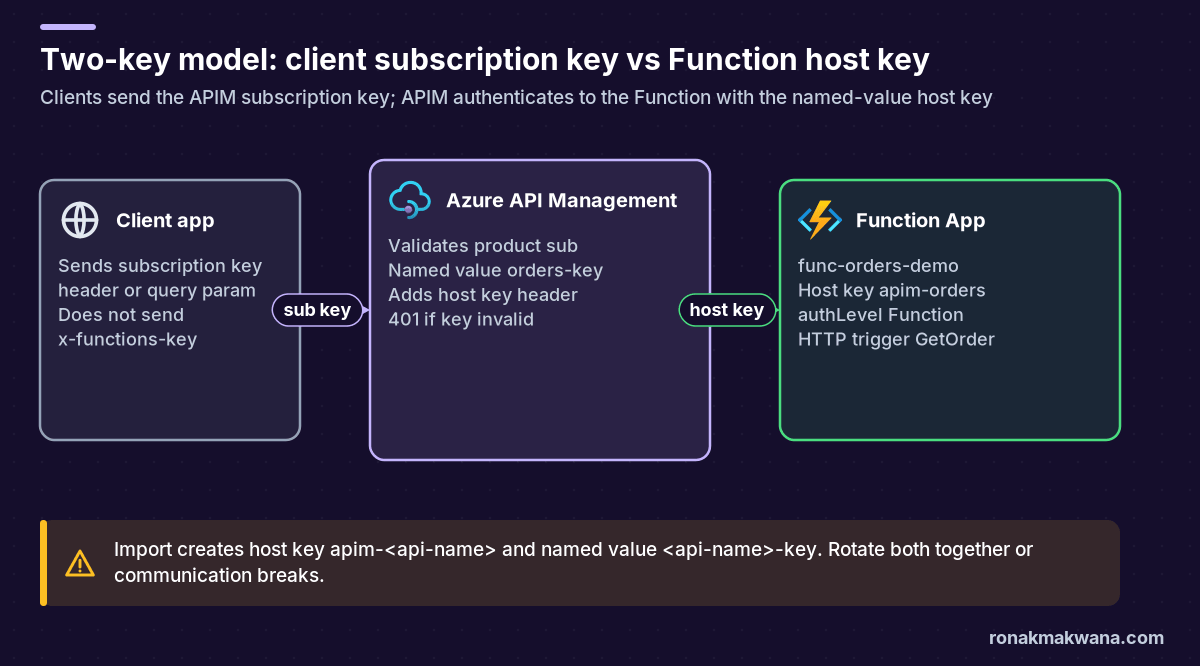
- Import auto-creates a Function host key named
apim-<api-name>and an APIM named value<api-name>-keythat holds it. APIM sends that host key to the Function (header for APIs created after 4 April 2019). Clients do not sendx-functions-keyon the normal import path. - Clients call the APIM gateway with
Ocp-Apim-Subscription-Key(or thesubscription-keyquery parameter). Without a valid key for an active subscription at an applicable scope, APIM returns 401 and does not forward the call. - After import: assign a product, keep subscription required, optionally strip the subscription key before the backend, and restrict Function inbound access to APIM’s outbound IP (or the whole APIM subnet in VNet scenarios).
Prerequisites
- An Azure subscription and Contributor (or equivalent) access on the resource group.
- An API Management instance (any tier that supports Function App import; workspaces currently do not).
- A Function App with at least one HTTP-triggered function. Authorization level must be Anonymous or Function for import to offer it.
- A product you will assign in Full view during create (or you can add the API to a product afterwards).
- Optional: Azure CLI or curl for expected-result checks (examples below are not live-tested).
How the two keys work
After a Function App import, traffic uses two secrets with different audiences:
- APIM subscription key — issued to the client (product, API, all-APIs or service scope). Sent as
Ocp-Apim-Subscription-Keyorsubscription-key. Validated at the gateway. Missing or invalid → 401, not forwarded. - Function host key — created as
apim-<api-name>on the Function App and stored in APIM as named value<api-name>-key. APIM presents it to the Function soauthLevelFunction succeeds. Clients should not hold or send this key for the standard import path.
Microsoft documents that removing or changing either the host key or the named value breaks communication, and the values do not auto-sync. If you rotate, update both. For secrets you must store outside APIM named values, follow the same Key Vault habit described in Secure data pipelines with managed identity and Key Vault.
Step 1: HTTP-triggered Function (authLevel Function)
Create (or reuse) a Function App such as func-orders-demo with an HTTP trigger. Set authorization to Function so a key is required at the Function endpoint. Anonymous also imports, but then anyone who can reach the Function URL can invoke it unless you add network controls.
Illustrative Python v2 shape (not deployed):
import azure.functions as func
import logging

app = func.FunctionApp()

@app.function_name(name="GetOrder")
@app.route(route="orders/{id}", methods=["GET"], auth_level=func.AuthLevel.FUNCTION)
def get_order(req: func.HttpRequest) -> func.HttpResponse:
    logging.info("GetOrder invoked")
    order_id = req.route_params.get("id")
    return func.HttpResponse(
        f'{{"orderId":"{order_id}","status":"ok"}}',
        status_code=200,
        mimetype="application/json",
    )
Default URL shape is https://<APP_NAME>.azurewebsites.net/api/<FUNCTION_NAME> unless you customise route or routePrefix. Keys can be passed as query code or header x-functions-key when calling the Function directly — that is the backend contract APIM will satisfy after import, not what public clients should use.
Step 2: Import Function App into APIM
In the APIM instance apim-contoso-demo:
- Open APIs → APIs → + Add API.
- Under Create from Azure resource, choose Function App, browse to
func-orders-demo, and select the HTTP functions to import (for exampleGetOrder). - Switch to Full view, set the API name/URL suffix (for example
orders), and assign productorders-api. - Select Create.
APIM then creates host key apim-orders on the Function App (App keys → Host keys) and named value orders-key under APIs → Named values. Post–4 April 2019 APIs pass the host key in a header to the Function. You can append more functions later via the API’s Import menu.
Step 3: Product, subscription, and call with the subscription key
By default, new APIs and products require a subscription. A subscription is a named container for a primary/secondary key pair. Scopes can be product, a single API, all APIs, or the built-in all-access service subscription.
- Ensure product
orders-apiincludes APIordersand Requires subscription is on. - Create a product-scoped subscription (portal: Subscriptions, or the developer portal request flow). Do not embed the built-in all-access subscription key in clients.
- Call the gateway with the subscription key in the header (preferred) or query string.
Illustrative curl (not executed; replace host and key):
# Paths follow the operation URL APIM creates from the Function route.
# Illustrative only — copy the Test tab URL for your API.

# Expect 401 — no subscription key
curl -i "https://apim-contoso-demo.azure-api.net/orders/orders/123"

# Expect 200 — valid product subscription key
curl -i "https://apim-contoso-demo.azure-api.net/orders/orders/123" \
  -H "Ocp-Apim-Subscription-Key: YOUR_PRODUCT_SUBSCRIPTION_KEY"

# Equivalent query form (used only if the header is absent)
curl -i "https://apim-contoso-demo.azure-api.net/orders/orders/123?subscription-key=YOUR_PRODUCT_SUBSCRIPTION_KEY"
You can also use the API Test tab in the portal; as an administrator the subscription header is often pre-filled.
By default the subscription key is forwarded to the backend and can appear in Function logs. If that is sensitive, add an inbound policy at the end of inbound to delete it (illustrative, not applied to a live instance):
<policies>
  <inbound>
    <base />
    <set-header name="Ocp-Apim-Subscription-Key" exists-action="delete" />
    <set-query-parameter name="subscription-key" exists-action="delete" />
  </inbound>
</policies>
Step 4: Harden so callers cannot bypass APIM
Import does not mean APIM replaces Function auth — it means APIM holds the host key. Callers who know the Function’s public URL and a valid function/host key can still hit the backend directly unless you harden network access.
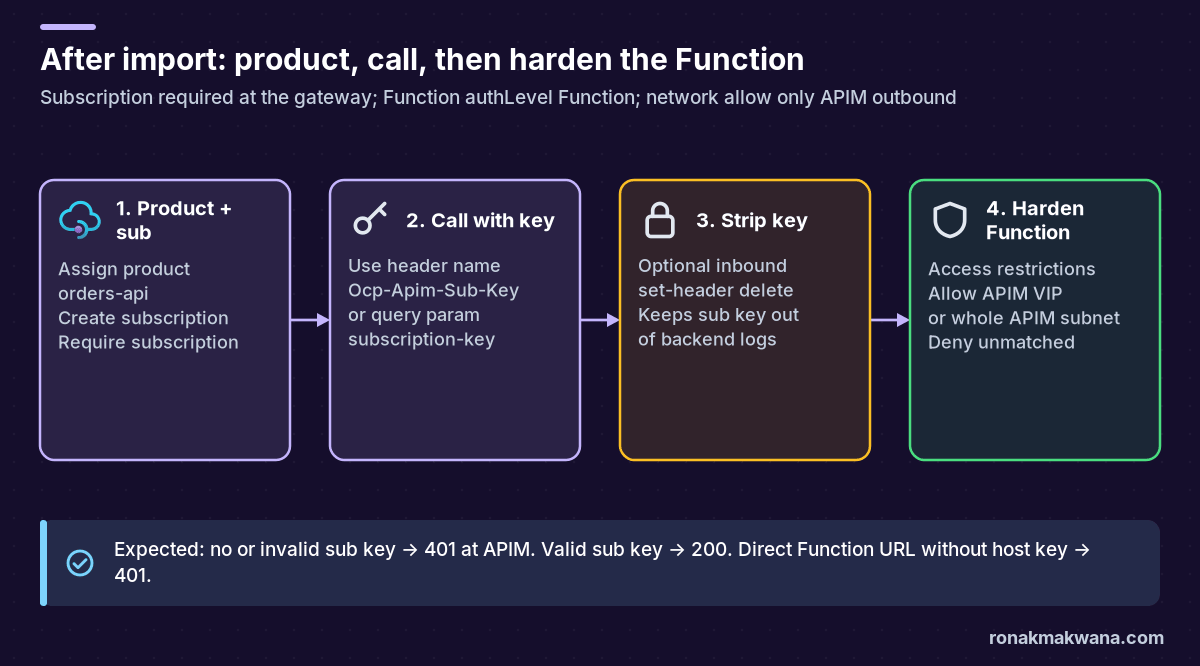
- Keep authLevel Function (or tighter) so a key is always required at the Function.
- Public backend + classic APIM tiers (Developer/Basic/Standard/Premium): read the instance’s public VIP from the APIM overview (
publicIPAddresses). On the Function App → Networking → Access restrictions, allow that IP (CIDR/32) and leave unmatched as Deny. APIM uses its public IP when calling a public backend. - APIM in a VNet calling a private backend: allow the whole APIM subnet (not only the resource’s private VIP), because outbound runtime uses dynamic addresses from the subnet.
- Consumption and v2 shared tiers: no dedicated outbound IP. Allow-listing is region/datacenter ranges from the Azure IP ranges JSON — broader and less ideal. Prefer VNet integration / private backends where you need a tight allow list, or accept the wider range with eyes open.
- Optional: APIM access-restriction policies (IP filter, rate limit) on top of subscription keys.
Illustrative Azure CLI shape for a single VIP allow rule (not executed):
az webapp config access-restriction add \
  --resource-group rg-orders-demo \
  --name func-orders-demo \
  --rule-name allow-apim-vip \
  --action Allow \
  --ip-address 203.0.113.10/32 \
  --priority 100
Expected results
| Call | Expected | Why |
|---|---|---|
| APIM URL, no subscription key | 401 from APIM | Subscription required; request not forwarded |
| APIM URL, invalid subscription key | 401 from APIM | Key not tied to an active applicable subscription |
| APIM URL, valid product subscription key | 200 from Function (via APIM) | Gateway accepts sub key; APIM presents host key |
| Direct Function URL, no function/host key | 401 from Functions | authLevel Function |
| Direct Function URL after access restriction (non-APIM IP) | 403 from App Service front end | Network ACL before the worker |
Exact status text can vary by tier and policy; treat the table as the documented happy/unhappy path, not a live capture.
Troubleshooting
- 401 at APIM with a key you believe is valid: confirm subscription state is Active, scope covers this API (product includes it, or API/all-APIs/service scope), and you are not mixing primary/secondary after a regenerate. Product-scoped policies do not apply to all-access / all-APIs / API-scoped keys in the same way — check which subscription you used.
- 401/403 from the Function after APIM accepted the call: open Function App keys and APIM named values. If someone regenerated
apim-ordersor editedorders-keyalone, restore both to the same secret. Post-2019 backends expect the host key in a header. - Function not listed during import: only HTTP triggers with Anonymous or Function auth levels appear.
- Works in portal Test, fails from the client: portal uses an admin subscription automatically; the client needs its own product/API subscription key in
Ocp-Apim-Subscription-Key. - Access restriction blocks APIM: wrong VIP, Consumption/v2 shared outbound not covered by your /32, or VNet backend restricted to the private VIP instead of the whole APIM subnet.
- Subscription key appears in Function logs: add the delete policies for header and query parameter before the backend request leaves APIM.
Security, reliability, monitoring and cost
Security
- Never ship the built-in all-access APIM subscription in applications.
- Treat the Function host key and the APIM named value as one linked secret; rotate together.
- Prefer header over query for subscription keys so keys are less likely to land in intermediary URL logs.
- Layer APIM policies (rate limit, IP filter, JWT validation) when a subscription key alone is not enough.
Reliability
- APIM retries and backend circuit patterns are policy-driven; Functions scale separately (Consumption, Flex Consumption, Premium, Dedicated).
- HTTP triggers that run longer than ~230 seconds can hit frontend timeouts even if the function continues — design async patterns for long work.
Monitoring
- APIM: gateway logs / Application Insights for 401 rates, latency and backend failures.
- Functions: invocation logs and App Service access restriction metrics (403 spikes after hardening).
Cost (high level)
- APIM: Consumption bills per call with shared infrastructure (no dedicated VIP). Developer/Basic/Standard/Premium (classic) give dedicated capacity and a stable public VIP useful for backend allow lists. v2 tiers also run on shared infrastructure without a deterministic outbound IP.
- Functions: Consumption / Flex Consumption for variable HTTP traffic; Premium or Dedicated when you need VNet, pre-warmed instances or longer predictable compute.
- Check current Azure pricing pages before budgeting — SKUs and meters change.
References
- Import an Azure Function App as an API
- Subscriptions in Azure API Management
- Create subscriptions in Azure API Management
- Add a product to Azure API Management
- IP addresses of Azure API Management
- API Management access restriction policies
- Azure Functions HTTP trigger
- Azure Functions networking options
- Set up App Service access restrictions